EasyManua.ls Logo

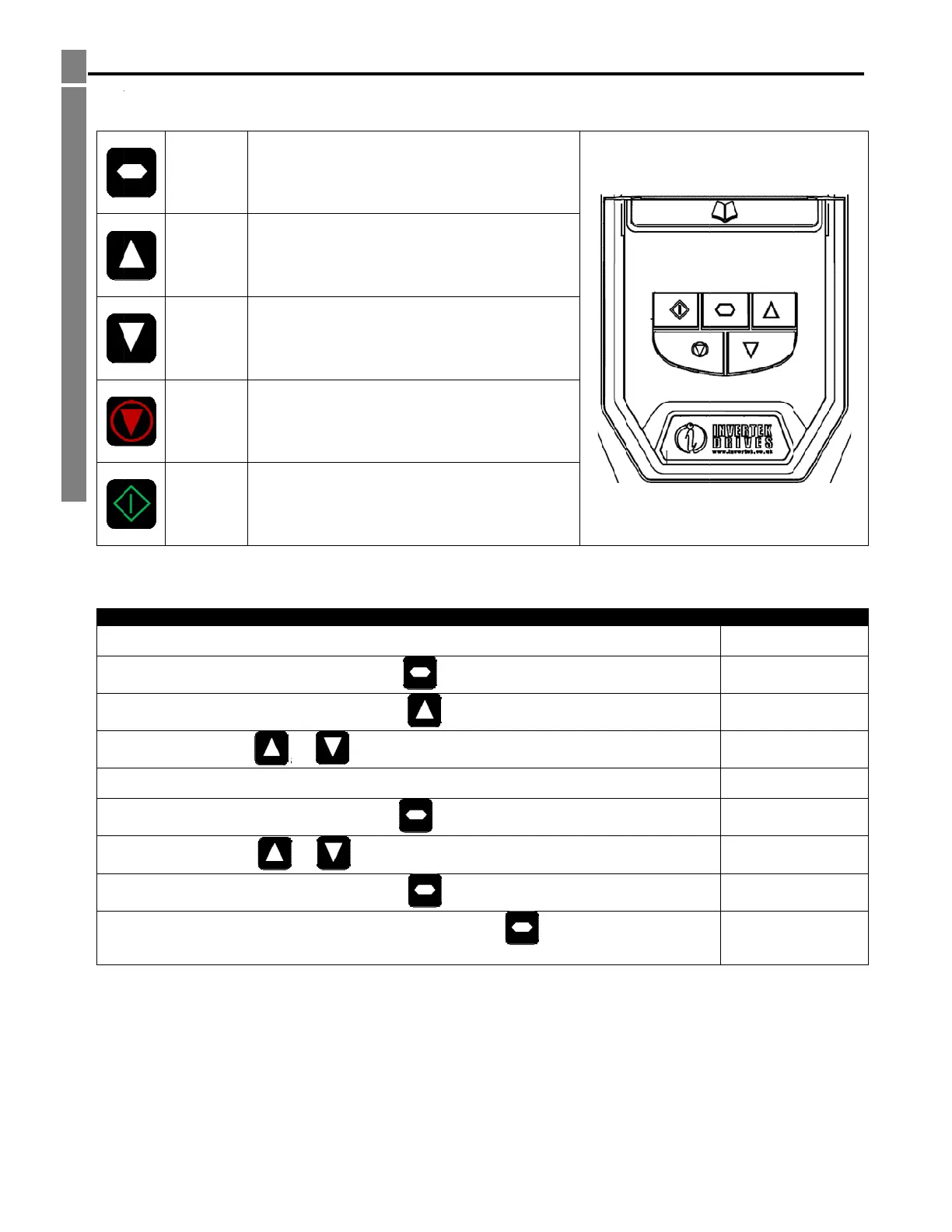
Invertek Drives OPTIDRIVE P2 Series - Managing the Keypad; Keypad Layout and Function (Standard LED); Changing Parameters

Invertek Drives OPTIDRIVE P2 Series
53 pages
To Next Page IconTo Next Page
To Previous Page IconTo Previous Page
Loading...
5ManagingtheKeypad
5.
M
Thed
r
5.1.
K
5.2.
C
Th
M
anaging
t
r
iveisconfigure
d
K
eypadLay
o
NAVI
G
U
DO
W
RES
E
ST
O
ST
A
C
hangingP
a
eparameterval
t
heKeypa
d
anditsoperati
o
utandFun
G
ATE
Usedt
o
param
e
P
Usedt
o
param
e
W
N
Usedt
o
param
e
E
T/
O
P
Usedt
o
When
A
RT
When
revers
e
mode
i
a
rameters
The
a
Use
ueisnowadjus
t
O
p
d
onmonitoredv
ctionSta
n
o
displayrealti
m
e
tereditmode
a
o
increasespe e
d
e
tervaluesinp
a
o
decreasespe
e
e
tervaluesinp
a
o
resetatrippe
d
i
nKeypadmod
e
i
nkeypadmod
e
e
thedirection
o
i
senabled
P
o
Pressandhol
d
Pre
s
a
ndcan
b
Selectthereq
u
Press
theand
Pre
s
t
edandautoma
o
p
p
tidriveODP2
U
iathekeypada
n
n
dardLEDK
e
m
einformation,
a
ndtostorepar
d
inrealtimem
o
a
rametereditm
e
dinrealtime
m
a
rametereditm
d
drive.
e
isusedtoStop
e
,usedtoStart
a
o
frotationifbi
d
Procedure
o
weronDrive
d
thefor
>
s
stheKe
y
b
eusedtosele
c
u
iredparamete
r
thebutt
o
keystoadjust
t
s
stheke
y
ticallystored.P
r
p
eratingmode
U
serGuideRevis
n
ddisplay.
e
ypad
toaccessand
e
ameterchange
s
o
deortoincrea
ode
m
odeortodecr
e
ode
arunningdrive
a
stoppeddrive
o
d
irectionalkeyp
a
>
2seconds
y
c
tthedesiredp
a
r
,e.g.P102
o
n
t
hevalue,e.g.s
e
y
ressthe
k
ions1.30
e
xit
s
se
e
ase
.
o
rto
a
d
a
rameter
e
tto10
k
eyfor>2seco
n
n
dstoreturnto
Display
St
P1
-
P1
-
P1-0
3
P1
-
0
.
1
0
P1
-
St
shows...
op
-
01
-
02
3
etc..
-
02
.
0
0
.0
-
02
op

Table of Contents

Related product manuals