KEYMANDER User Manual
Laptop Setup
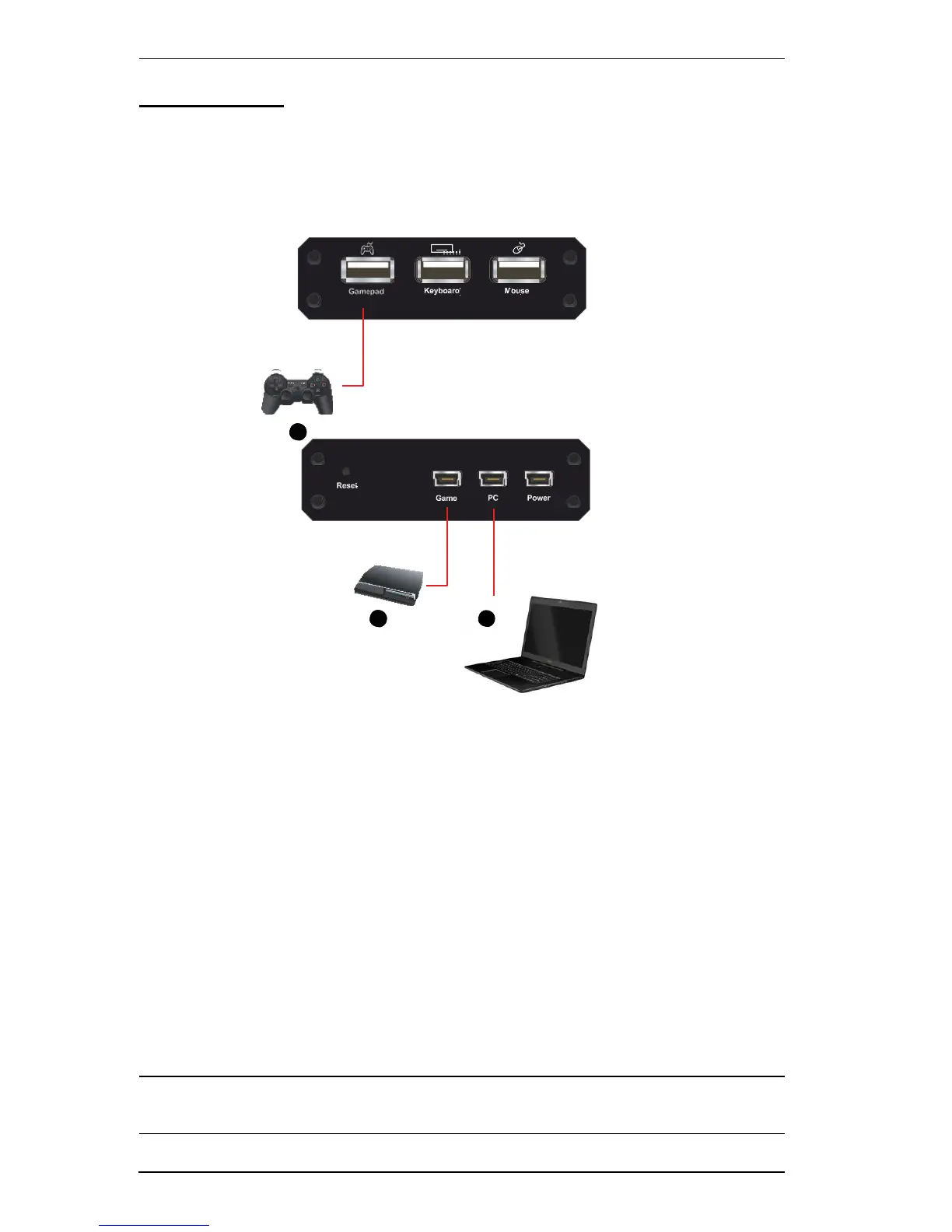
You can connect the KeyMander to a laptop for gameplay and switch keyboard
use between the PS/Xbox and laptop. A laptop also allows you to configure
the KeyMander using the KeyMander software and quickly switch back to
gameplay. Use the diagram and steps below to connect a laptop:
1
3
2
1. Connect a PS/Xbox controller to the Gamepad Port.
2. Use the Mini USB to USB cable included with this package, to connect the
PC Port to a laptop.
3. Use the Mini USB to USB cable included with this package to connect the
Game Port to the PS/Xbox’s controller port.
4. Power on all devices.
5. Press [F12]
to enable Play Mode (See Play Mode, page 18
).
Note: You can use the laptop’s touchpad or a USB mouse connected to the
laptop or KeyMander for gameplay.
8



 To Next Page