Direct Mapping Mode
Direct Mapping allows you to change how PS/Xbox game controller buttons
are mapped to the keyboard - directly from the keyboard and controller. For
example, you can map a controller button to the spacebar. For default
mappings see Keyboard Map, page 11.
To enter Direct Mapping mode:
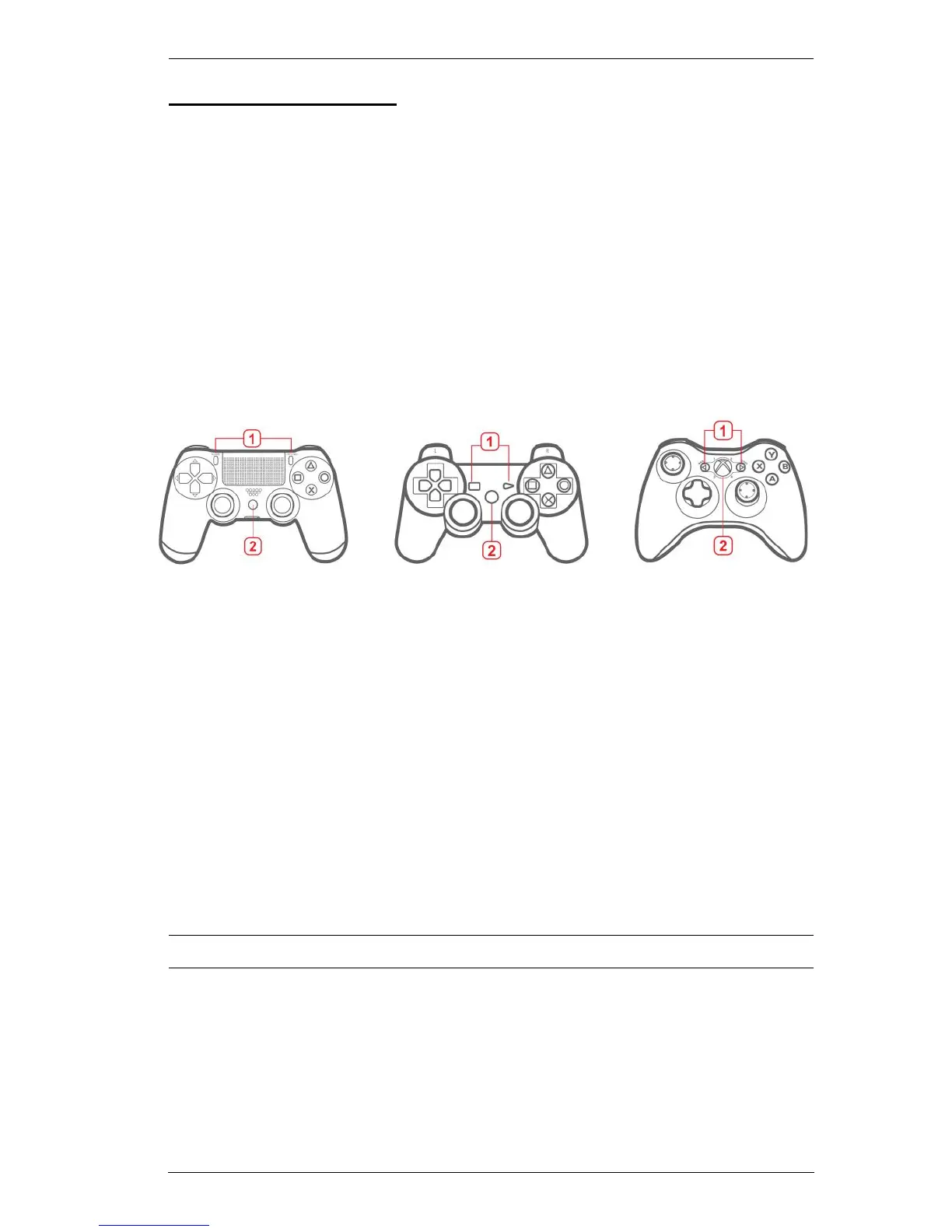
1. From the game controller connected to the KeyMander, press Share +
Options (PS4), Select + Start
(PS3), Back + Start (Xbox) or View + Menu
(Xbox One) at the same time.
2. Press the PS, Xbox Guide, or Xbox Button.
3. Press a PS/Xbox controller button.
4. Press a key on the keyboard to map the controller button to.
5. Single Beep - Direct Mapping successful.
Repeat steps 3-4 to continue mapping buttons.
6. Press: Share + Options (PS4), Select + Start (PS3), Back + Start (Xbox) or
View + Menu (Xbox One)
to exit.
7.
Double Beep
-
Exit Direct Mapping successful
.
Note: Direct Mapping changes are not permanently saved to a Profile.



 To Next Page