Mouse Sensitivity Mode
Mouse Sensitivity allows you to change the Aim/Look and ADS sensitivity of
the mouse using the PS/Xbox game controller connected to the KeyMander.
For more information on mouse sensitivity see Mouse Movements, page 32.
To enter Mouse Sensitivity mode:
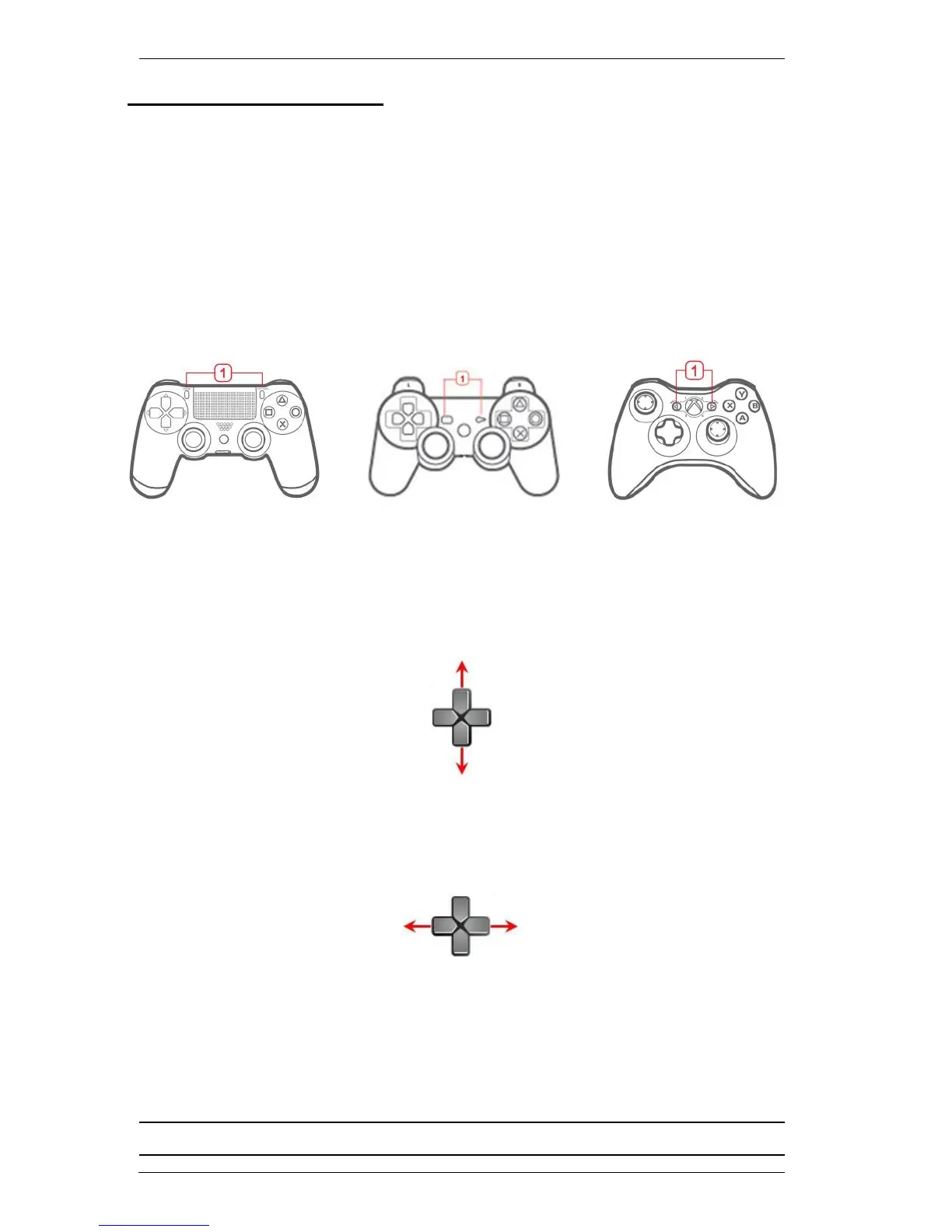
1. From the game controller connected to the KeyMander, press Share +
Options (PS4), Select + Start
(PS3), Back + Start (Xbox) or View +
Menu (Xbox One) at the same time.
2. To adjust Aim/Look sensitivity - use the Direction Up (more sensitive) or
Direction Down (less sensitive) buttons on the PS/Xbox controller
.
One press
equates to one level of sensitivity.
3. To adjust ADS sensitivity - use the Direction Left (more sensitive) or
Direction Right (less sensitive) buttons on the PS/Xbox controller
.
One press equates to one level of sensitivity.
4. Press Share + Options (PS4), Select + Start (PS3), Back + Start
(Xbox)
or View + Menu (Xbox One)
at the same time to exit.
5.
Double Beep
-
Exit Mouse Sensitivity successful
.
Note: Mouse Sensitivity Mode changes are not permanently saved to a Profile.



 To Next Page