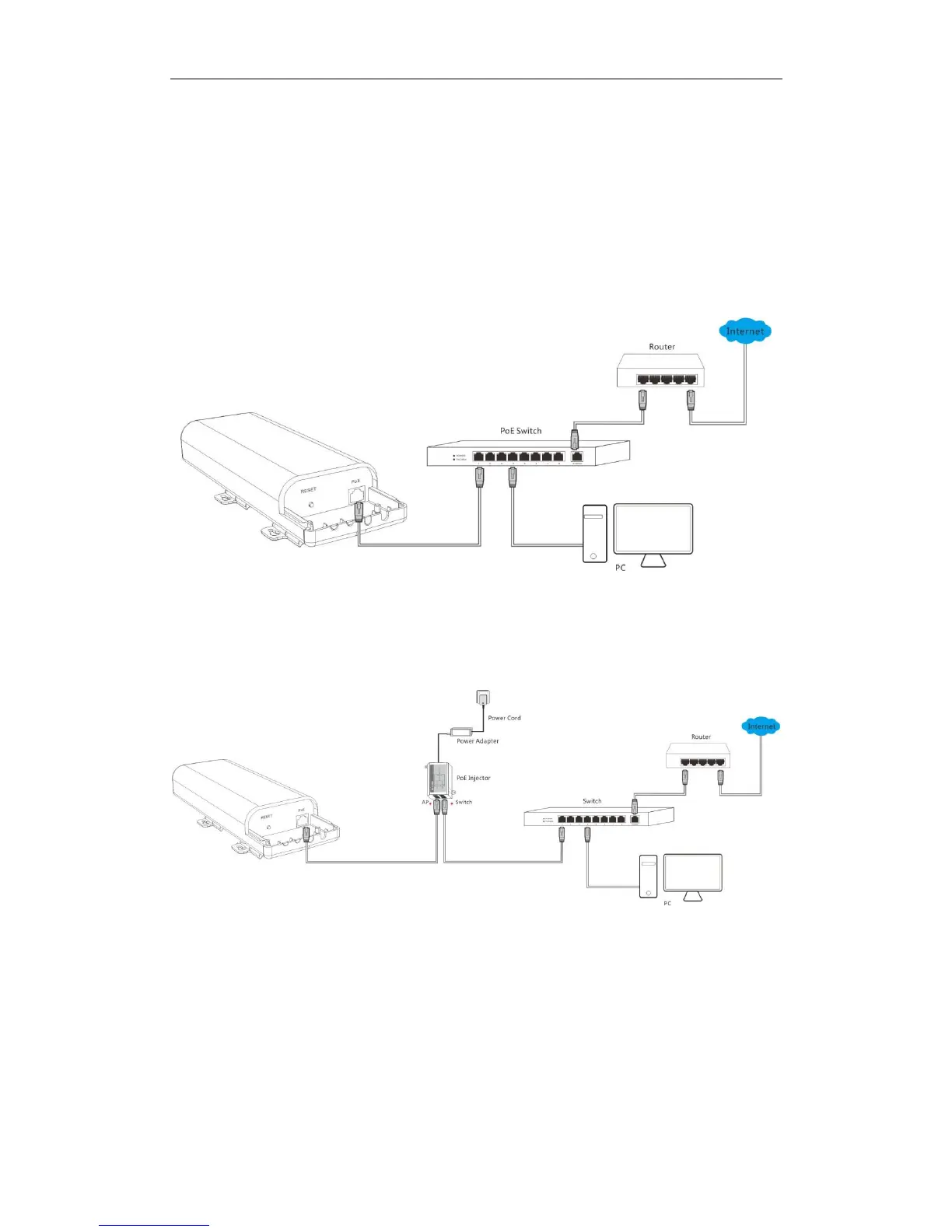
Step 3: Connect the AP
As you can connect your AP to a PoE switch or with the included PoE injector for power supply,
two methods are available here to connect your AP. Select the proper method according to your
needs.
With a PoE switch for power supply
❶ Connect the Ethernet cable, which has been connected to the AP in Step 1, to a PoE switch.
❷ Connect your PC or other Ethernet devices to the PoE switch with Ethernet cables.
With the included PoE injector for power supply
❶ Connect the Ethernet cable, which has been connected to the AP in Step 1, to the AP port of
the PoE injector.
❷ Connect a switch to the Switch port of the PoE injector with an Ethernet cable.
❸ Connect the included power adapter to the PoE injector, connect the power adapter to the
included power cord and plug the power cord into an outlet for power supply.
❹ Connect your PC or other Ethernet devices to the switch with Ethernet cables.



 To Next Page