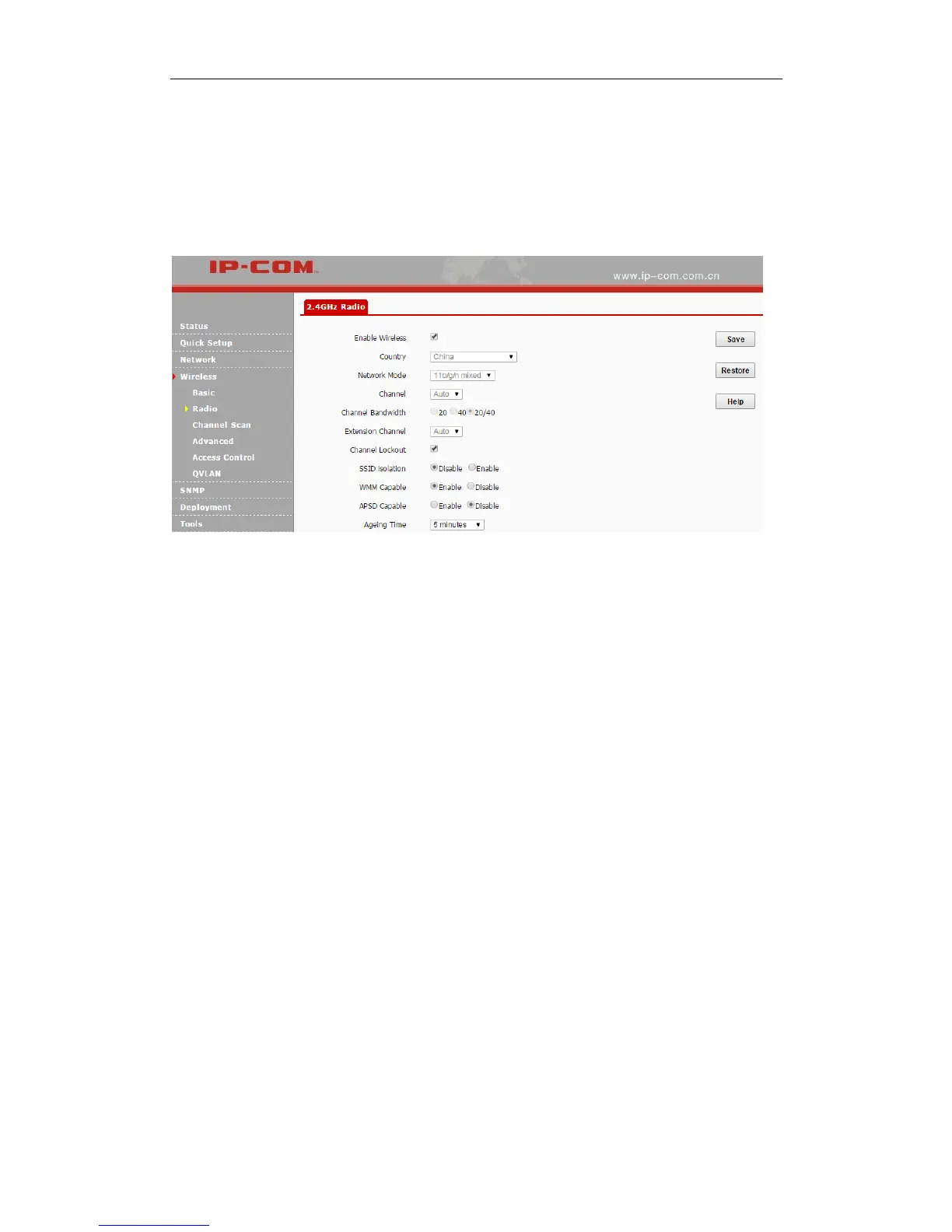
Radio
Click Wireless > Radio to configure radio settings. In the AP Client mode and WDS mode, radio
settings are not configurable.
Parameters on this page are described below:
Enable Wireless: Check/Uncheck it to enable/disable WiFi function.
Country: Select the country where your device works to match channels in different regions.
Network Mode: Select a proper network mode for your device. The default mode is 11b/g/n
mixed. 11b: Select it if you have only 11b wireless devices in your wireless network. Up to
11Mbps wireless rate is supported in this mode. 11g: Select it if you have only 11g wireless
devices in your wireless network. Up to 54Mbps wireless rate is supported in this mode.
11b/g: Select it if you have 11b and 11g wireless devices in your wireless network. Up to
54Mbps wireless rate is supported in this mode. 11b/g/n mixed: Select it if you have 11b, 11g
and 11n wireless devices in your wireless network. Up to 300Mbps wireless rate is supported
in this mode.
Channel: Select a proper channel for your wireless network.
Channel Bandwidth: Select a proper channel bandwidth to enhance wireless performance.
This option is available only in 802.11b/g/n. Wireless speed in the channel bandwidth of
20/40 is 2 times in 20.
Extension Channel: This is used to ensure radio frequency for 802.11n devices on the



 To Next Page