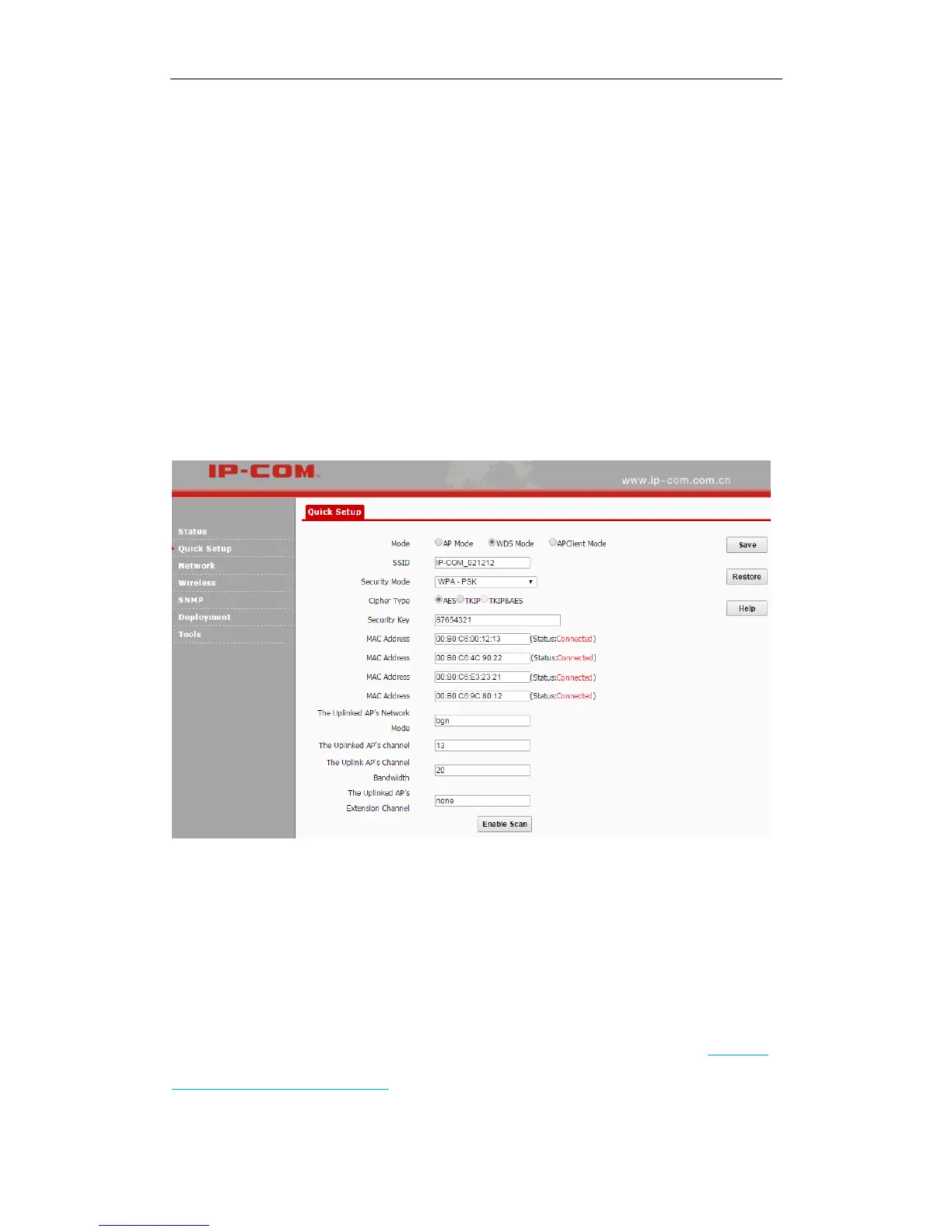
Step 4: Log in to the web UI of AP1 and configure WDS settings to bridge itself with AP2, AP3,
AP4 and AP5 respectively.
❶ Click Quick Setup, select WDS Mode and click Enable Scan.
❷ Locate SSIDs of AP2, AP3, AP4 and AP5 in the list, and then select them one by one (At this
time, SSIDs of AP2, AP3, AP4 and AP5 have been changed into the SSID of AP1, i.e.
IP-COM_021212).
❸ Enter the security key (WiFi password) of AP1 in the Security Key field, say 87654321.
❹ Click Save to complete your settings.
When status of corresponding MAC addresses displays Connected, they’ve bridged successfully.
AP Client Mode
In this mode, the device extends the wireless coverage of another wireless AP or router. The
advantage of the AP client mode is that the remote device does not need to have WDS function
and may not need to be the same brand. Therefore, it can work with almost any wireless device.
Its typical application scenario is shown as below. As for its network topology, refer to Neowork
topology in one-to-one WDS mode.



 To Next Page