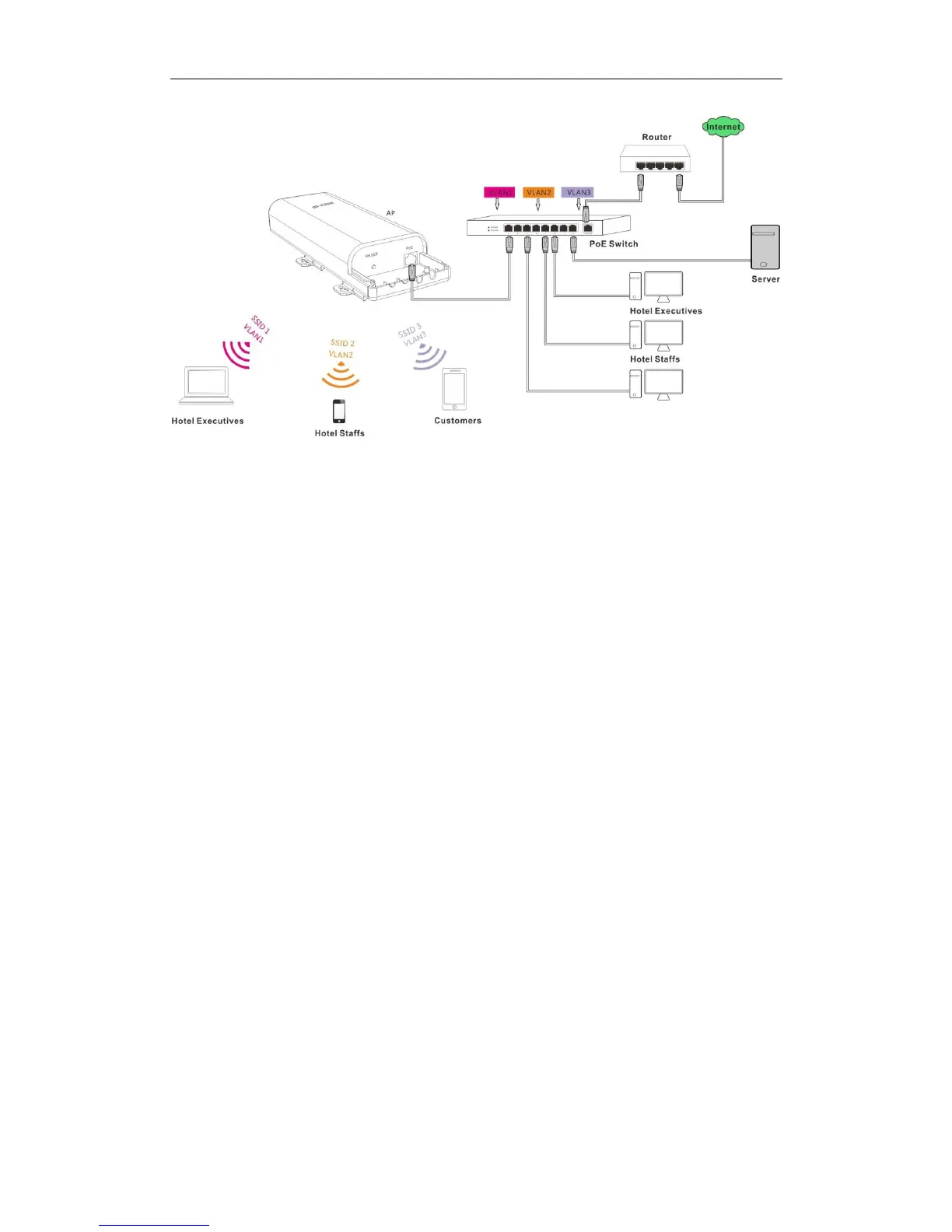
As shown in the network topology, AP515 should work with a switch that has VLAN assigned.
People in a hotel are generally classified into three kinds: hotel executives, hotel staffs and
customers. They belong to different VLAN networks to have different authorities (hotel
executives-VLAN1, hotel staffs-VLAN2 and customers-VLAN3).
Configuration Steps:
Configurations on the Switch (Configurations may vary on different switches):
Configure the port on the switch connected to the AP as the Trunk port, PVID=100 and all
VLANs allowed;
Configure the port on the switch connected to the server in the hotel as the Trunk port,
PVID=100 and VLAN1, VLAN2 allowed;
Configure the port on the switch connected to the router as the Trunk port, PVID=100 and
VLAN1, VLAN3 allowed.
Configurations on the AP:
❶ Click Wireless > Basic to enable 3 SSIDs: SSID1, SSID2 and SSID3, encrypt your SSIDs
and click Save.



 To Next Page