iPECS eMG80
Hardware Description and Installation Manual Issue 1.3
90
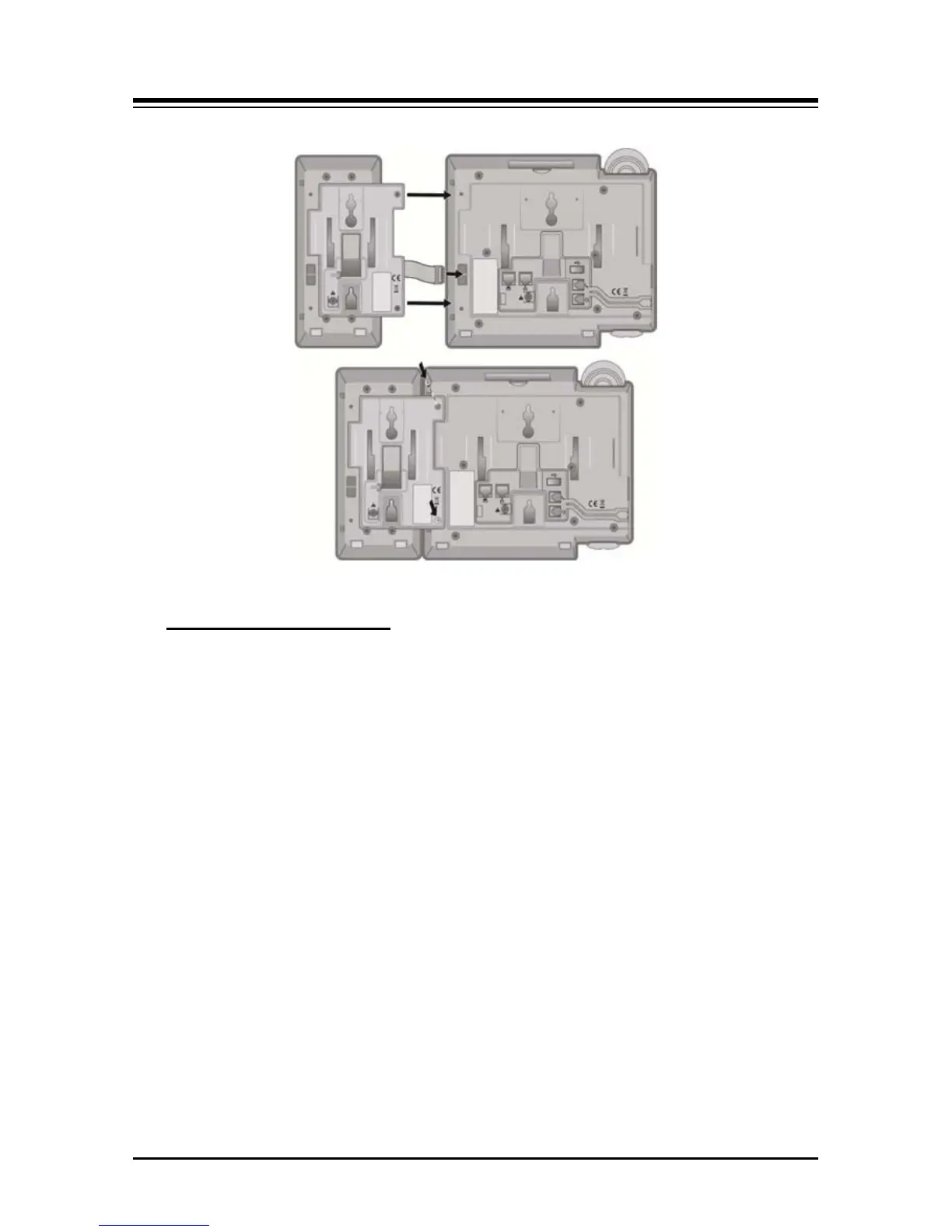
Figure 7.3.4-3 LIP-8000 DSS Installation
The Button kits for the LIP-9000 Series phone provide 12, 24, or 48 additional flexible
buttons. The flexible buttons on the Button kit are used as with the flexible buttons on the
phone proper and can be assigned for any of the flexible button functions. One of three
Button kits may attach to an LIP-9020, LIP-9030 or LIP-9040 phone, and can be placed on
your desktop or can be wall-mounted with the phone.
LIP-9000 Console Installation
The available button kits are shown in the below and described as follows.
• LIP-9012DSS has 12 flexible buttons with tri-color LED. The DSS button kit uses a
paper label for the button designations.
• LIP-9024DSS has 24 flexible buttons with tri-color LED. The DSS button kit uses a
paper label for the button designations.
• LIP-9024LSS has 12 flexible buttons with tri-color LED. The LSS button kit uses
an LCD for the button labels and has two flexible button pages to represent 24
total flexible buttons. The two lower buttons control the page view. The page
button LED will flash when there is new activity under a button on the page. You
can press the page button at any time to change the flexible button page view.
• LIP-9048DSS has 48 flexible buttons with tri-color LED. The DSS uses a paper
label for the button designations.


 To Next Page