#6
iStorage datAshur SD
®
User Manual v1.0.8
www.istorage-uk.com
3. First Time Use
Note: When datAshur SD is unlocked and not connected to a USB port and no operations are performed
within 30 seconds, the device will enter Idle State automatically. The LED turns to solid RED and then fades
out to the Idle State.
When datAshur SD is connected to a USB port, the SHIFT ( ) button does not function.
When connected to a powered USB port, a locked datAshur SD will start charging after 30 seconds,
indicated by the BLUE LED blinking every 5 seconds.
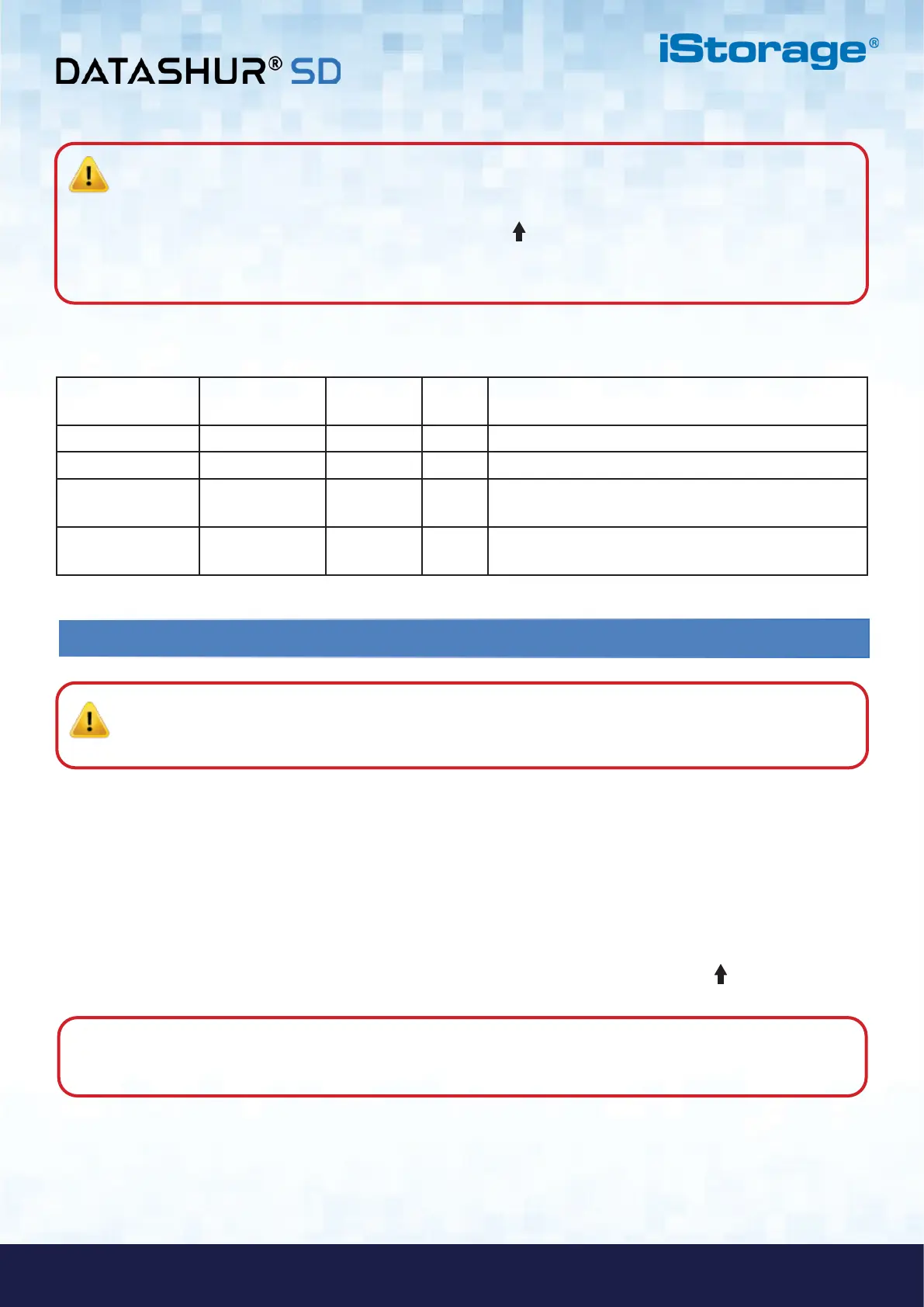
Power-on States
After the device wakes from Idle State, it will enter one of the following states shown in the table below.
Power-on State LED indication
Encryption
Key
Admin
PIN
Description
Standby
RED Solid
Waiting for Admin or User PIN entry
Reset
RED Solid
Waiting for configuration of an Admin PIN
Low Battery Level
RED Blinks 3
Times
Charge on a powered USB port for 20-30 minutes
Initial Shipment
State
RED and GREEN
Solid
Waiting for configuration of an Admin PIN
PIN Requirements:
• Must be between 8-64 digits in length
• Must not contain only repetitive numbers, e.g. (3-3-3-3-3-3-3)
• Must not contain only consecutive numbers, e.g. (1-2-3-4-5-6-7), (7-8-9-0-1-2-3-4), (7-6-5-4-3-2-1)
Examples of these types of Alphanumerical PINs are:
• For “Password” press the following buttons:
7 (pqrs) 2 (abc) 7 (pqrs) 7 (pqrs) 9 (wxyz) 6 (mno) 7 (pqrs) 3 (def)
Password Tip: You can configure a memorable word, name, phrase or any other Alphanumerical PIN combination
by simply pressing the button with the corresponding letters on it.
Important: datAshur SD is supplied in the ‘Initial Shipment State’ with no pre-set Admin PIN. A 8-64
digit Admin PIN must be configured before the drive can be used. Once an Admin PIN has been successfully
configured, it is then not possible to switch the drive back to the ‘Initial Shipment State’.
Special Characters:
• The Admin PIN can be configured with the use of one or more ‘Special Characters’ (SHIFT ( ) + digit pressed
down together), this can be placed once or several times anywhere along your 8-64 digit Admin PIN.















 To Next Page