#8
iStorage datAshur SD
®
User Manual v1.0.8
www.istorage-uk.com
5. To enter Admin Mode
The Admin PIN can be used to setup the datAshur SD with a host of security features including the creation of a secondary
User PIN by first entering the Admin Mode indicated by a solid BLUE LED.
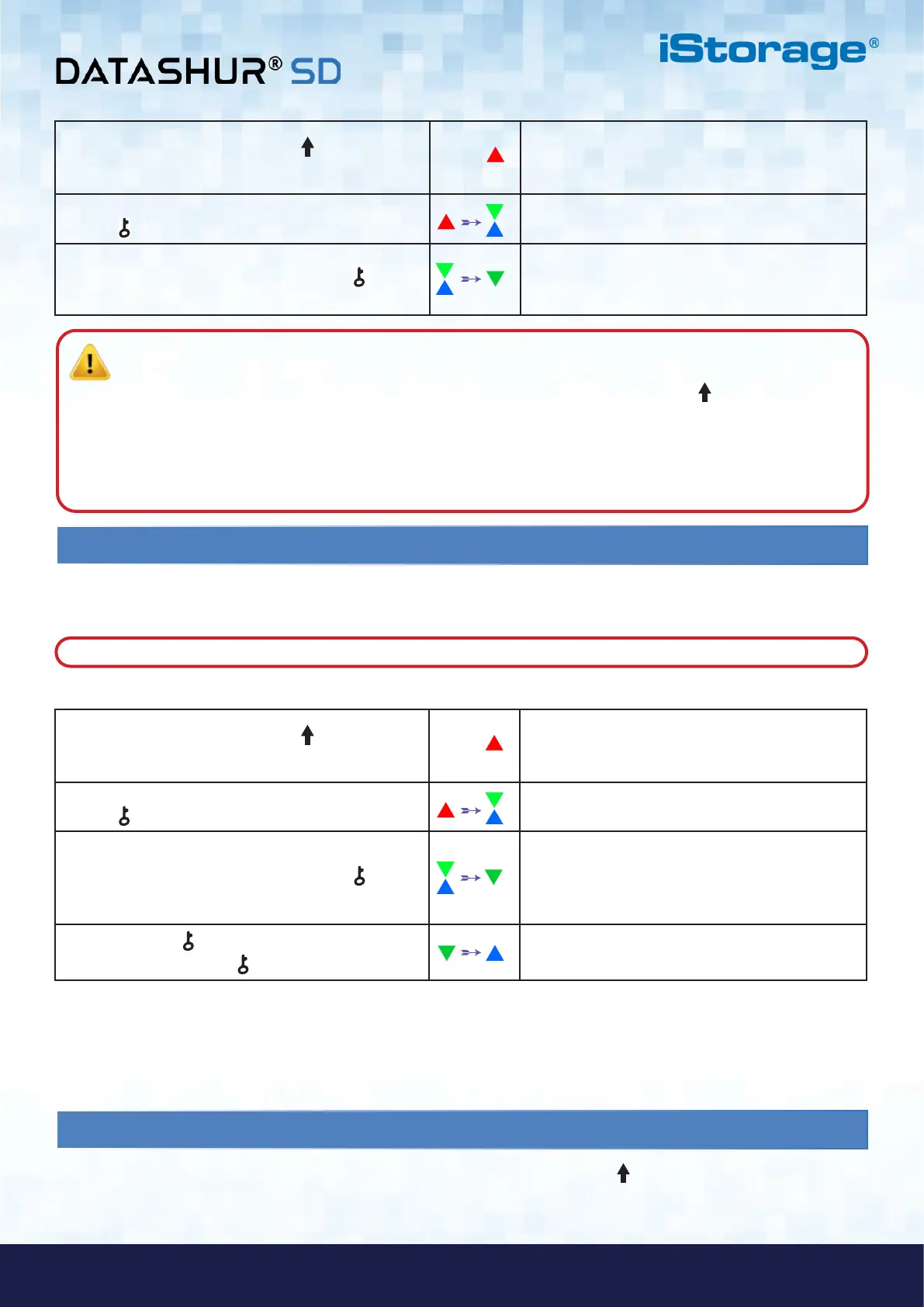
To Enter Admin Mode, do the following.
1. Press and hold down the SHIFT ( ) button
for one second
A solid RED LED switches on indicating the drive is
in Standby State
2. In Standby State (solid RED LED) press the
KEY ( ) button once
GREEN and BLUE LEDs blink together
3. With the GREEN and BLUE LEDs blinking together,
enter the Admin PIN and press the KEY ( ) button
again
GREEN and BLUE LEDs will alternately blink
several times and then to a solid BLUE LED
changing to a blinking GREEN LED indicating the
device is unlocked
4. Press the KEY ( ) button three times
within 2 seconds (KEY ( ) x 3)
Blinking GREEN LED will change to a solid BLUE
LED indicating the device is in Admin Mode
Note: Once datAshur SD has been successfully unlocked, the GREEN LED will remain blinking for 30 seconds
only, during which time the datAshur SD needs to be connected to a powered USB port. It can be locked down
immediately (if not connected to a USB port) by pressing and holding down the SHIFT ( ) button for a second
or by clicking the ‘Safely Remove Hardware/Eject’ icon within your operating system when connected to a USB
port.
When the datAshur SD is unlocked and connected to a USB port, it will not accept further instructions via the
keypad.
6. To exit Admin Mode
To immediately exit Admin Mode (solid BLUE LED), press and hold down the SHIFT ( ) button for a second - the solid
BLUE LED switches to a solid RED LED which then fades out to the Idle State. To access the drive contents (data), the
datAshur SD must first be in the Idle State (all LEDs off) before an Admin/User PIN can be entered.
When the datAshur SD is in Admin Mode, the BLUE LED will remain on and solid for 30 seconds only, during which time
the drive can accept instructions via the keypad allowing it to be configured with a host of security features. If no key event
happens within 30 seconds, the datAshur SD will exit Admin Mode automatically - the solid BLUE LED switches to a solid
RED LED which then fades out to the Idle State (all LEDs off).
Note: The datAshur SD must not be connected to a USB port when accessing Admin Mode.
1. Press and hold down the SHIFT ( ) button
for one second
A solid RED LED switches on indicating the drive is
in Standby State
2. In Standby State (solid RED LED) press the
KEY ( ) button once
GREEN and BLUE LEDs blink together
3. With the GREEN and BLUE LEDs blinking together,
enter the Admin PIN and press the KEY ( ) button
again
GREEN and BLUE LEDs change to a blinking
GREEN LED indicating the drive has been
successfully unlocked as Admin















 To Next Page