PATTERN
PRESSURE
SYSTEM COMP.
1: 0
/min
PRESS1: 0%
PRESS2: 0%
PRESS3: 0%
PRESS4: 0%
PROGRAM.:
1
STOP
V-MIN
V-MIN
V-MIN
V-MIN
_
_
_
_
PATTERN
PRESSURE
SYSTEM COMP.
1: 0
/min
PRESS1: 0%
PRESS2: 0%
PRESS3: 0%
PRESS4: 0%
PROGRAM.:
1
COM2STOP
V-MIN
V-MIN
V-MIN
V-MIN
_
_
_
_
PATTERN
PRESSURE
SYSTEM COMP.
1: 0
/min
PRESS1: 0%
PRESS2: 0%
PRESS3: 0%
PRESS4: 0%
PROGRAM.:
1
EXTER.STOP
V-MIN
V-MIN
V-MIN
V-MIN
_
_
_
_
PATTERN
PRESSURE
SYSTEM COMP.
1: 0
/min
PRESS1: 0%
PRESS2: 0%
PRESS3: 0%
PRESS4: 0%
PROGRAM.:
1
COM-STOP
V-MIN
V-MIN
V-MIN
V-MIN
_
_
_
_
Manual #50-14 Revised 8/08
Page 4-- 41
C. 1998
Stop Function
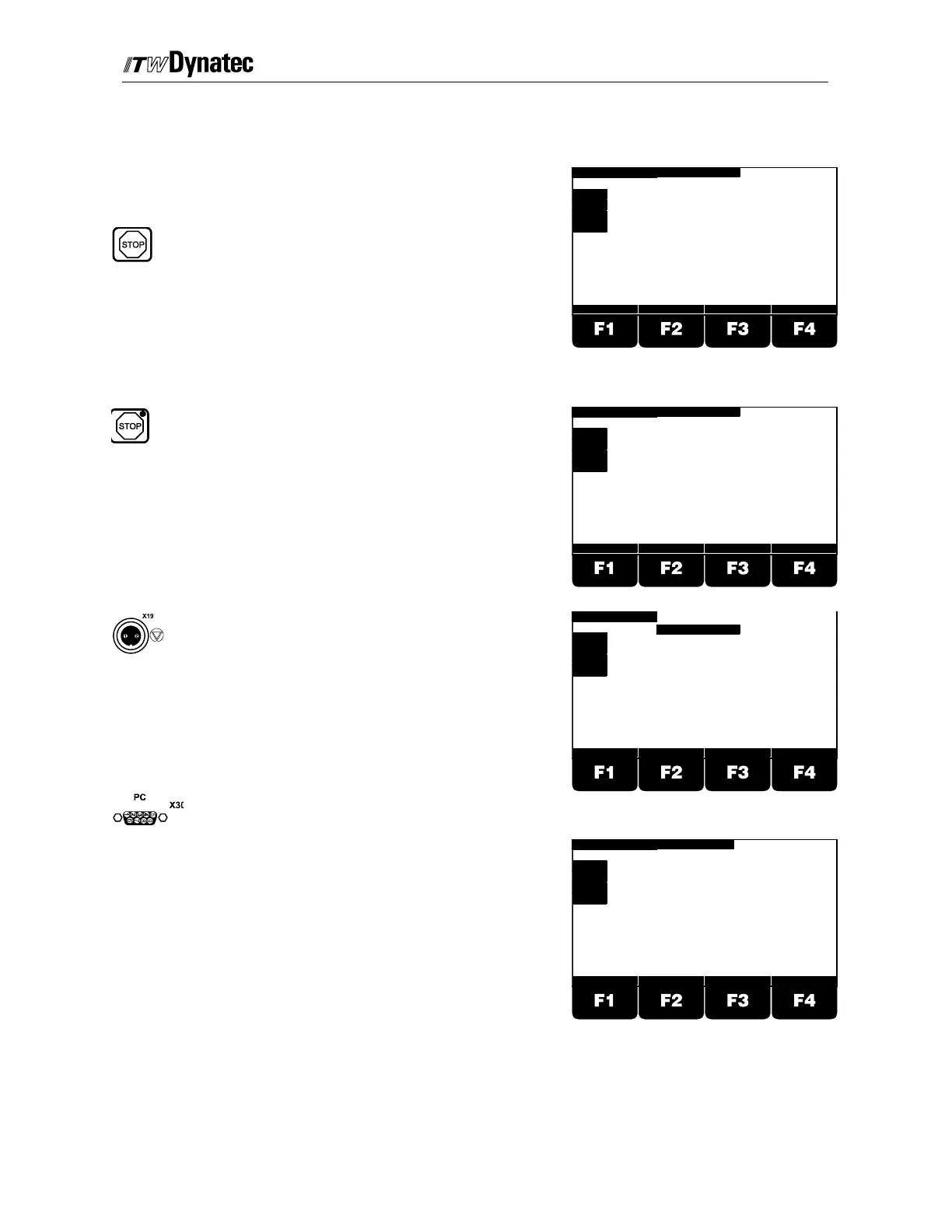
Activating the Stop function on the DY2008 disables all
drive outputs. Stop may be activated through any of five
means:
1. Pressing the STOP button in the top, right
corner of the front panel, in which case the
word STOP is flashing in the top, center of
the display screen.
2. Pressing the STOP button on the optional
Remote Purge Control device
(28.11101.602), in which case the words
COM2- STOP are flashing in the top, center
of the display screen.
3. Via the Machine Stop (X19) pins #1 and
#2, in which case the words EXTER STOP
are flashing in the top, center of the display
screen.
4. Activating the STOP function from a
remotely connected computer via the Data
Interface Option (28.11101.601), in which
case the words COM- STOP are flashing in
the t op, center of the display screen.



 To Next Page