Offset
(Head Position)
Trigger
Applicator
C1:
C2:
C3:
C4:
C5:
C6:
C7:
C8:
PATTERN
PRESSURE
SYSTEM COMP.
1: 0 m/min
PRESS1: 0%
PRESS2: 0%
PRESS3: 0%
PRESS4: 0% PROGRAM.:
1
2: 0 m/min
3: 0 m/min
4: 0 m/min
SYSTEM
RETURN
STITCH OFFSET
1: 0 m/min
2: 0 m/min
3: 0 m/min
4: 0 m/min
C1:
C2:
C3:
C4:
C5:
C6:
C7:
C8:
SYSTEM MENU
DOTS
OFFSET
Page 4-- 52
Manual #50-14 Revised 8/08
C. 1998
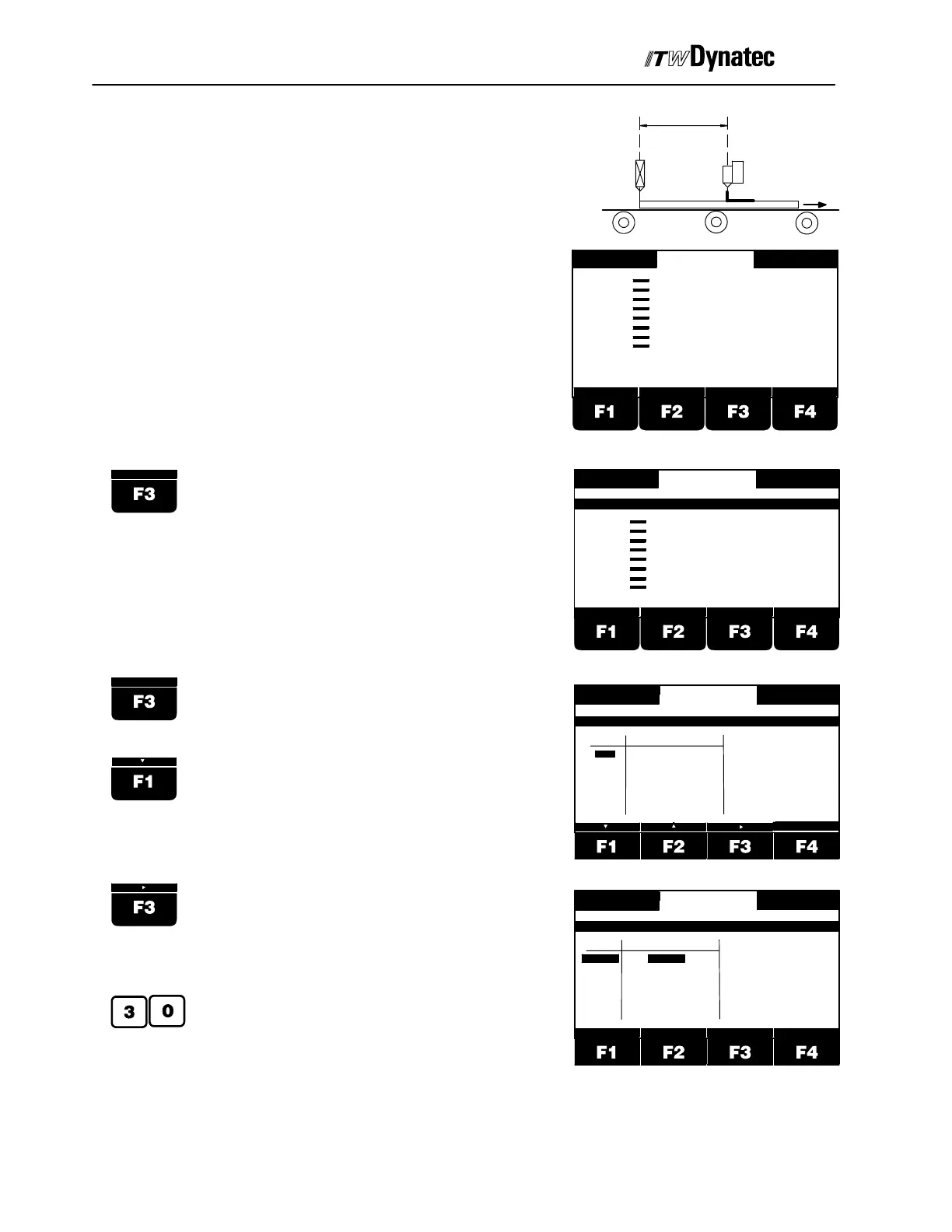
Offset (Head Position)
In order to apply the glue pattern at the proper location
it is required to enter the distance between applicator
head and trigger device for every channel.
The shown display appear a few seconds after
switching on the pattern controller. If you are in a
different menu press F4 RETURN as many times as
necessary to return to the Main Menu, as shown at
right.
Press button F3.
Press button F3.
Use buttons F1 and F2 to select a channel.
Press button F3.
Use the numeric keys to enter the distance
between applicator head and trigger device
for the selected channel. e.g. 30mm.
CHAN.
1
2
3
4
1: 0 m/min
2: 0 m/min
3: 0 m/min
4: 0 m/min
DISTANCE
20 mm
20 mm
20 mm
20 mm
ZURUECK
OFFSET MENU
RETURN
CHAN.
1
2
3
4
1: 0 m/min
2: 0 m/min
3: 0 m/min
4: 0 m/min
DISTANCE
30 mm
20 mm
20 mm
20 mm
ZURUECK
OFFSET MENU
RETURN
123



 To Next Page