mP4G/mP4GL Motherboard
○○○○○○○○○○○○○○○○○○○○○○○○○○○○○○○○○○○○○○○○○○○○○○○○○○
User’s Manual
4•6
○○○○○○○○○○○○○○○○○○○○○○○○○○○○○○○○○○○○○○○○○○○○○○○○○○
Next, install the processor Fan/Heatsink assembly as de-
tailed below.
Install the Fan/Heatsink
To install the processor Fan/Heatsink assembly do as
follows:
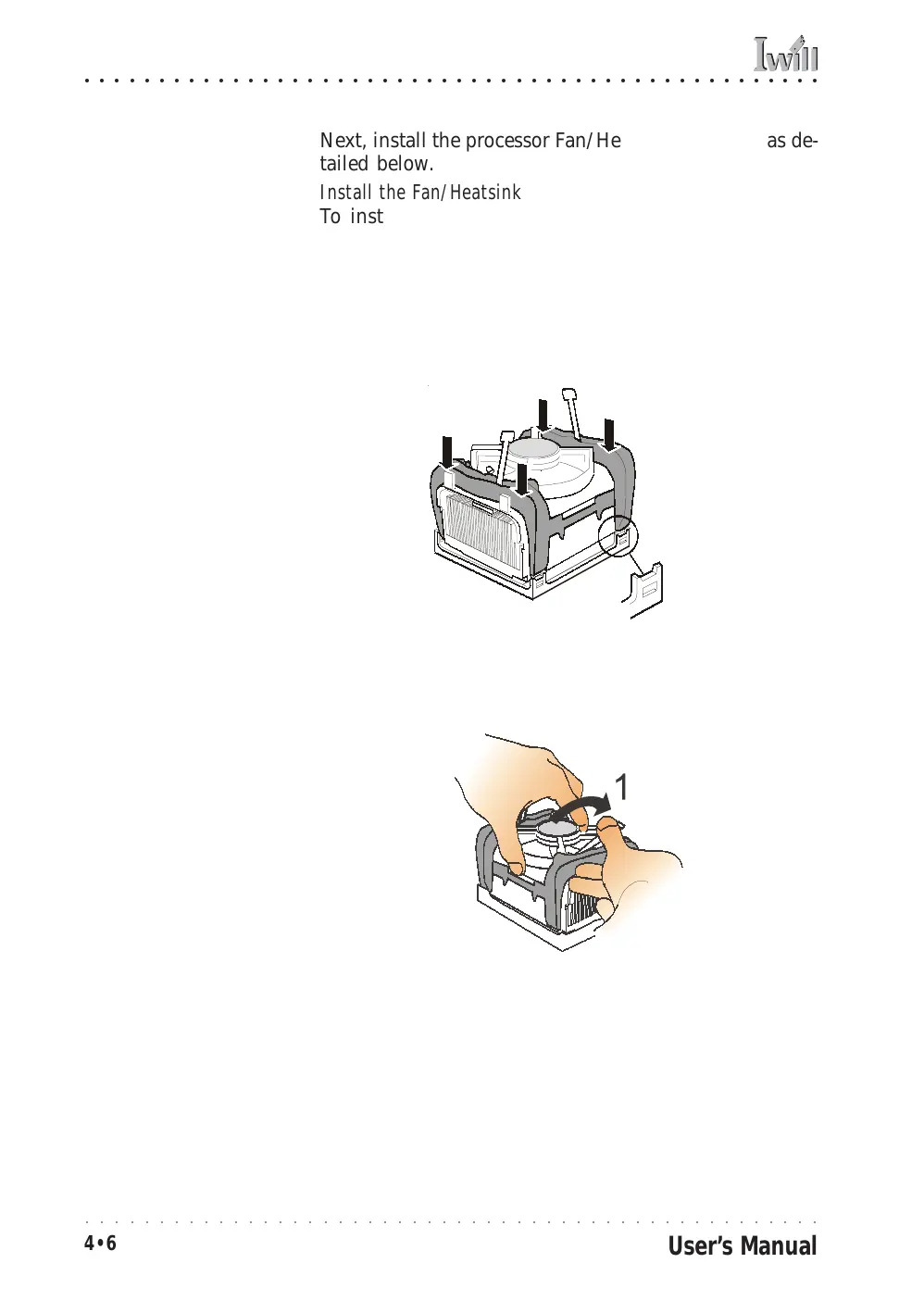
1. Place the Fan/Heatsink on top of the Pentium 4 CPU
so that it’s retaining clip frame snaps into the re-
cesses in the Retaining Mechanism. The Fan/
Heatsink will only fit into the mechanism frame in
the correct orientation.
2. Hold the Fan/Heatsink steady and press one of the
clip assembly’s locking levers down into the locked
position.
Step 1:
Clip Fan/Heatsink assem-
bly into the Retention
Mechanism
Step 2:
Hold the assembly steady
and press one of the re-
taining clip locking arms
into the locked position



 To Next Page