4: Installing The Motherboard
○○○○○○○○○○○○○○○○○○○○○○○○○○○○○○○○○○○○○○○○○○○○○○○○○○
User’s Manual
4•7
○○○○○○○○○○○○○○○○○○○○○○○○○○○○○○○○○○○○○○○○○○○○○○○○○○
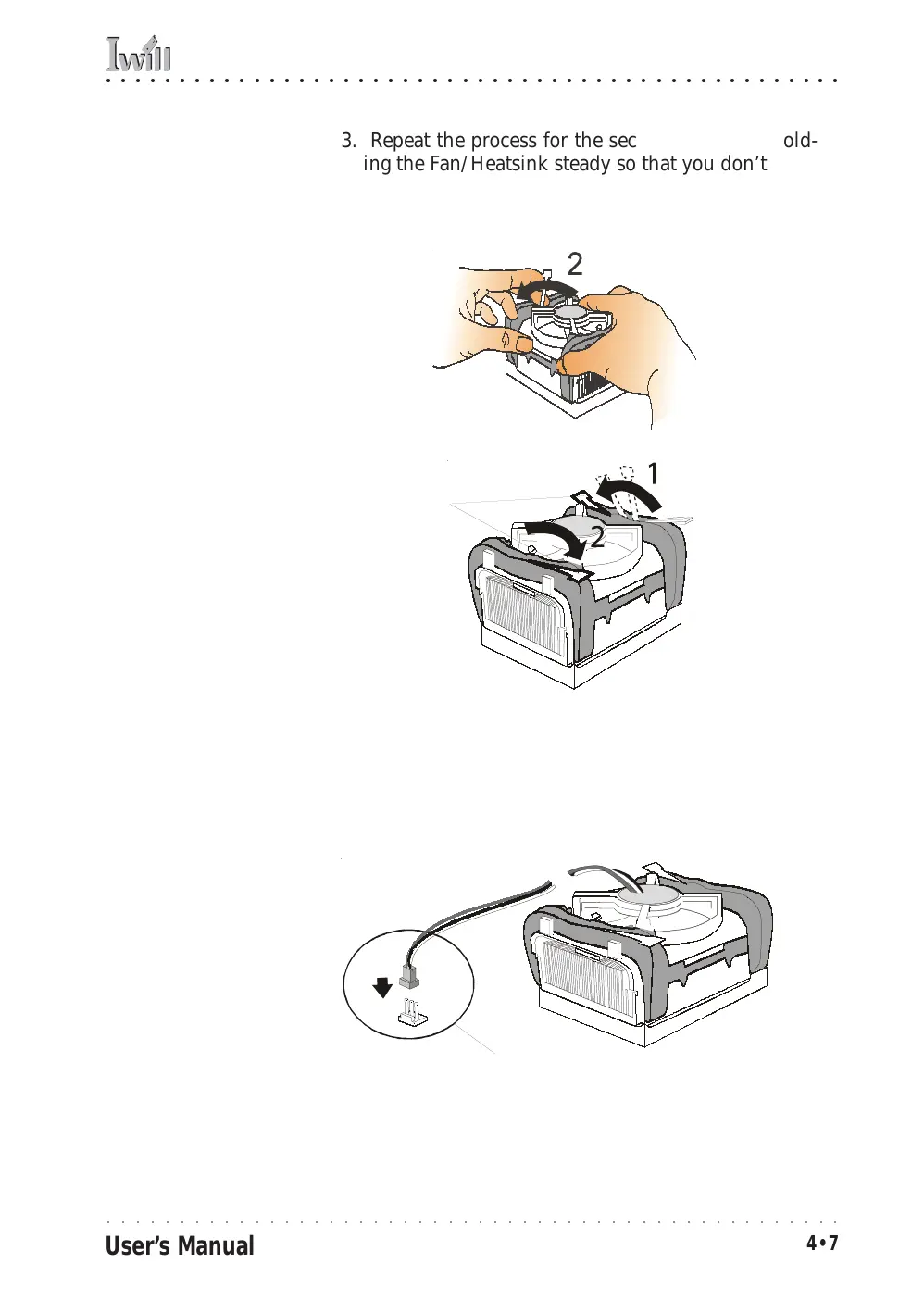
3. Repeat the process for the second clip. Keep hold-
ing the Fan/Heatsink steady so that you don’t dam-
age the TIM. The locking levers should now hold
the heatsink securely in the Retention Mechanism.
Connect Fan/Heatsink Power Lead
Plug the fan power lead onto the CPU Fan power connec-
tor near the CPU socket. The entire CPU installation is
then complete.
Step 3:
Hold the assembly steady
and press the other retain-
ing clip’s locking arm into
the locked position
Step 4:
Plug the Fan power lead
onto the CPU fan power
connector



 To Next Page