Wireless Network Connection XT2 User Manual
Janam Technologies LLC Version 3, April 2017 Wireless Network Connection 4—2
C
onnecting the Janam XT2 to a Wireless Local Area Network (WLAN)
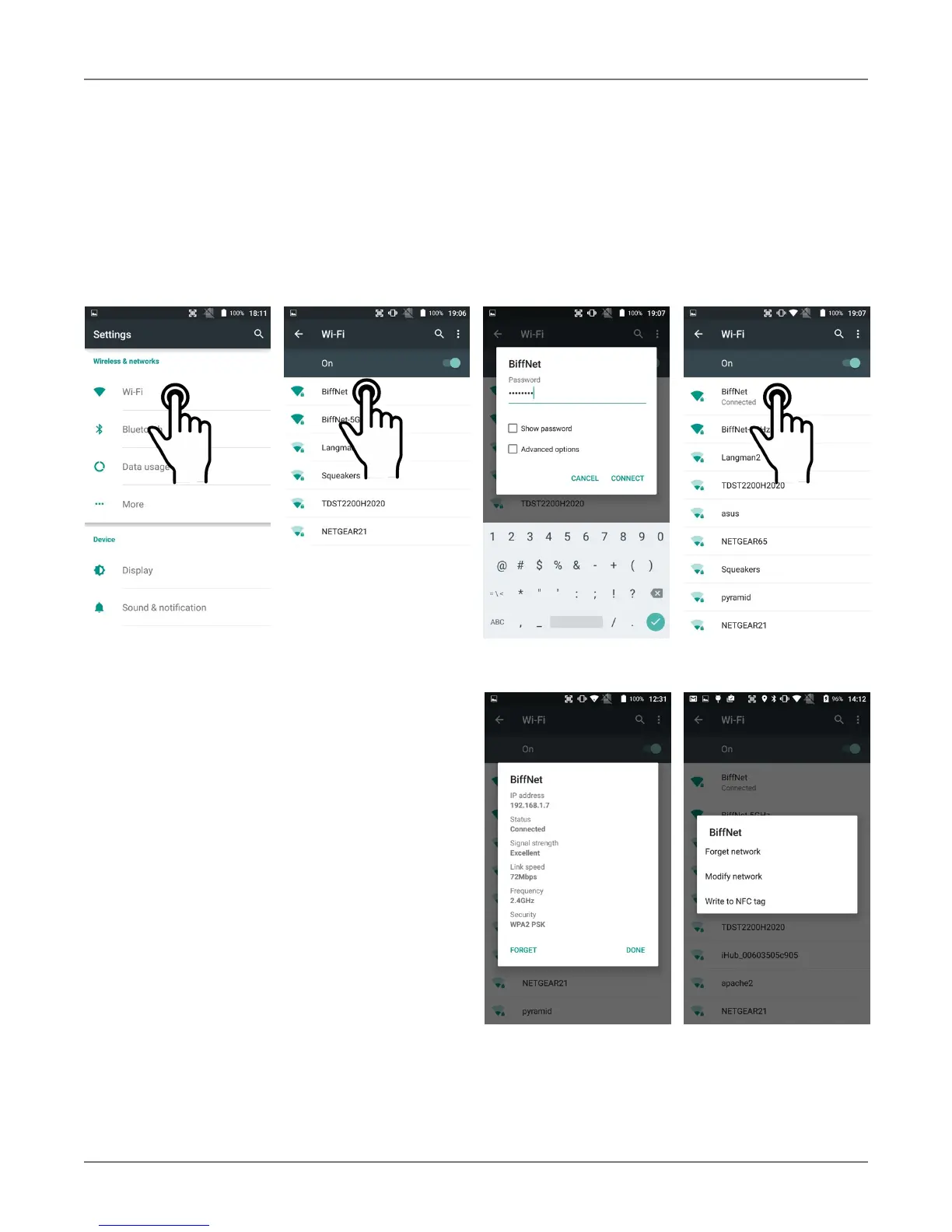
To initially connect the XT2 to a wireless local area network, go to Settings > Wireless & networks
>
W
i-Fi
.
Turn
W
i-Fi networking
o
n. The XT2 will begin searching for available Wi-Fi networks. After
a few seconds it will list what it has found, including the approximate signal strength and whether or
not a network is secured by a password or not. Tap on your preferred network. Enter the password.
The connection will be established. Upon successful completion, the network link will show up as
Connected.
If you tap on the network you are connected to,
a window pops up that shows you the IP address
and other information about the connection,
including signal strength, link speed, frequency,
and the type of security. Here you can also opt
to forget this network, so that next time you
come within range of it, the XT2 will not
automatically connect.
If you tap and hold on the network you are
connected to, a smaller popup will appear. Here
you can also forget the network, and there is
also a Modify network option.
You can also Write to NFC tag, which means
you can save your Wi-Fi access data in a NFC
tag.



 To Next Page