Email XT2 User Manual
Janam Technologies LLC Version 3, April 2017 Email 7—1
Introduction
Like a smartphone, laptop or desktop PC, the XT2’s email interface acts as a portal to an already
existing email account with one of the commonly available email service providers such as Google
Gmail, Microsoft Outlook, Yahoo, AOL or a private enterprise (corporate) network. This allows the
XT2 to receive, read, respond to, and send emails.
The default Email app on the XT2 can be used to manage multiple email accounts. Note that there is
both a stock Email app and also the Google Gmail app. Here we explain stock Email.
Before setting up an email account on the XT2, be sure that a core email address is active with an
email service provider or within a private enterprise (corporate) network to which the XT2 user has
access and authorization.
Setting up Email
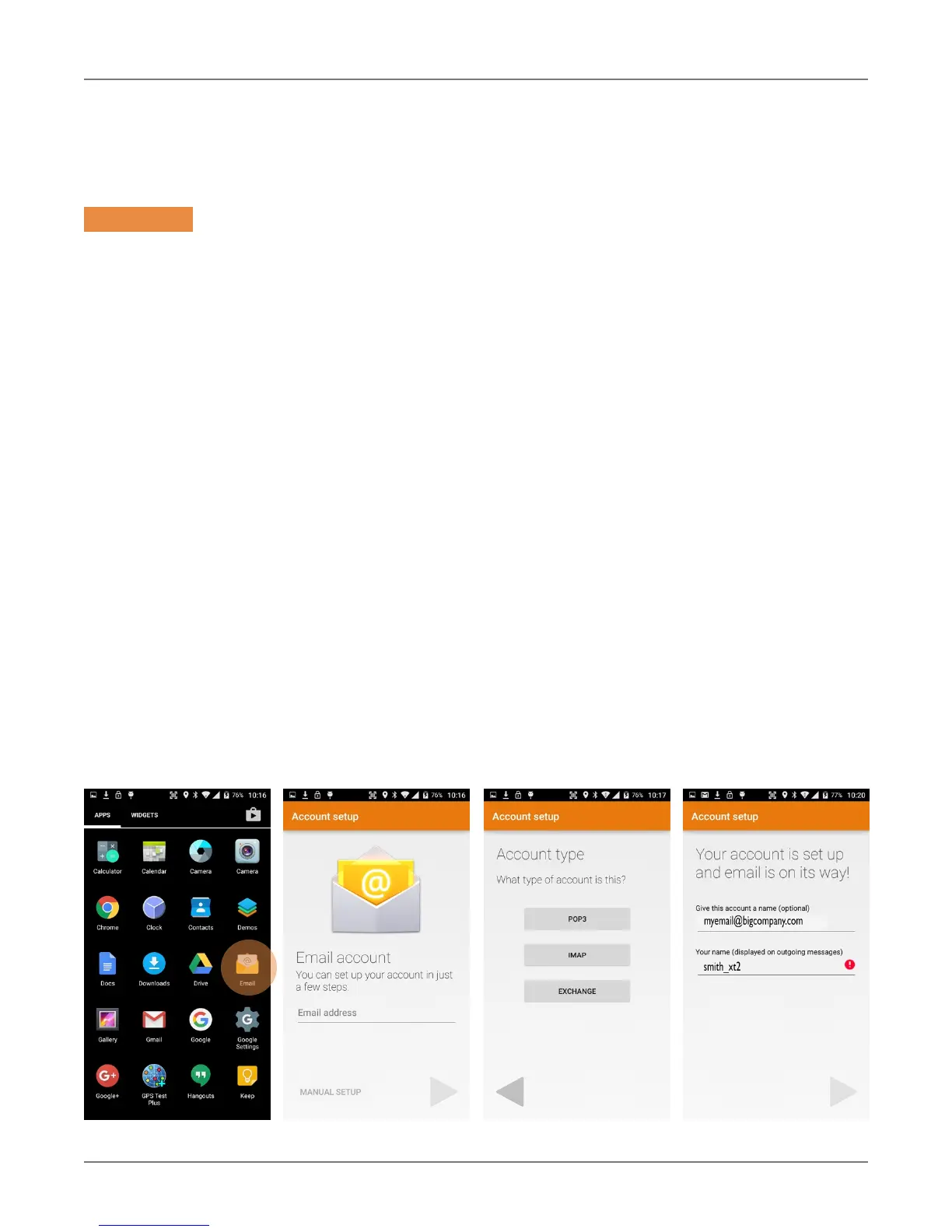
To add your email account(s) to the XT2, tap on Email on the Apps screen. If this is the first email
to be set up, the Account setup will come up. For popular email service providers (like Gmail or
Yahoo), entering your email address and password will be enough. For corporate email, use the
Manual Setup option.
Email
7



 To Next Page