XT2 Setup XT2 User Manual
Janam Technologies LLC Version 3, April 2017 XT2 Setup 3—6
Security
Android Security
The Android 5.x “Lollipop” operating system installed on the Janam XT2 can inherently provide a high
degree of security, centering around three areas:
! A screen lock to guard against unauthorized data access
! Encryption strong enough to virtually eliminate data breaches
! A device manager that can help to find or remotely wipe a lost device
Some of this security is implemented automatically behind the scenes, but other areas require user
input and choices.
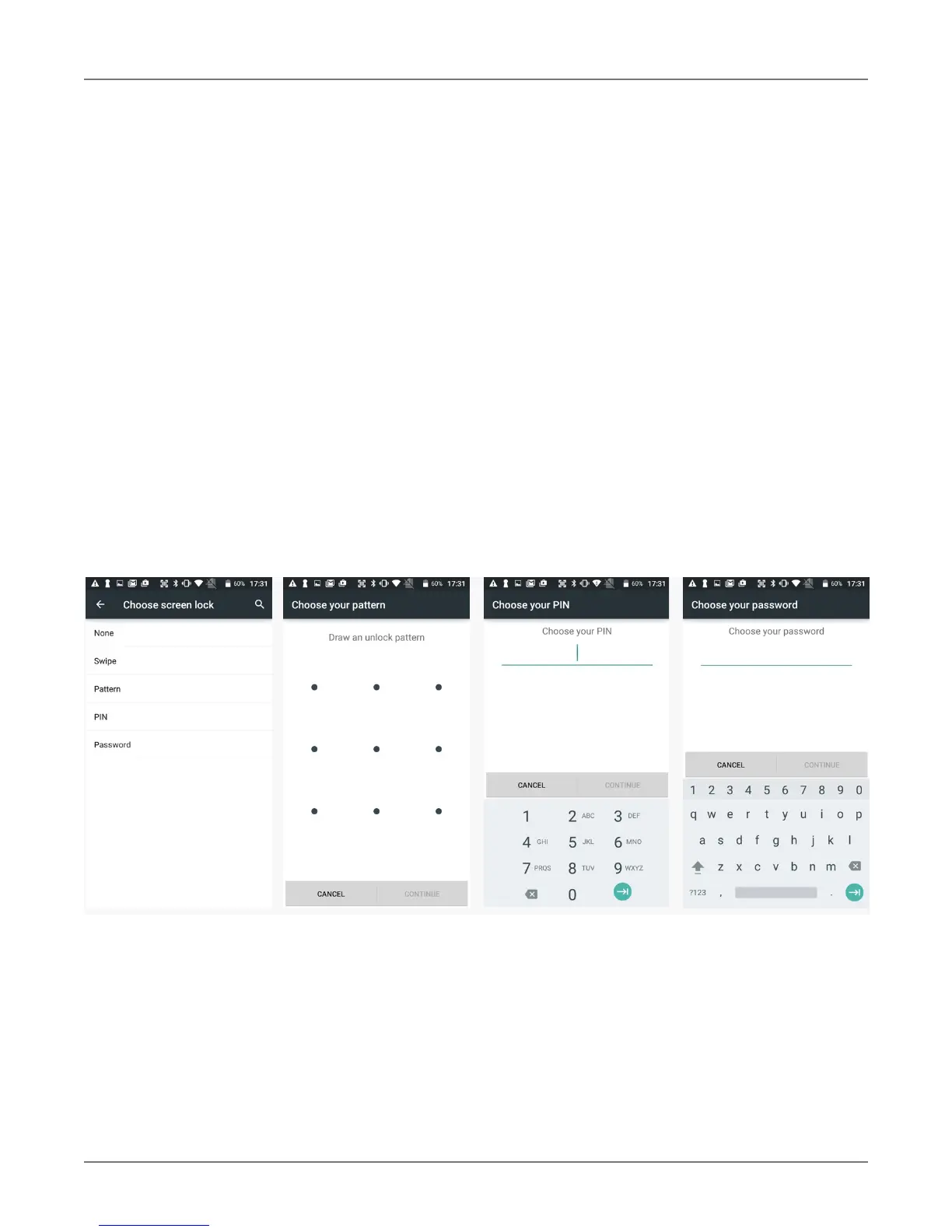
Screen Lock Types
Android provides several lock screen options ranging from none at all, to a simple swipe, to a pattern,
a PIN, or a conventional password. Patterns must connect at least four unique dots, PINs must be at
least four digits long (but can be as long as 16), and passwords must be at least four characters (but
can also be as long as 16). To set, go to
Settings > Security > Screen lock.
Changing Screen Lock Settings
Lock screen options can be changed anytime. You can go from PIN to pattern or password, etc. To
make a change, go to Settings > Security > Screen lock. If you have lock screen security in place,
you must enter the code before you can change the screen lock type or code.



 To Next Page