FOTA Update XT2 User Manual
Janam Technologies LLC Version 3, April 2017 FOTA Update 13—1
FOTA Update
13
Update via FOTA client
The Android version of the Janam XT2 supports
Firmware Over The Air (FOTA) starting with
version 87.07C3 of the OS image. To determine
if your device OS supports this feature, please
follow these steps:
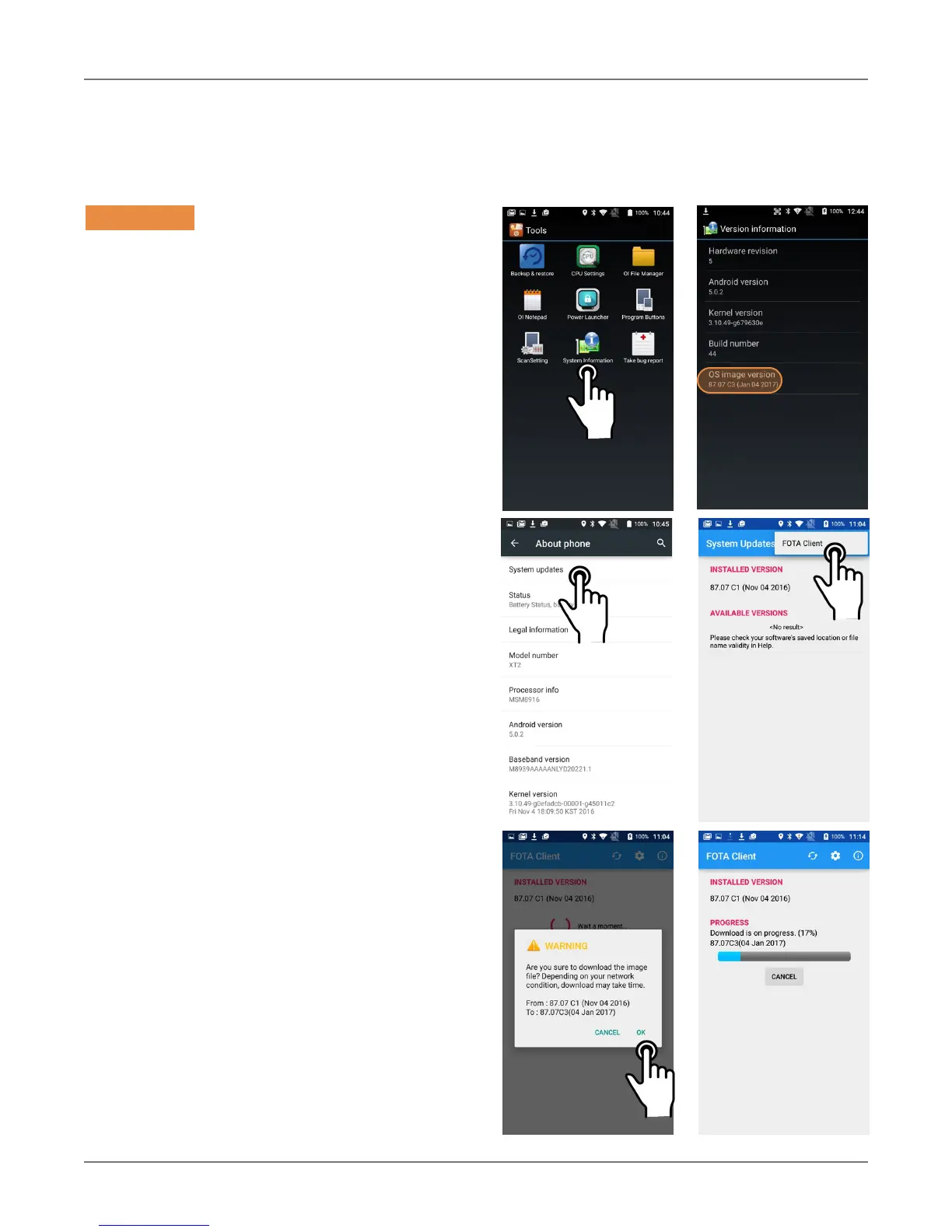
Go to Tools, tap on System Information, then
on Version Information. Here you can see
which OS image version is currently installed. If
your device OS image version is earlier than
87.07C3, please update the OS image with the
“Update from SD card” procedure first.
If your XT2 is on OS image version 87.07C3 or
later, go to Settings > About phone, and tap
on System updates. Tap on the menu icon in
the upper righthand corner of the screen. This
will bring up the FOTA client pop-up. Tap on it.
The FOTA client will then check your current OS
image version and check for available upgrade
versions on the server. If one is found, there will
be a warning on the display, asking if you really
want to download the upgrade.
If you wish to proceed, tap OK and the download
will start. Downloading the file will take several
minutes.



 To Next Page