Email XT2 User Manual
Janam Technologies LLC Version 3, April 2017 Email 7—3
General Email settings
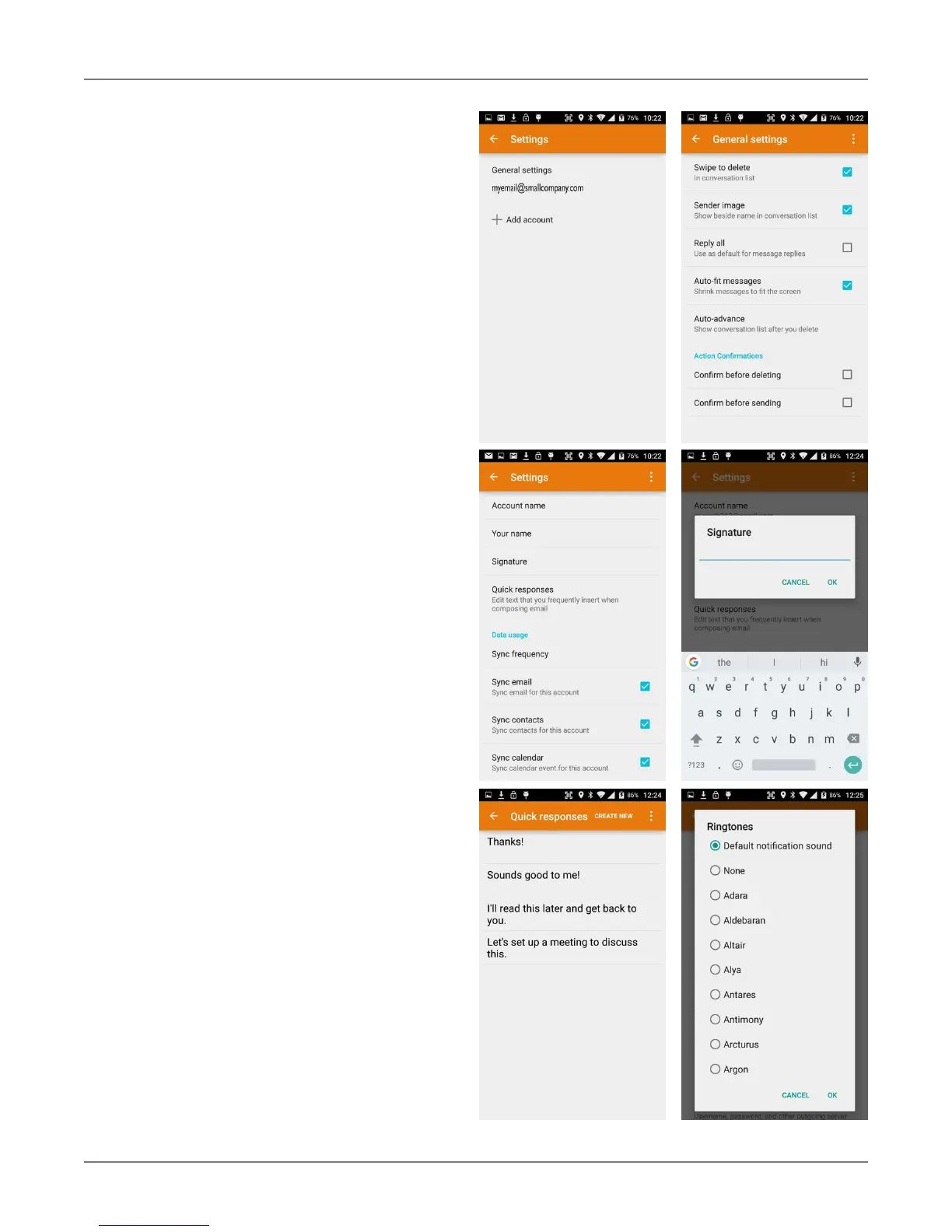
In email, General settings apply to all of your
email accounts. Most of these settings are self-
explanatory: Swipe to delete a message, show-
i
ng sender avatars, setting replying to all as
default (!), auto-fit messages on the display,
confirmations before sending and deleting
messages, etc.
Account-specific Email settings
Some like it dark, some like it light. Here you
can set the background and accent colors for
your email accounts.
Signature
Business email usually benefits from a cus-
tomized signature with name, title, company,
etc. This is where it’s set up.
Quick responses
You can create a number of quick stock re-
sponses for when you don’t have time to com-
pose an email. Once set up, call up the quick
response list, tap on a response, and it’s in-
serted into the email.
Data usage
Email practices can affect data usage. This in-
cludes the frequency of syncing, allowing
downloading of potentially large attachments
over cellular data connections, or waiting until
Wi-Fi is available.
Notification settings
Here you can set whether you want to be noti-
fied if new email arrives. You can choose a spe-
cial ringtone, and whether there should be a
vibrate alert for email.
Server settings
Incoming and outgoing server settings may
change, and this is where it’s done, including
password changes for email.



 To Next Page