XT2 Setup XT2 User Manual
Janam Technologies LLC Version 3, April 2017 XT2 Setup 3—3
Backup, Restore, and Reset
Android backup concept
It is important to understand that Android does not offer full backup (i.e. one large file from which all
s
oftware, settings, and data can be restored). Instead, Android synchronizes (i.e. backups) with
Google’s servers a wide variety of settings and data, including WLAN passwords, bookmarks, contact
and email information, a list of installed applications, words added to dictionaries, app data, and most
of the device settings.
All of this can be restored in case of a failure, or when moving onto a new device. The idea here is to
provide continuity rather than a total 1:1 full backup. This can be done in several ways.
Option A: Automatic via Google Sync
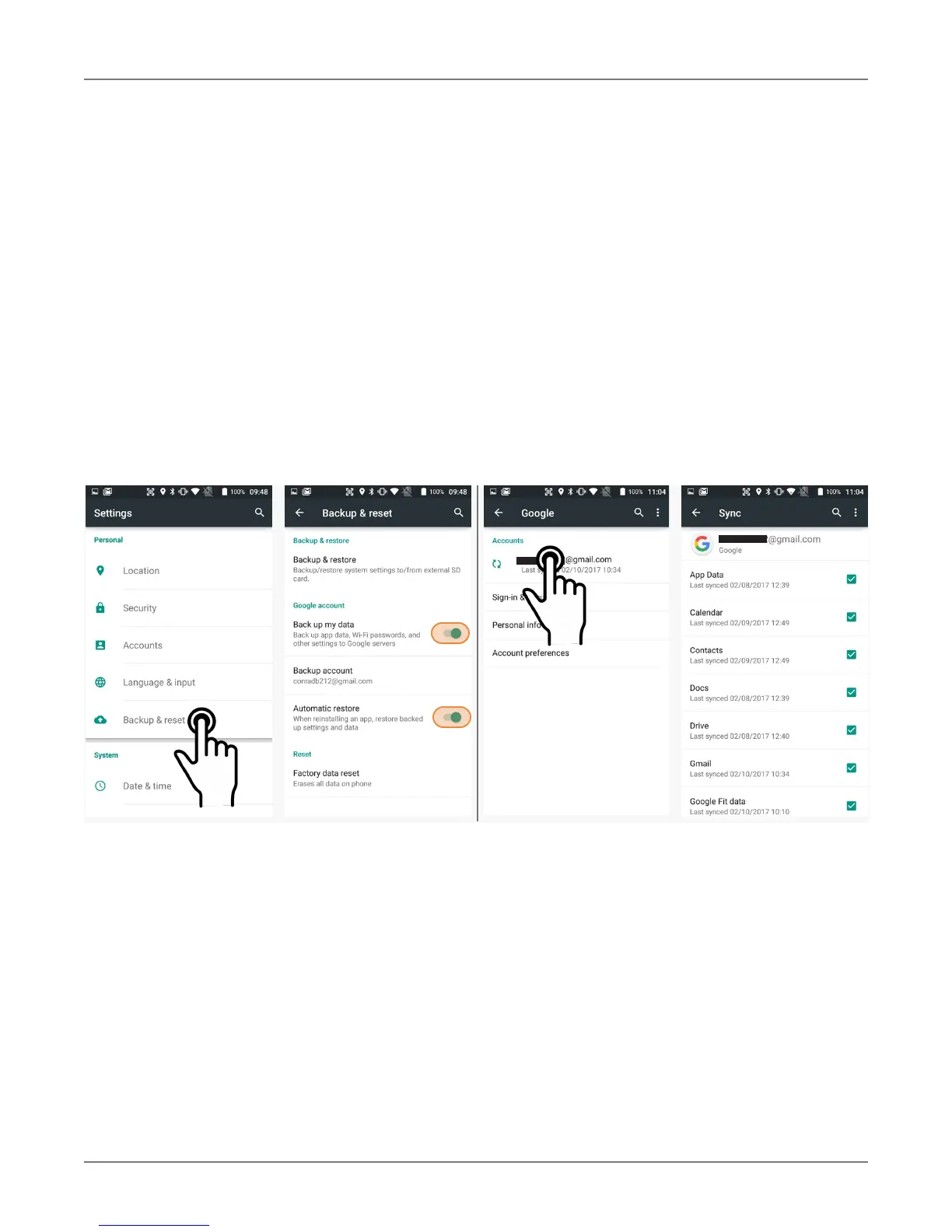
Google can synchronize various settings and data transparently. This is enabled and set up in a two
step process. First, enable the process in
Settings > Backup & Reset > Google account. Then go
to Settings > Accounts > Google > Select Google account > check everything you want to sync.
With the above settings in place, all of the selected data, settings, and configurations will automatically
be backed up to Google. Restoring everything simply means logging into your Google account and
everything will be restored, even if it is a new device.



 To Next Page