XT2 Setup XT2 User Manual
Janam Technologies LLC Version 3, April 2017 XT2 Setup 3—4
Option B: Manual backup onto card
Android also offers a backup to local storage media. In the XT2, that’s the removable microSD card.
T
he card can be used to restore the device to its fully configured state. This process can also serve
as a rapid deployment tool. Only one device is configured in full. The rest are simply cloned from the
master backup card. Having a backup stored on a card also allows quick repair in the event of a
software crash by simply inserting a storage card and running the backup.
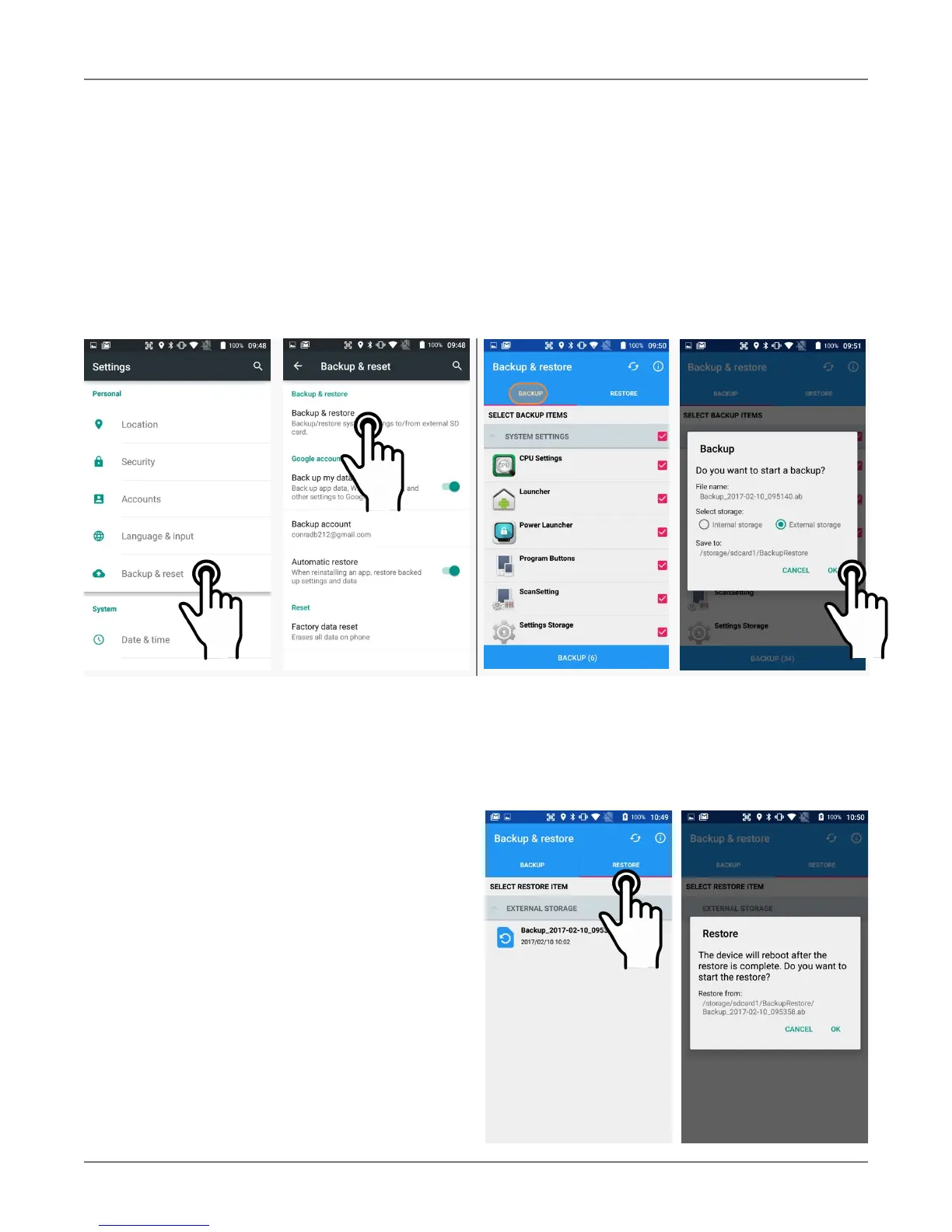
To create a card backup, go to Settings > Backup & Reset, then tap on Backup & restore. Tap
on Backup and select everything you wish to be included in the backup. Then tap Backup at the
bottom of the screen. The backup file should be stored on external storage on a microSD card.
Note that these backup methods do not include photos, videos, and documents. Pictures can be
backed up using the Google Photos app. Settings for that process are in the Photos app. Other
options are third party apps such as Flickr, Dropbox, Photobucket, or Microsoft OneDrive. There are
also comprehensive third party solutions that back up everything, like MyBackup Pro.
Restoring from a backup
To restore from a card backup, go to Settings >
Backup & Reset, then tap on Backup &
restore. If there are multiple backup files, select
the one you wish to restore and tap on it.



 To Next Page