Phone Functionality XT2 User Manual
Janam Technologies LLC Version 3, April 2017 Phone Functionality 10—2
+1 (655) 412-3412
During Call Features
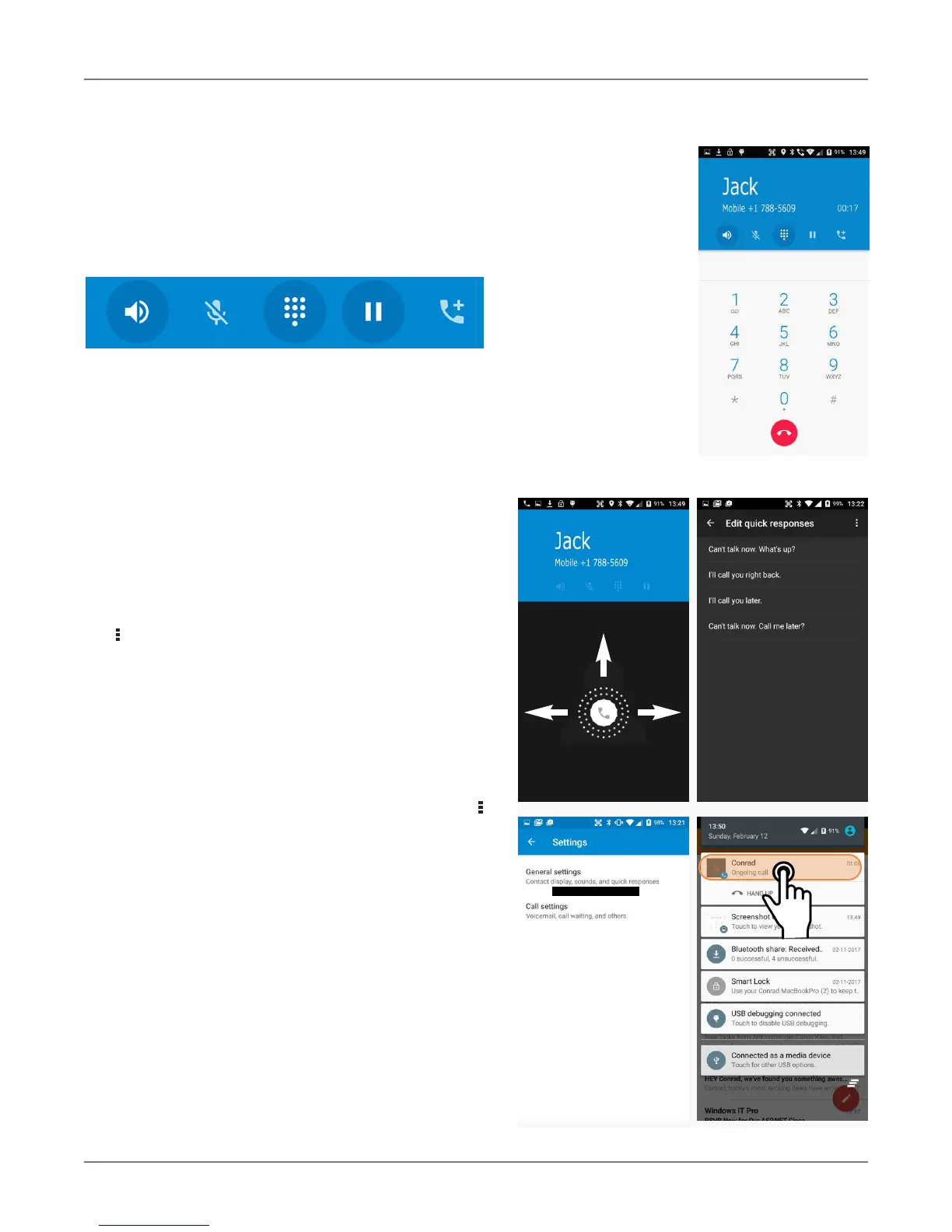
During a phone call, you can tap on a variety of
standard phone features to add a call, mute the
conversation, put the caller on hold, put the caller
o
n speaker phone, and bring up the phone dial.
Grayed out options are not available on the call in
progress.
Answering a Call
When a call comes in, the XT2 brings up the phone
screen, showing either the number or (if known)
the identity of the caller.
You then have the option to answer the call (swipe
right), reject it (swipe left), or respond with a
quick text message (swipe up).
Text messages can be selected from a list of canned
messages, or you can quickly type one.
To edit your quick responses, open the Phone app,
tap the three dot options button in the upper right
corner of the screen, tap Settings, tap General
settings, then tap Quick responses. You’ll see a
list of the canned quick responses. To change these,
simply tap them, then enter a new quick response
when prompted. If you like your new quick re-
sponse, go ahead and tap OK.
Settings
Phone options can be accessed by tapping the
three dot options icon on the upper right hand of
the Phone apps Speed Dial, Recents, or Contacts
main screen. There are General settings (sort order,
sounds, vibrate, quick responses, etc.) and Call set-
tings (voice mail, call forwarding, auto answer,
etc.).
Using Apps During a Call
Depending on your carrier, during a call you may be
able to launch another app to look up information
while the call is going on, and then return to the
phone call.
To do this, simply launch the desired application. To
return to it, swipe down from the top of the display
to reveal the action center. The call is listed there.
Tap on it to return to the call.
reject answer
quick text



 To Next Page