XT2 Setup XT2 User Manual
Janam Technologies LLC Version 3, April 2017 XT2 Setup 3—5
Resetting the XT2 to factory condition
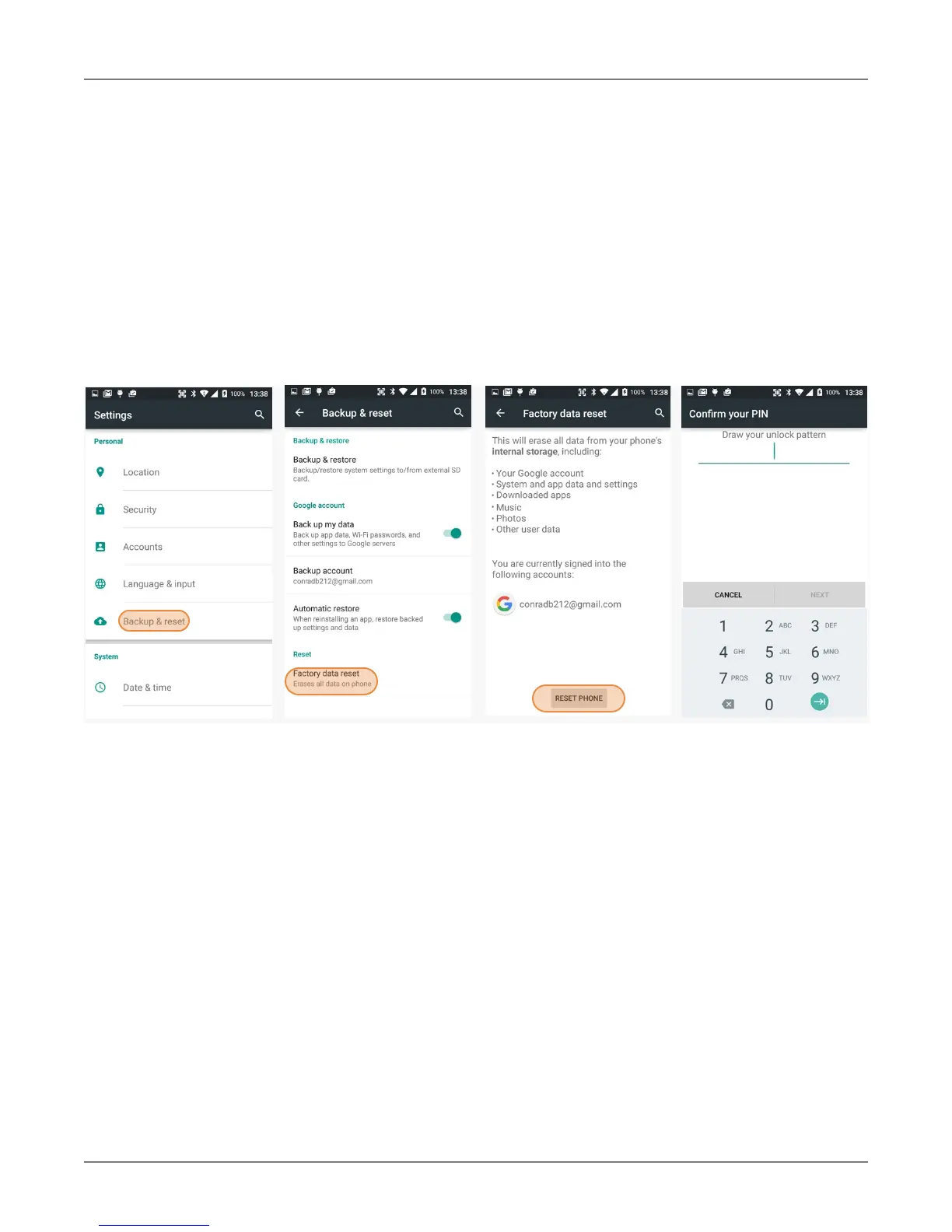
Resetting the XT2 erases all personal data from internal device storage. This includes Google Account
i
nformation, information about any other accounts, system and application settings and
configurations, and any downloaded applications. In essence, the device is returned to factory
condition.
To perform a full reset, go to Settings > Backup & Reset, then tap on Factory data reset at the
bottom of the screen. This brings up a warning screen. If you wish to proceed, tap on RESET PHONE.
Depending on your access security options, you will be asked to supply your PIN, password, or
pattern. Once everything has been erased, you can turn off the device, or opt to reboot and set it
up from scratch or from a backup.
If you are unable to power on your device, you can perform a factory data reset by pressing the Power
key and the Volume up key at the same time until the screen lights up.



 To Next Page