5-9
5.11 [SHIFT][9]:
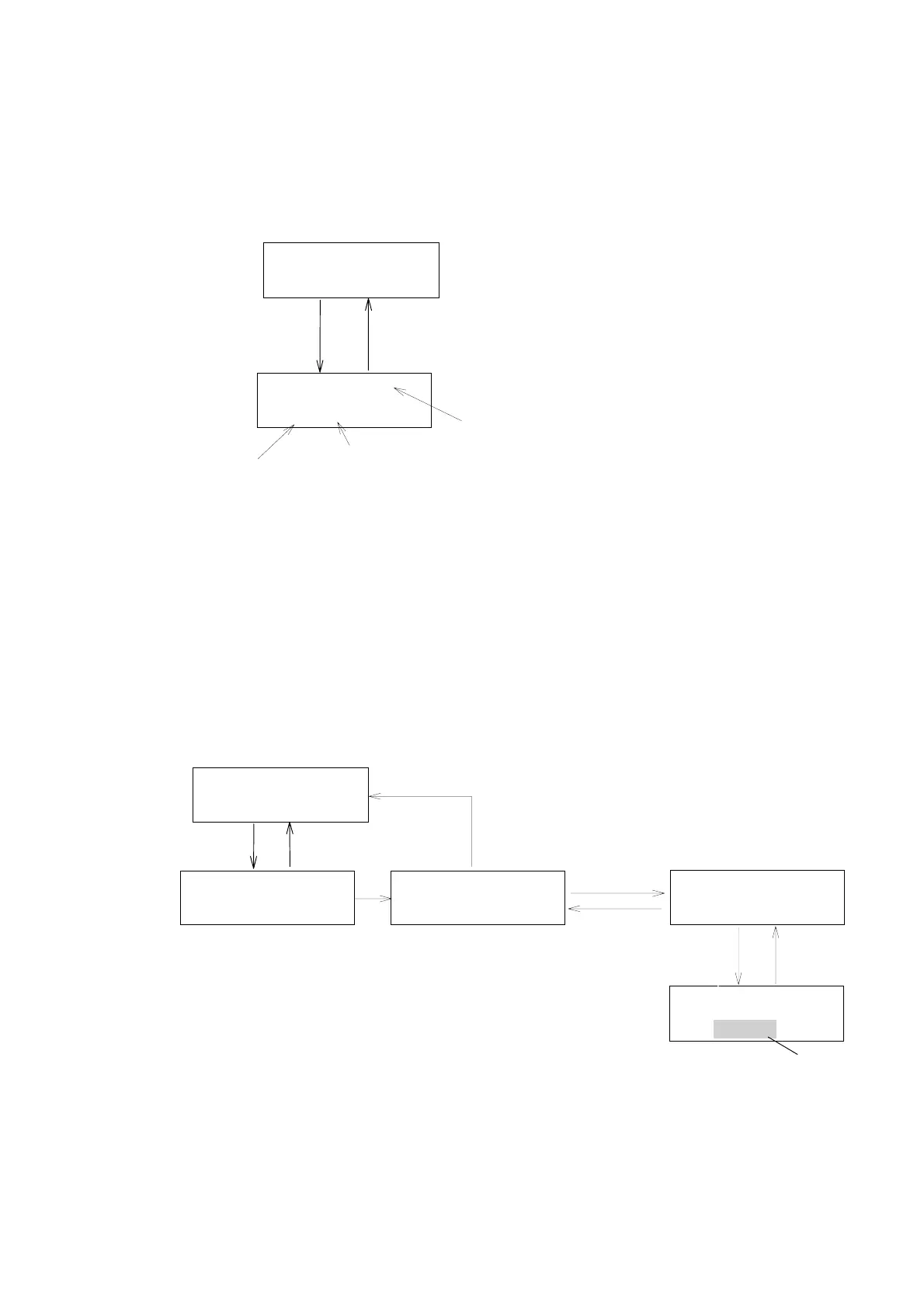
Pressing [SHIFT] [9] keys will bring up the “g factor monitoring screen”.
Calculated g factor is displayed on this screen in real time. CD signal and
absorbance are also displayed on this screen.
[SHIFT] [9]
Monitorscreen
NORM291X10
0.0000.000STD
[MONITOR]
GFACT=X.XXXXXX
Y.YYYZ.ZZZ
gfactormonitorscreen
CDsignal
Absorbance
gfactorisdisplayedathere.
(RefertoSection「5.6」)
Figure 5.13 Monitoring g FACTOR
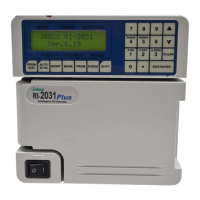
5.12 [SHIFT] [MARK][5]: Setting Flowcell Path-length
The CD values described in the material is usually the one measureing with
using the cell of 10 mm path length. By setting ”25 mm “ path length with
using standard flowcell (25mm cell path length ), the output value is corrected
to that with 10-mm cell; that means the CD signal has been corrected to 1/2.5
and outputted as a CD output signal. In case that path length is set to “10
mm”, CD signal with no correction is outputted.
Blinkig
[SHIFT] [MARK]
Monitorscreen
[EDIT/ENTER]
NORM291X10
0.0000.000STD
[MONITOR]
PARAMETERMODE
5:CELLPATH
CELLPATH
10mm
[yy][EDIT/ENTER]
Cellpathlengthsettingscreen
CELLPATH
10mm
PARAMETERMODE
1:SETW.LCONST
[5]
[EDIT/ENTER]
[MONITOR]
[MONITOR]
or [ ] 4 times
▼
Figure 5.14 Setting FLowcell Path-length
Artisan Technology Group - Quality Instrumentation ... Guaranteed | (888) 88-SOURCE | www.artisantg.com


 To Next Page