6-4
6.4.2
Editing the time program
6.4.2.1
Time program input
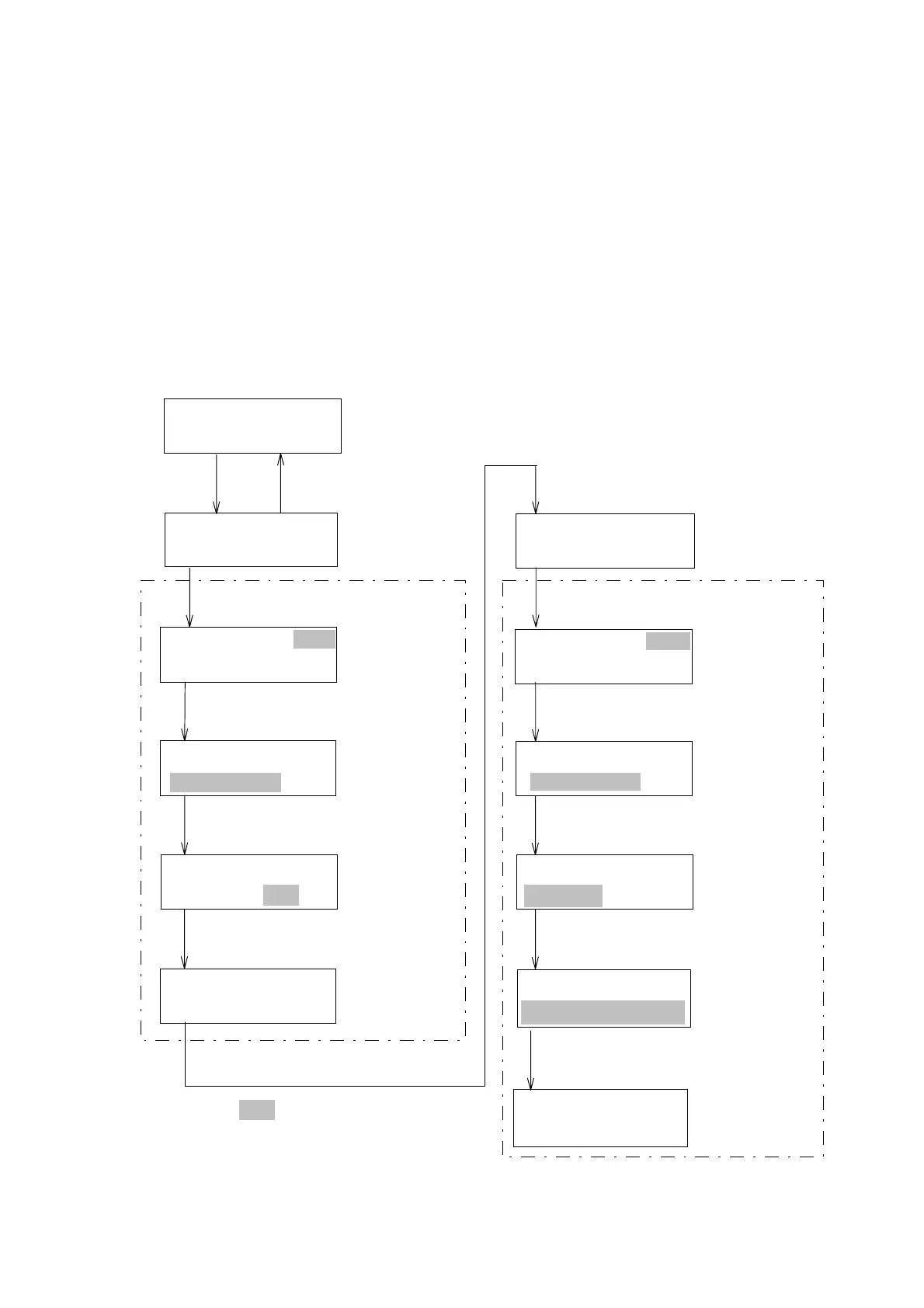
(1) Time program input example:
As an example, the following time program will be created. First, wavelength
will be changed to 250 nm one minute after starting the program under the
initial parameters. Next, spectrum measurement will be performed at two
minutes after starting the program.
Press the [▼] key while the initial parameters screen is displayed (Fig. 6.4).
The Step 1 screen will appear. Use the procedure described in Fig. 6.5 to
complete the time program.
PRG5ST2T:0.0
PRG5ST2T:2.0
1:WAVELENGTH
PRG5ST1T:1.0
W.L250nm
PRG5ST1T:1.0
1:WAVELENGTH
PRG5ST1T:0.0
[ ]
▼
[ ]
▲
PRG5ST1T:0.0
[EDIT/ENTER]
[1][EDIT/ENTER]
[EDIT/ENTER]
Input"1minutes"
Input"270nm"
Conpletionof
step1
PRG5ST2T:0.0
[EDIT/ENTER]
[2][EDIT/ENTER]
or [4][EDIT/ENTER]
Step1screen
Step2screen
[ ]
▼
(Initialparametersdisplayscreen)
Wavelength
inputscreen
Step0
PRG5INITIAL
W.L:270RSPN:STD
[2][7][0][EDIT/ENTER]
PRG5ST1T:1.0
W.L270nm
PRG5ST2T:2.0
BASELINE
[EDIT/ENTER]
SelectmemoryNO.3
PRG5ST2T:2.0
MEMORYNO.3
Input"2minutes"
[ ]
▼
[ ]
▼
[ ]
▼
:Valuesblinking
PRG5ST2T:2.0
MEMORYNO.3
[ ]
▲
[ ]
▲
[ ]
▲
Completionof
step2
Figure 6.5 Instructions for Creating the Example Time Program
Artisan Technology Group - Quality Instrumentation ... Guaranteed | (888) 88-SOURCE | www.artisantg.com


 To Next Page