7-2
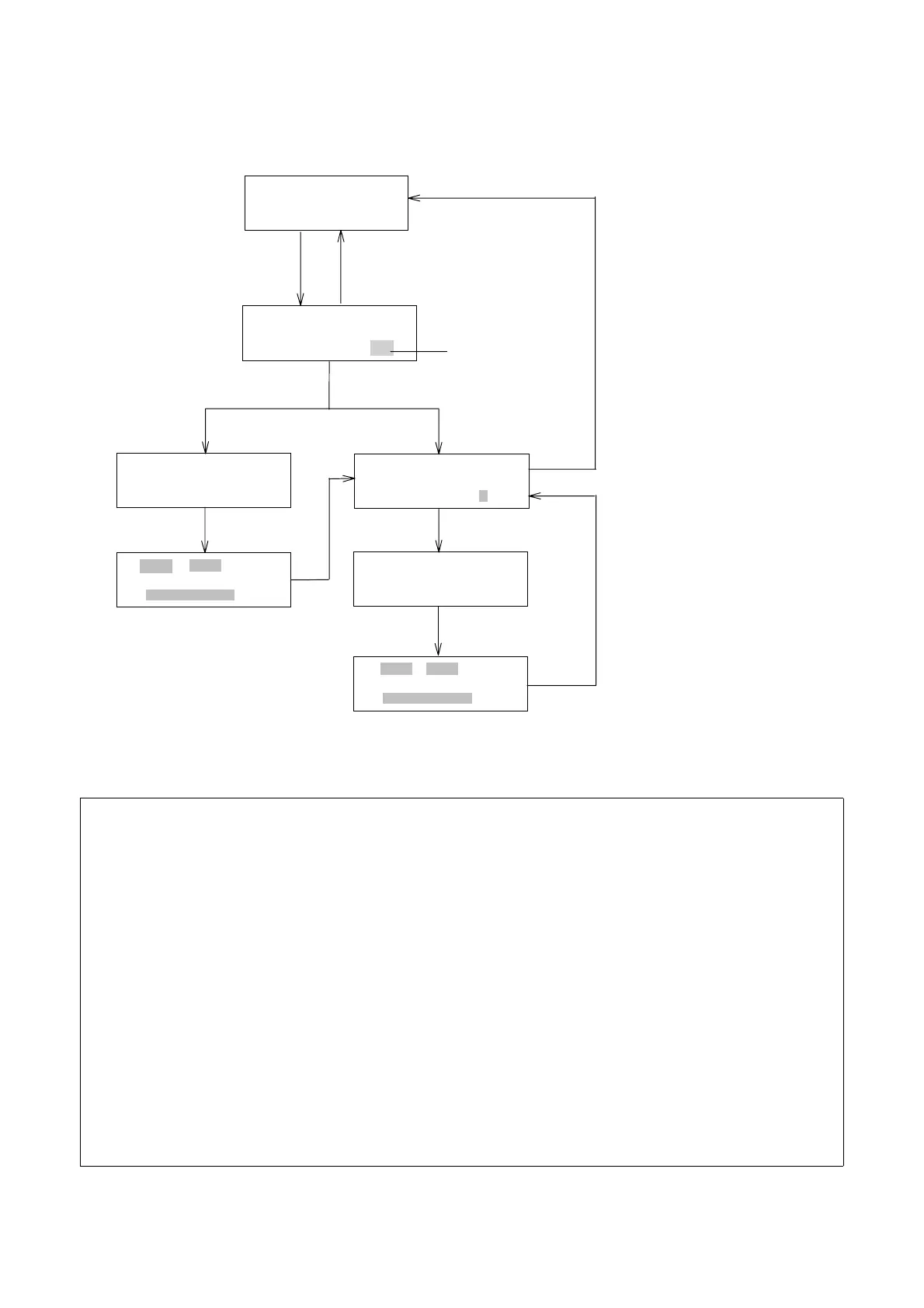
4) Enter "n" and press [EDIT/ENTER] after step 3) to set memory no “n”. Refer to
Section 7.3.
5) Press [MONIT] to return to NORMAL OPERATION or TIME PROGRAM mode.
SPECTRUMMEASURE
SETMEMORYNOn
SPECTRUMMEASURE
BASE=0MEAS=10
[MONIT]
[SCAN]
Normaloperationmode
monitorscreen
Blinking
BASELINEMEASURE
PUSHPROGRUN
[0] [EDIT/ENTER]
[1] [EDIT/ENTER]
Spectrummodeinitialscreen
SPECTRUMMEASURE
PUSHPROGRUN
[n][EDIT/ENTER]
MEASXXXMEMn
YY.YYZ.ZZZ
MEASXXXBASE
YY.YYZ.ZZZ
[PRGM RUN]
[PRGM RUN]
Measureingbaselinespectrum
[MONIT]
Measureingsamplespectrum
Figure 7.1 Key Operations and Corresponding Displays in SPECTRUM mode
(NOTE 1)
Pressing [MONIT] while in any one of the SPECTRUM mode displays will restore either
the NORMAL OPERATION or TIME PROGRAM MONITOR display.
(NOTE 2)
Output of spectra obtained in a time program is carried out in SPECTRUM mode. In
addition, the baseline spectrum is measured in the SPECTRUM mode even if
spectrum measurement of a sample is carried out in a time program.
(NOTE 3)
Stored spectra will NOT be output unless a baseline spectrum has been acquired and
stored into memory #10.
(NOTE 4)
When the power is turned off, the baseline spectrum (stored in memory #10) and all the
measured spectra (stored in memories #0-9) will not be back upped.
Artisan Technology Group - Quality Instrumentation ... Guaranteed | (888) 88-SOURCE | www.artisantg.com


 To Next Page