QUATTROjskjsdfdsfdzxczxczxczxczxc
QUATTRO
Rev. A 2012-09-10Service manual
21
2
Toresettheoverllprotectiondothefollowing:
Switch off the power to the machine. (Use the
switch on the back).
Turn off the mains water supply.
Open the machine’s drainage plug for the
overllprotection(2,gure19).Letthewater
run out.
Replace the drainage plug.
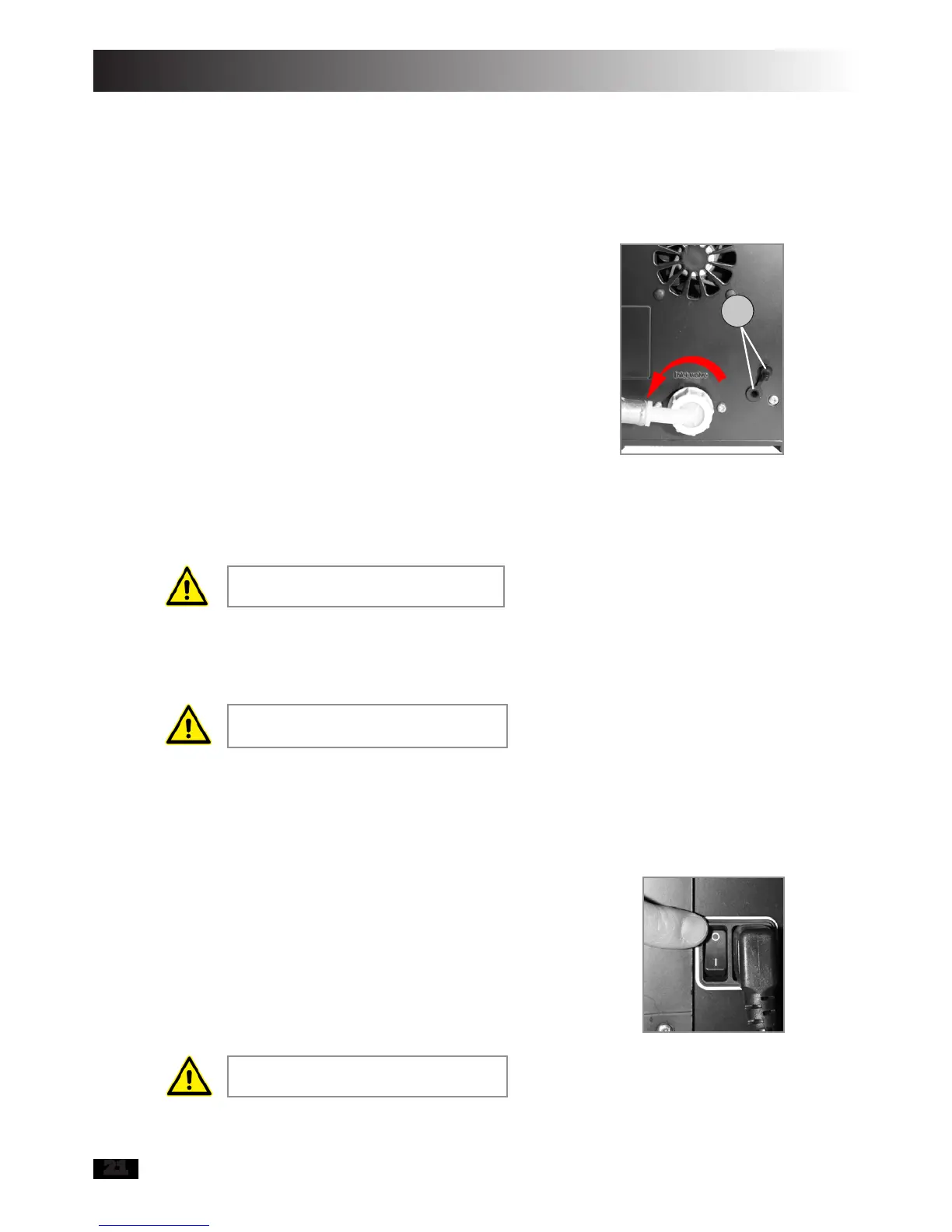
Remove the hose from the inlet valve until the
pressure in the hose is gone, 1 to 2 turns
counterclockwiseisnormallysufcient
(gure25).
Attach the hose to the inlet valve.
Turn on the water to the machine.
Switch on the power.
1.
2.
3.
4.
5.
6.
7.
8.
Figure 25
7.4 Resetting overheating protection
To reset the overheating protections do the
following:
Switchoffthepowertothemachine(gure26).
Allow the water in the heater tank to cool down
for at least 30 minutes.
Switch on the power.
1.
2.
3.
This applies to all machines regard-
less of the type of water supply.
The machine is equipped with overheating protection,
which breaks the current to the heater tank’s element
if the temperature in the tank becomes too high. The
normal working temperature is 81 degrees Celsius.
If the above measures do not help,
then see chapter 7.10 and 7.12.
If the above measures do not help,
then see chapter 7.11.
Figure 26


 To Next Page