56
6. Maintenance
6.5.5. Maintenance of the counter-knife
The counter-knife has two cutting edges. When the cutting edge is blunt, the counter-
knife can be dismounted. After cleaning the guideway the second cutting edge can be
used. After the second cutting edge is blunt the counter-knife needs to be replaced.
6.5.6. Maintenance of the knives (knife disk)
1. Lock the knife disk against moving when mounting the knives.
2. Mount the knife. Attend the required tightening torque.
3. Unlock the knife disk and move the knives past the counter-knife by rotating the
knife disk. Attend that the distance between the knife blade and the counter
knife is approx. 0,5 mm on the inside (towards the main shaft). Towards the
outside the distance increases slightly.
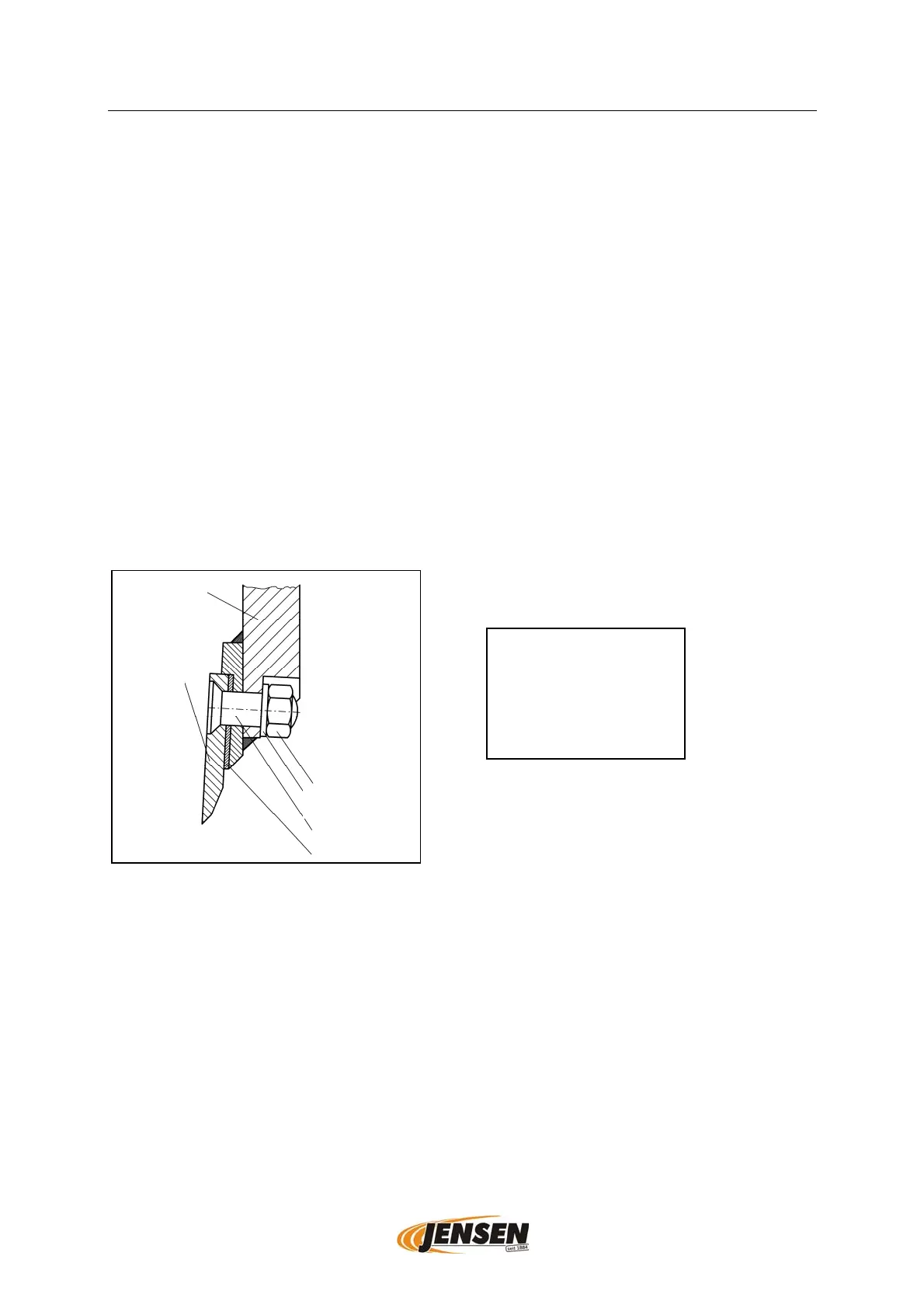
4. When using re-sharpened knives the distance between the knives and the
counter-knife must be corrected by using the original knife spacers (see picture
below).
5. Check that the knives do not hit the counter-knife.
6. Control and re-tighten the knife bolts after one operating hour after
replacement/sharpening of the knives.
tightening torque:
¾“ 410 Nm
M16 310 Nm
knife-disk
knife
nut
Locking washer
Knife bolt
knife spacer


 To Next Page