25
VX6020
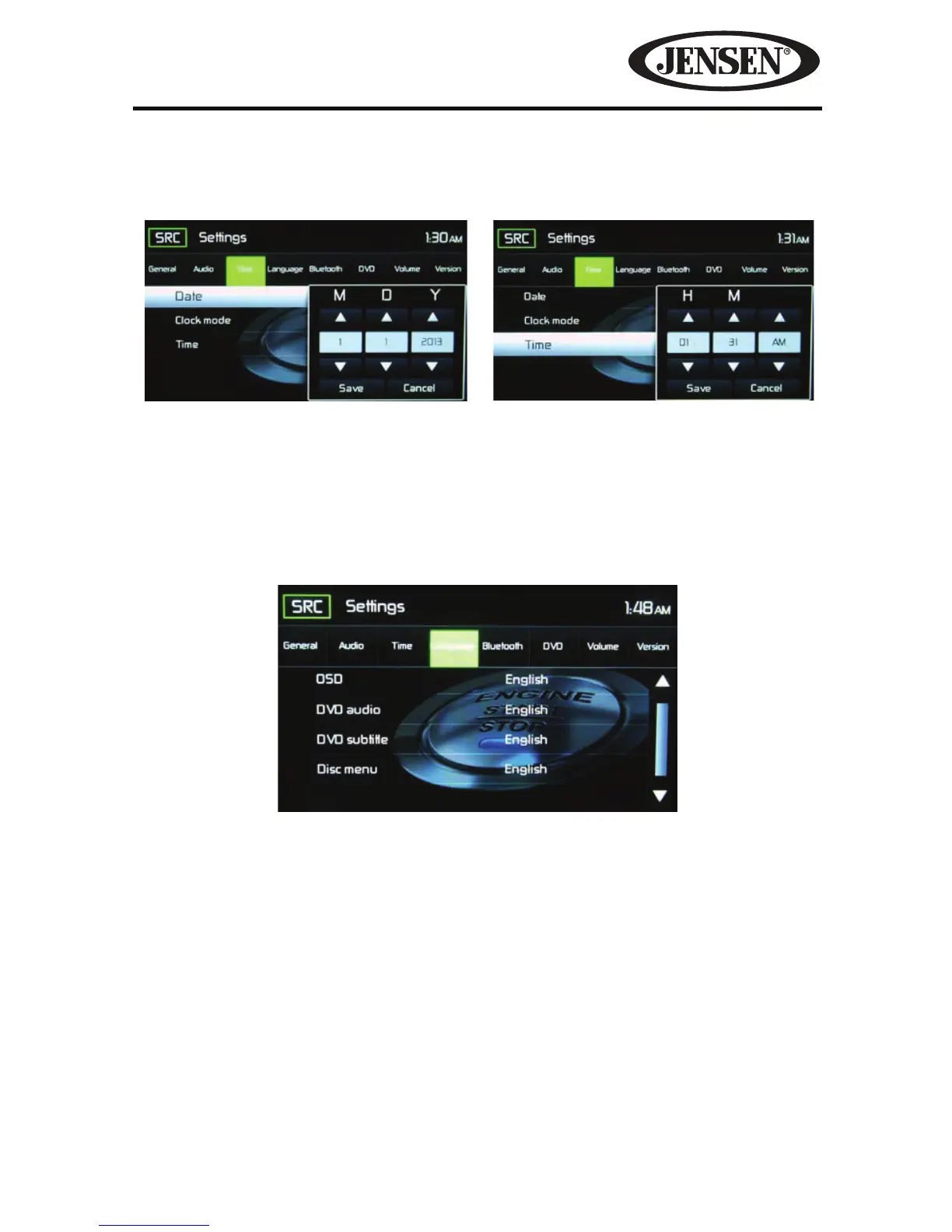
Time- Touch the Time icon and use the S or T icons to set the hour, minute, and
either AM or PM (see Figure 14). After setting the time, touch Save. The time will
appear to the right of the Date option.
Language Sub-menu Features
If a DVD supports more than one Subtitle or Audio language, all the languages are
available for selection during playback. If the selected language is not supported by
the DVD, then the default language is used.
On Screen Display (OSD)-Touch English, Spanish, or French to select the language
for the OSD Display.
DVD Audio-If available, this feature allows the user to select one of the languages
contained on the disc for the DVD audio.
DVD Subtitle-If available, this feature allows the user to select one of the languages
contained on the disc for the DVD subtitles.
Disc Menu-Allows the user to select one of the languages contained on the disc
menu.
Figure 15. Language Sub-Menu Screen
Figure 14. Date and Time Setting Screens
Date Settings Time Settings



 To Next Page