Chapter 4. Parts and Controls
14 Kaye LTR -90 Operating Manual
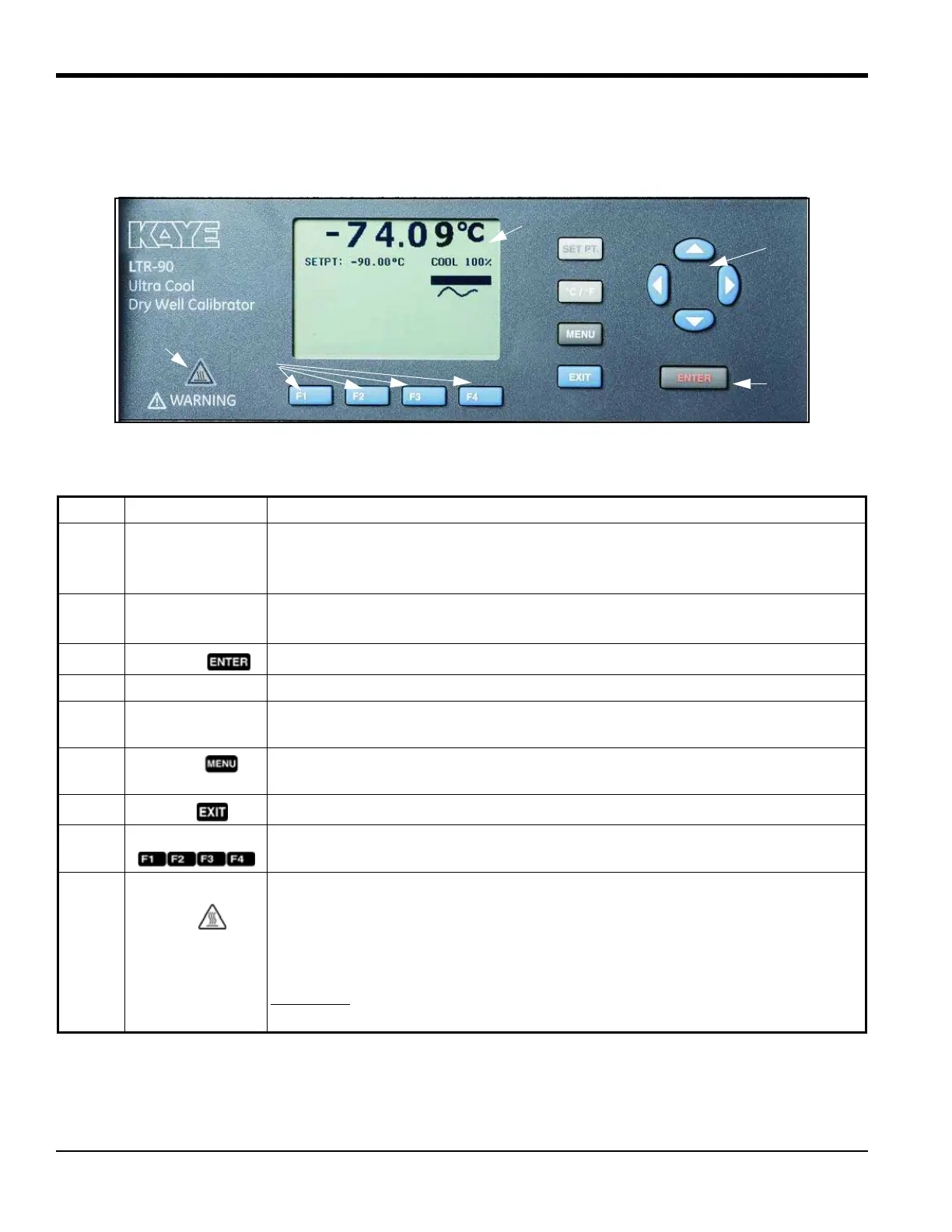
4.1.1 Display and Control Panel
Table 5 shows and describes the function of each button on the Control Panel.
Figure 3: Display and Control Panel
Table 5: Display and Control Panel
Item Name Function
1 Display Shows block temperature, measurements, status information, operating parameters,
and softkey functions. The contrast of the display is adjustable. To adjust the contrast,
push
to increase contrast or to decrease contrast while the Main screen is shown.
2Arrow Keys
Navigates through menu selections, increases or decreases numbers, and scrolls menus
up or down.
3
Enter Key
Selects menus and sets new values.
4 SET Point Key Set a SETPOINT temperature to heat or cool to.
5 °C/°F Key Switches the displayed temperature units between °C and °F. Key is enabled only when
the Main screen is shown.
6 Menu Key Opens the Main menu. See “Menus and Menu Navigation” on page 25 for information
on each menu and the settings found in the menus.
7
Exit Key
Cancels all changes and navigates back to the previous menu.
8 Softkeys Navigates the menus on the display. The functions of the softkeys are shown on the
display above the buttons.
9 Block Temperature
Indicator
Visual safety indicator that illuminates when the block temperature is unsafe and
extinguishes when the block temperature is safe. If the block temperature is unsafe and
the Calibrator is turned off or the mains power cord is disconnected, the indicator
flashes until the block temperature cools to a safe temperature. Do not transport or
remove Inserts until the indicator is off.
WARNING!
For safe operation and maintenance of the product, do not remove
Inserts when the Block Temperature indicator is illuminated.



 To Next Page