Chapter 6. Calibrator Operation
36 Kaye LTR -90 Operating Manual
6.1.8b Communications Setup
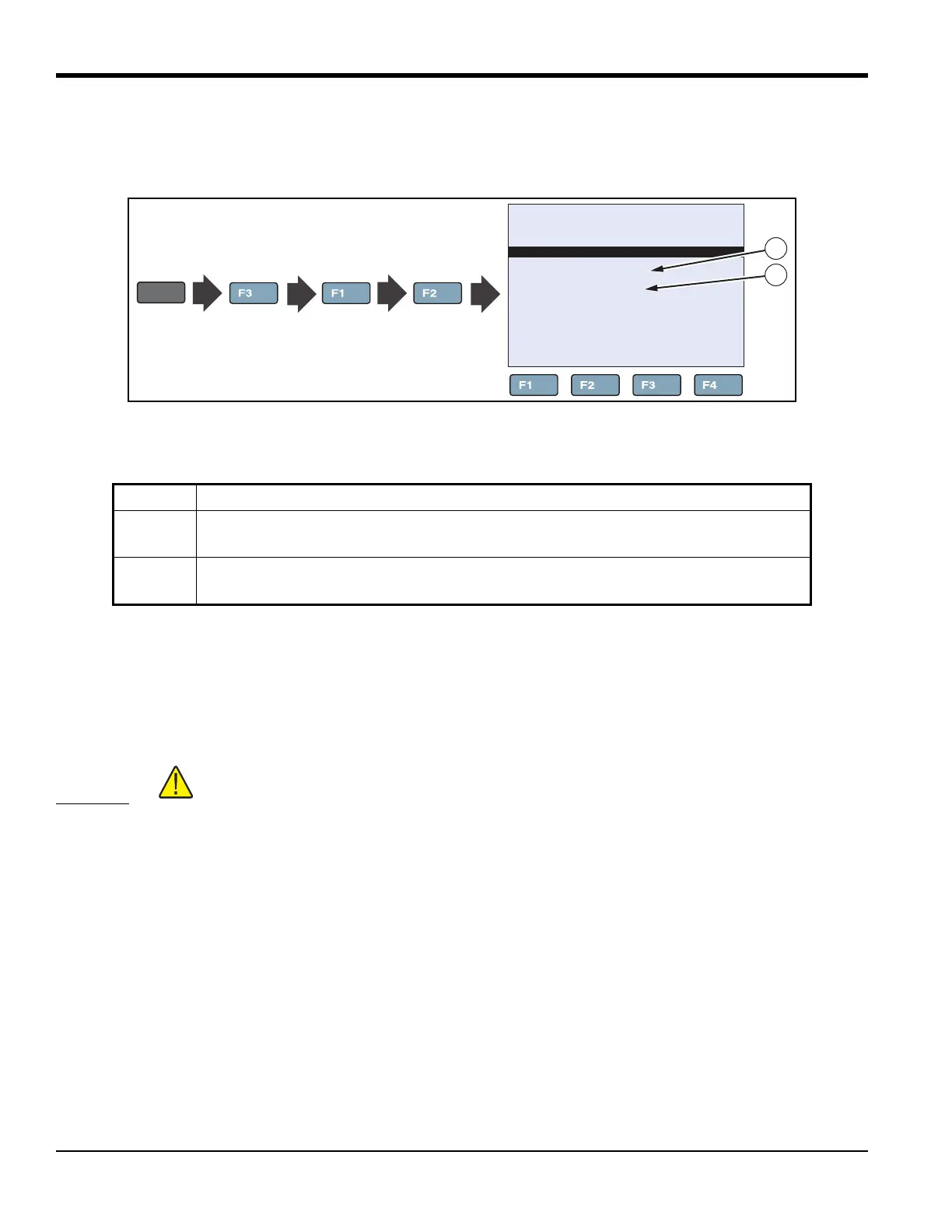
Table 15 shows and describes the menu selections on the Communication Setup menu.
Figure 22: Communication Setup Key Sequence
6.1.9 Calibration Setup Menu
The Calibration Setup menu supplies access to all calibration parameters for the Calibrator. Calibration parameters are
set at the factory when the instrument is calibrated. Access to these parameters is protected by a password to prevent
unauthorized changes that could make the Calibrator inoperable. Calibration is required yearly, so these parameters
require periodic adjustments by trained, knowledgeable personnel to maintain the accuracy of the instrument.
CAUTION!
Do not change the values of the control parameters from the factory set values.
Calibration parameters must be correct for the instrument to function properly.
Table 15: Communication Setup Menu
Item Function
1
BAUD RATE is the serial communication transmission rate or baud rate. BAUD can be set
to 1200, 2400, 4800, 9600, 19200, or 38400 baud.
2
LINEFEED turns on or turns off transmission of a line feed character (LF, ASCII 10) after
transmission of a carriage-return.
66.03°C
COMMUNICATION SETUP
BAUD RATE: 9600
LINEFEED: ON
COMM
SETUP
SYSTEM
MENU
SYSTEM
SETUP
MENU
1
2



 To Next Page