EasyManua.ls Logo

Kenwood K-521 - Adjusting the External Component Input Level

Kenwood K-521
76 pages
Print Icon
To Next Page IconTo Next Page
To Previous Page IconTo Previous Page
Loading...
43
External Components
English
Related
Information
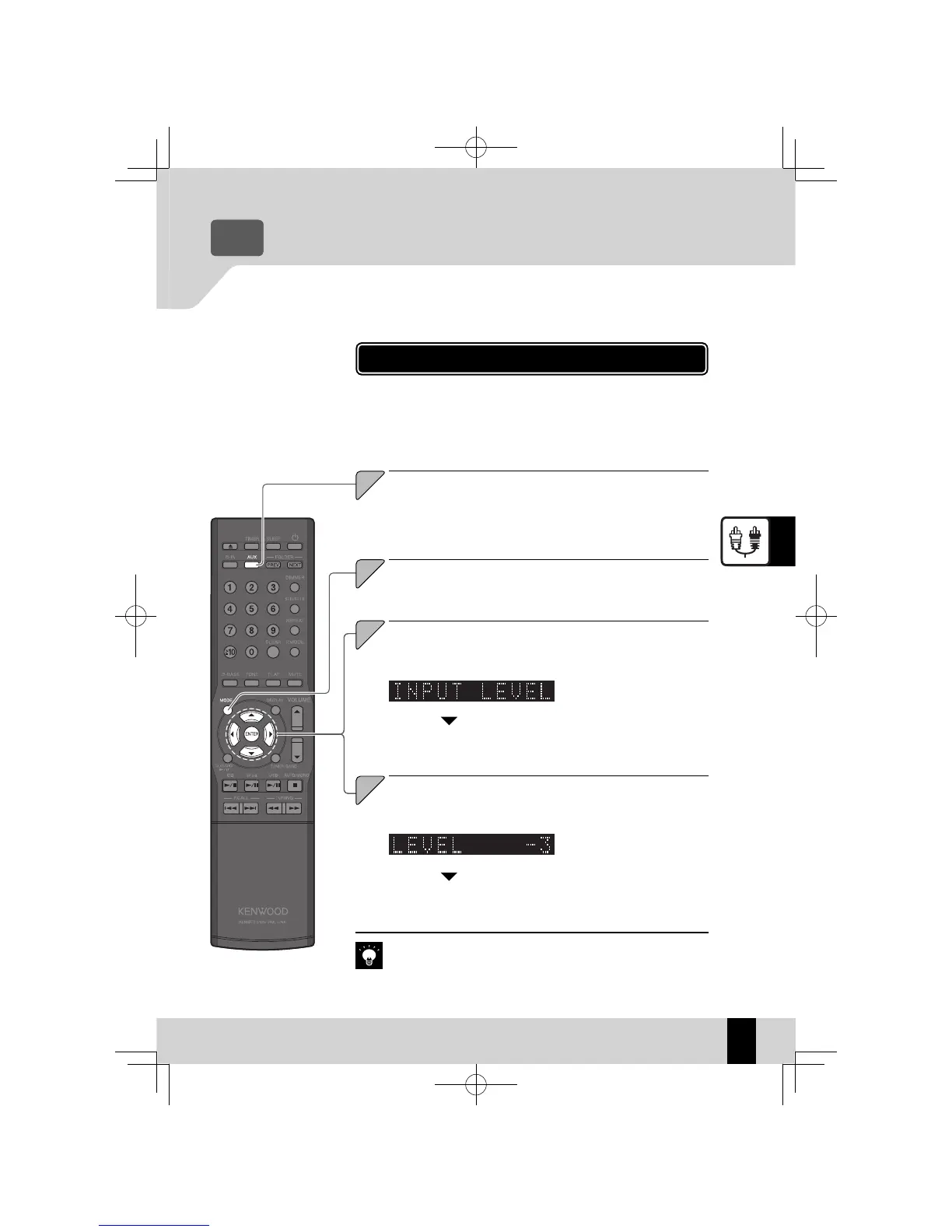
Adjusting the External Component Input Level
Use the procedure below to adjust the input level for the external
component connected to the [AUX IN] terminal.
Use this adjustment when the volume from an external component is
noticeably higher or lower than other input sources at the same vol-
ume setting.
Press the [AUX] key.
1
1
Select "INPUT LE VEL".
Press the [
C
] or [
D
] key.
3
3
Adjust the Input Lev el.
Press the [
A
] or [
B
] key.
4
4
You can adjust the input
z
level in a range from -3 to 5.
Press the [ENTER] key.
Connecting Other Accessories (Commercially Available Units)
z
R
P.13
Audio Settings
z
R
P.47 onwards
If you adjust the input level for AUX, the output level from the
z
[AUX REC
OUT] terminal will also change.
Press the [MODE] key.
2
2
Press the [ENTER] key.
Related
Information
K-521EB60-5813-0801GVT0294-002A.indb43K-521EB60-5813-0801GVT0294-002A.indb43 09.10.264:31:58PM09.10.264:31:58PM

Table of Contents