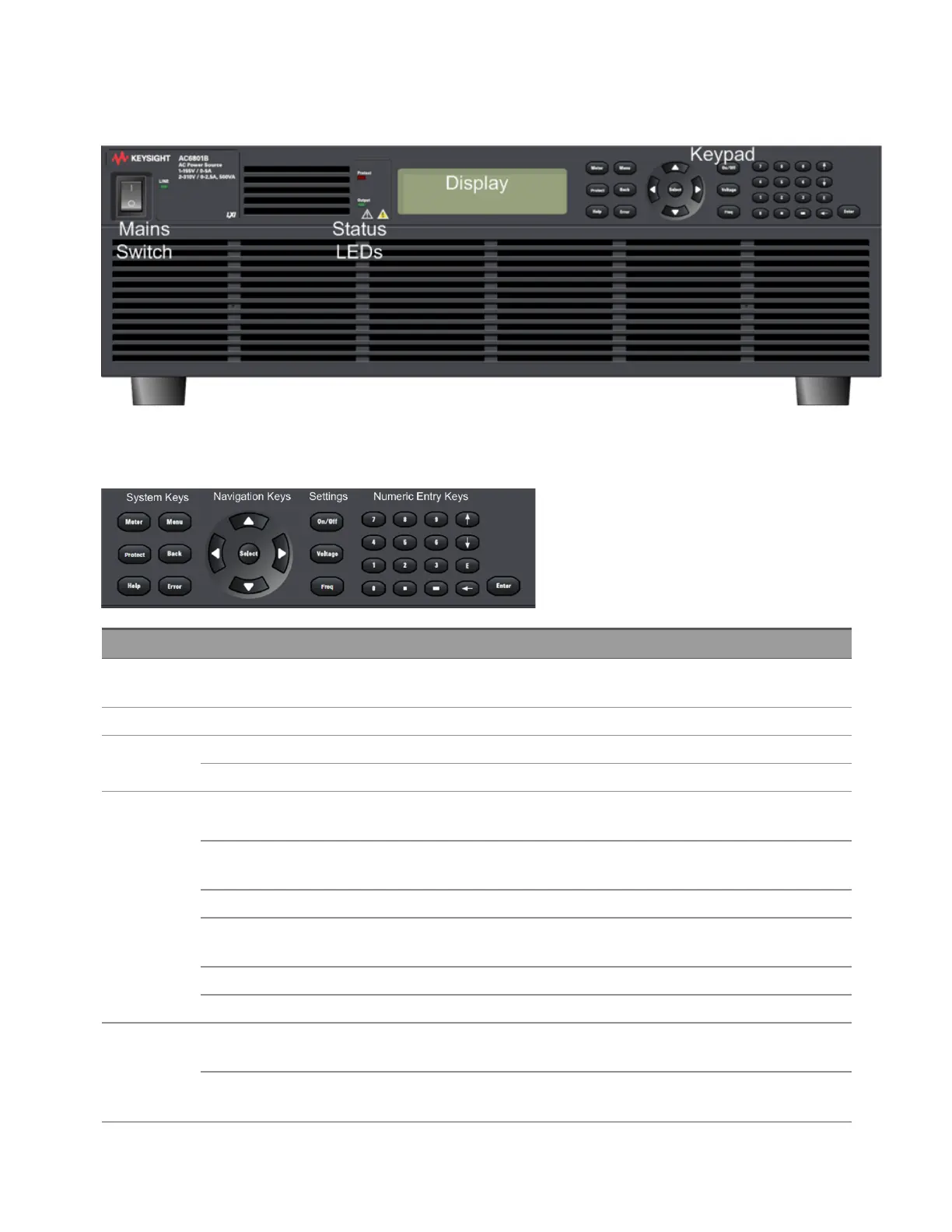
General Front-Panel Organization
Keypad Layout
Item Description
Mains Switch Rocker switch for turning the instrument on(1) and off(0). The LINE indicator turns green when
power is on.
Display 64 × 256 monochrome dot matrix display
Status LEDs PROTECT Lights in red when a protection feature has been activated
OUTPUT Lights in green when output is ON
System Keys [Meter] Selects Metering Mode displays and cycles through three display formats (METER_VI, METER_
VIP, and METER_ALL).
[Menu] Toggles between the top Menu level and the Metering Mode display (METER_VI, METER_VIP, or
METER_ALL).
[Protect] Opens the Protect menu (equivalent to [Menu]>Protect).
[Back] Backs out of current menu, eventually returning to the Metering Mode display. Not a backspace
for numeric entries.
[Help] Displays context-sensitive help messages.
[Error] Displays messages in ERROR queue.
Navigation Keys [p] [q] [t]
[u]
Navigate within menus, display fields, or data entry fields.
[Select] Selects a menu item to go down in a menu tree. Also confirms a user entered value, such as a
GPIB address.
2User Information
68 Keysight AC6800B Series Operating and Service Guide



 To Next Page