Configuring Instrument Preferences
Press [Menu]>System >Preferences to configure the display and to lock and unlock the instrument.
Configure the Screen Saver
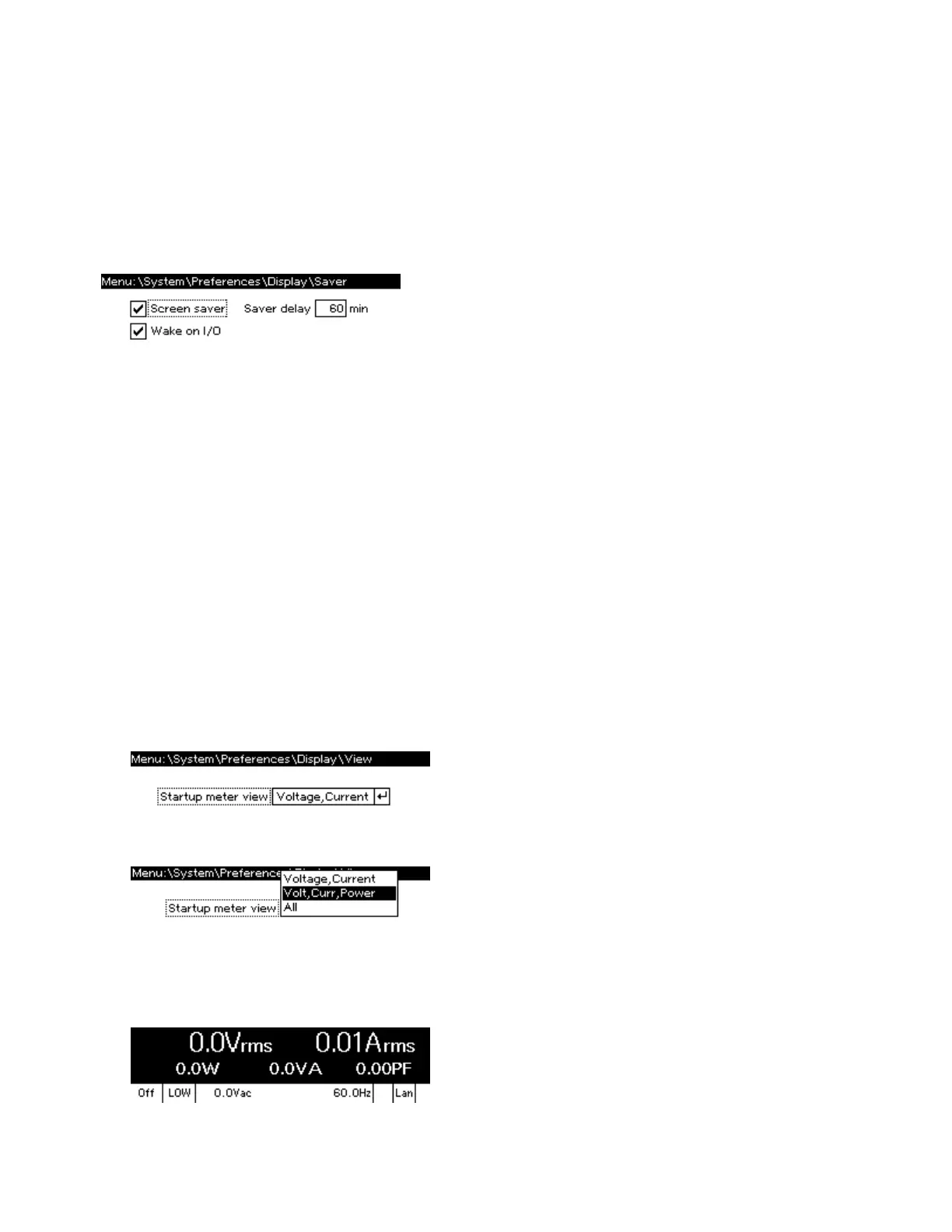
Press [Menu] >System>Preferences>Display>Saver to configure the screen saver.
Screen saver – enables the screen saver function.
Saver delay – specifies the time in minutes between the last time any communication occurs with the
instrument or a key is pressed until the screen saver goes into effect.
Wake on I/O – restores the display whenever any I/O interface activity occurs.
SCPI:
SYSTem:SSAVer[:STATe]
SYSTem:SSAVer:DELay
SYSTem:SSAVer:RWAKeup
Specify the Startup Meter View
1. Press [Menu] >System>Preferences>Display>View to select the instrument's initial meter
view.
2. Press [Select] and use the up and down arrows to highlight your selection.
3. Press [Select] to confirm your selection and then press [Meter] to exit. This setting does not change
the current meter view; it only changes upon cycling power. For example, the image below shows the
starting meter view with Volt, Curr, Power selected.
2User Information
84 Keysight AC6800B Series Operating and Service Guide



 To Next Page