KICstart Version 1.1.0.x
KICstart User Manual 17
Starting the Profile
KICstart is on and beeping and Ready to Profile – 2 long and 2 short audible beeps
♦ KICstart is on and beeping. KICstart is plugged into download cable and download cable is plugged
into the computer.
♦ KICstart battery and internal temp are at the proper levels to profile.
♦ All thermocouples attached to the KICstart are below the defined product start temperature.
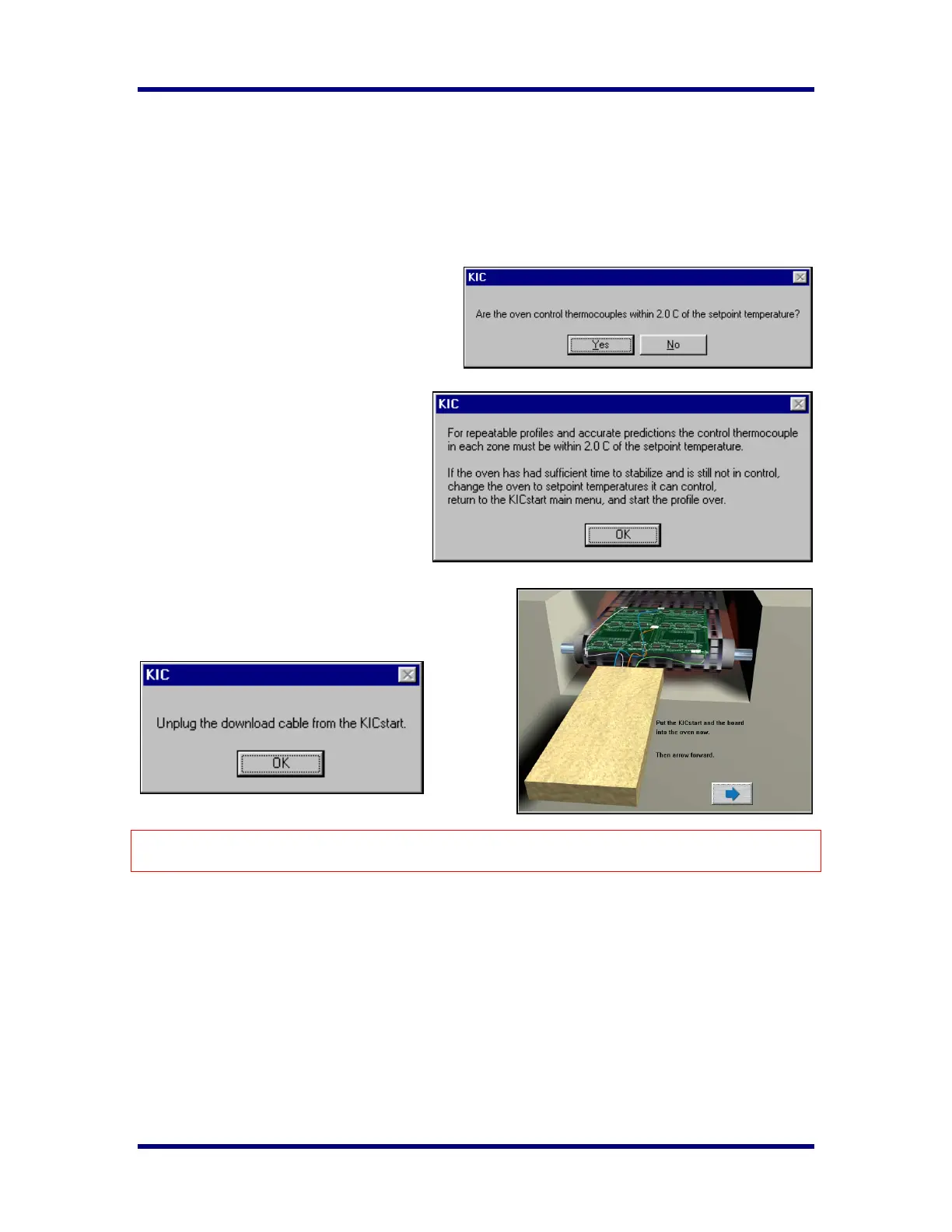
After you click on the Profile Start button the
software will ask if all the oven control
thermocouples are within 2 degrees of the
setpoint value.
¾ If you choose Yes, you will proceed to the
next screen.
¾ If your answer NO, it will ask you to
let the oven stabilize. If the oven has
stabilized and it still is not within 2
degrees of the set value, your oven is
not able to control to those setpoints.
Set the control temperatures it can
control, return to the Main Screen and
start the profile over.
¾ If your answer is YES it will prompt you to
disconnect the KICstart cable and then place the
KICstart and board into the oven.
The maximum operating temperature for the KICstart profiler is 105°C/220°F. If your process
temperatures will cause the KICstart to exceed this limit then DO NOT place the KICstart into the oven.
Trailing Wire Profiling
The KICstart profiler can be used with elongated thermocouples or a thermocouple extension long enough
to pass through the process. This is especially useful for low clearance processes or higher temperature
processes that would normally cause the KICstart profiler to overheat during use.
If you plan to keep the KICstart profiler connected during the profile, ignore the message to unplug the
download cable from the KICstart. At the end of the profile, be sure and leave the product TCs connected
long enough to achieve the profile-stop trigger value, 110°C, otherwise the profile will not complete.
Leave the product TCs connected until the download has completed and the KICstart asks you to turn off
the KICstart profiler.



 To Next Page