Version 1.1.0.x KICstart
26 KICstart User Manual
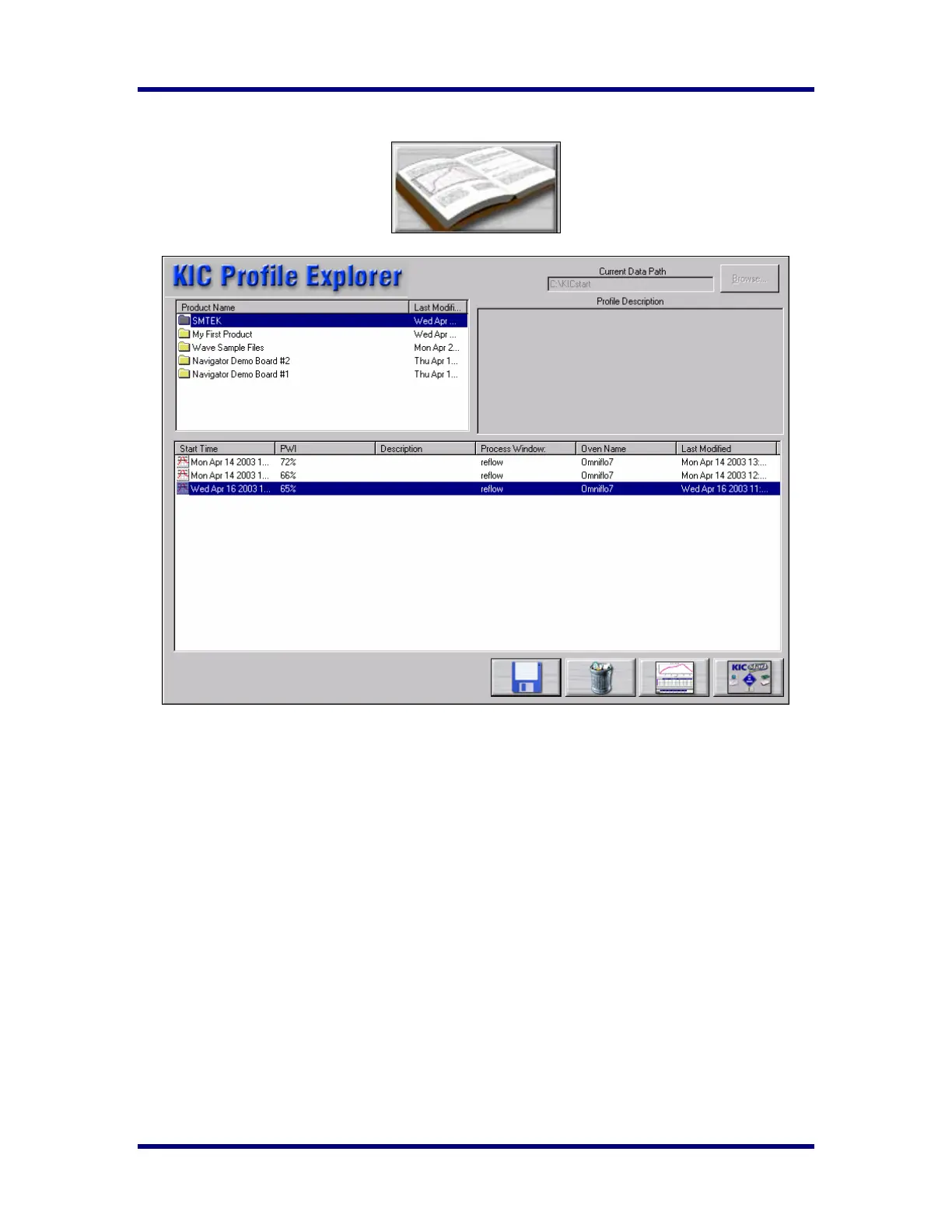
KICstart Profile Explorer
The KICstart Profile Explorer is a powerful and simple data file management tool. For each unique
product name you use when profiling, the KICstart software will create a folder with the same name.
Under that folder all the profiles run using that product name are saved.
♦ The list of product folders is in the upper left of the Profile Explorer. Click on a folder to display
the profiles in the profile section at the bottom.
♦ The profile section can be sorted by click on any of the column headers. Single clicking on a
profile will display the Profile Description in the upper-Right corner.
♦ Double clicking on the profile will display the graph and statistics for that profile.
Clicking on the Display Graph… button can also do this.
The Save button with the Blue floppy disk allows you to save a profile to another folder or to a floppy
disk.
The Delete button (trashcan) allows you to delete the selected profile.
The button in the lower right corner returns you to the Main Menu.
Inserting KICstart data files from an outside source
If you receive KICstart data files via floppy or email you can copy them to the KICstart\Profiles folder in
Windows Explorer. The next time you enter the KICstart-Profile Explorer screen the software will
automatically create folders for those profiles based on the profile name and put the profiles in the correct
folders.



 To Next Page