PAS SERIES Maintenance 7-17
7.4 Malfunctions and Causes
This section describes remedies for malfunctions encountered during
the use of the unit.
Six representative symptoms and their possible check items are indi-
cated. Look for the item that corresponds to your case. In some cases,
the problem can be solved quite easily.
If you find an item that corresponds to your case, follow the remedy for
the item. If the remedy does not solve the problem or if your case does
not match any of the items, contact your Kikusui agent/distributor.
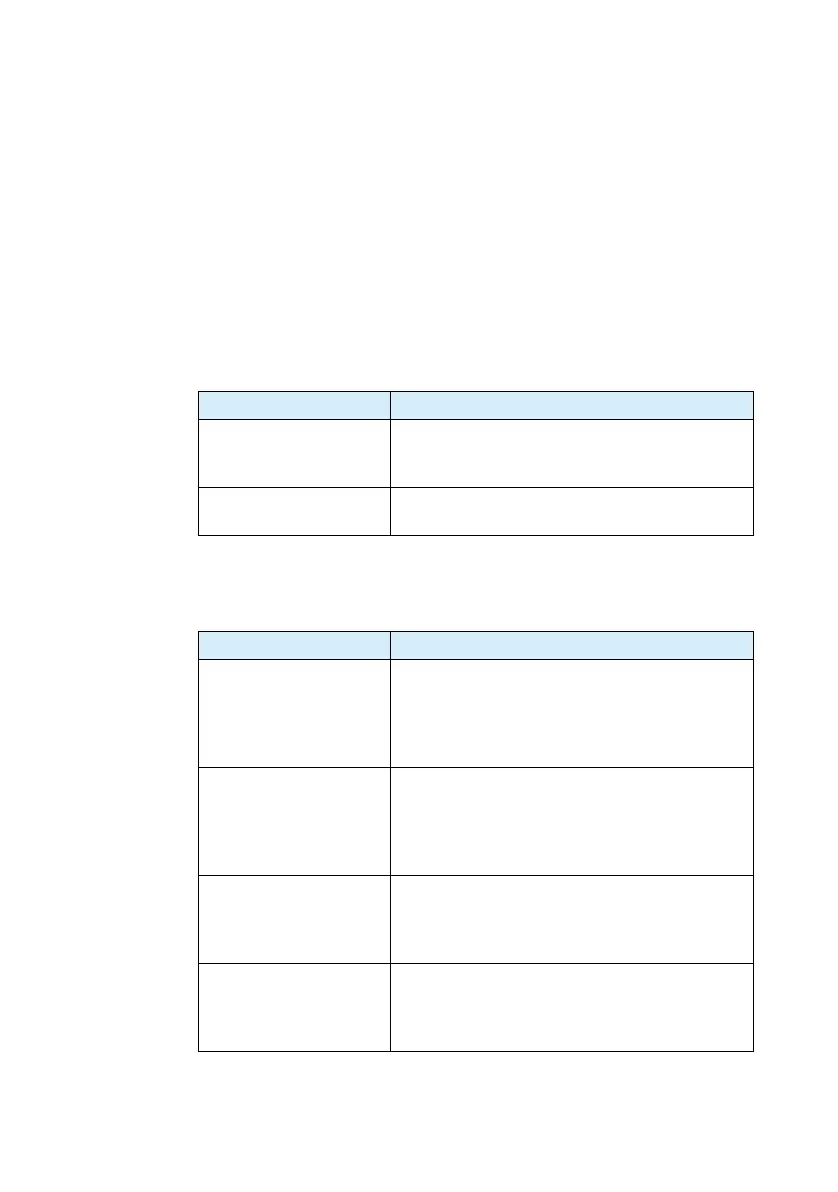
Symptom1: The panel displays nothing.
Symptom2: "ALM" is illuminated w
hen the OU
TPUT switch is
turned on.
Check Item Cause and Remedy
□
Wiring to the L, N, and
GND of the AC
IN ter-
minal is wrong.
• Connect the wires correctly by referring to "1.3
Connecting the AC power cord".
□
The AC power cord is
broken.
•
Replace the AC power cord with a new one.
Check Item Cause and Remedy
□
The OVP trip point is
set to a v
oltage
less than
or equal to the output
voltage.
• The output overvoltage protection function has
been activated.
Set the OVP trip point to a voltage greater than or
equal to the output voltage. See "3.2.2 Setting the
OVP (Overvoltage Protection) Trip Point".
□
The OCP trip point is
set to a curr
ent less than
or eq
ual to the output
current.
• The output overcurrent protection function has
been activated.
Set the OCP trip point to a current greater than or
equal to the output current. See "3.2.3 Setting the
OCP (Overcurrent Protection) Trip Point".
□
The actual output volt-
age is
higher
than the
preset voltage on the
panel.
• The output overvoltage protection function has
been activated. Voltage is being applied externally
such as by a battery, or the unit may have malfunc-
tioned.
□
Remote sensing func-
tion is
turned on.
• T
he output overvoltage protection function may be
activated. If you are not using the remote sensing
function, turn off remote sensing in CONFIG. See
"3.2.4 Unit Configuration (CONFIG)".









 To Next Page