English
47
•
IP Address
1
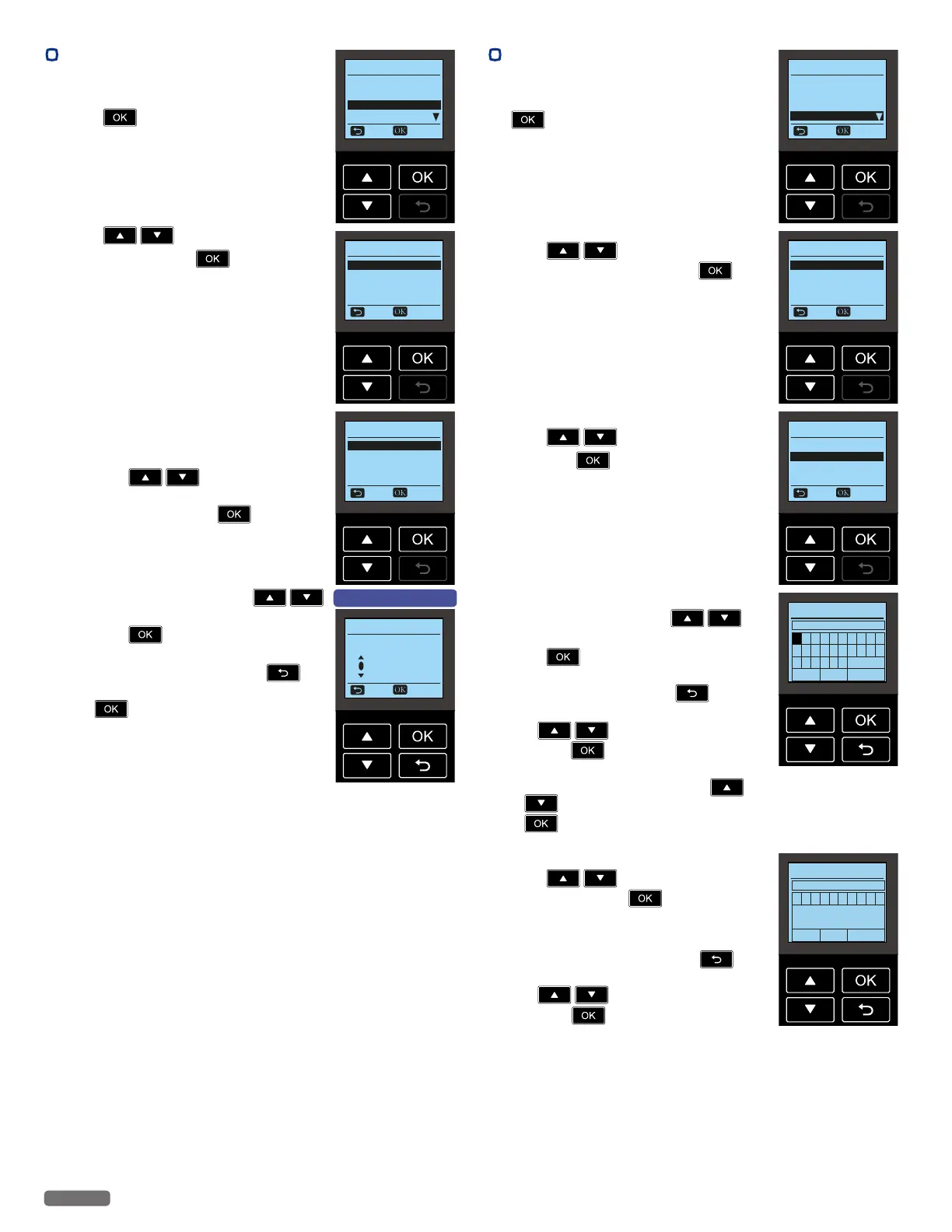
From the Control panel, navigate to [Home
> Setup > Wi-Fi Setup > IP Address], then
press
.
Wi-Fi Setup
Network and Password
Wi-Fi Protected Setup
IP Address
Proxy
Back Select
2 Press to select [Auto] or
[Manual], then press
.
[Auto] DHCP mode
It's easy to Automatically get the IP address
of this unit from the Network.
[Manual] Static mode
Set the Network address manually.
IP Address
Auto
Manual
Back Select
3 If you select [Manual], set the items below.
• IP Address
• Subnet Mask
• Default Gateway
• DNS
– Press
to select [IP
Address], [Subnet Mask], [Gateway]
or [DNS], then press
.
IP Address
IP Address
Subnet Mask
Gateway
DNS
Back Select
– Set digits one at a time. Press
to select from [0] to [9], then
press
.
– When you enter a wrong number, then
you can correct it by pressing
.
– After you select the last digit, then press
to set IP Address and return to
the previous screen.
e.g.) [IP Address] screen
IP Address
Back Select
192 . 168 . 011 . XXX
•
Proxy
1
From the Control panel, navigate to [Home
> Setup > Wi-Fi Setup > Proxy], then press
.
Wi-Fi Setup
Network and Password
Wi-Fi Protected Setup
IP Address
Proxy
Back Select
2 Proxy has 3 setup items.
Press
to select [Proxy]
[Address] or [Port], then press
.
Proxy
Proxy Off
Address
Port
Back Select
Proxy
Press
to select [On] or [Off],
then press
.
Proxy
On
Off
Back Select
Address
Enter proxy address. Press
to
select letters, numbers and symbols, then
press
.
– When you enter a wrong letter, then you
can erase it by pressing
.
– After entering the proxy address, press
to select [Done], then
press
.
– To change the characters, press
to select [a/A/1/+], then press
repeatedly until the character you
want to enter.
Proxy
Enter Proxy Address
a b c d e f g h i j
k l m n o p q r s t
u v w x y z a/A/1/+
< > Done
Port
Press
to select a proxy port
number, then press
.
– You can enter numbers only.
– When you enter a wrong number, then
you can erase it by pressing
.
– After entering the proxy port, press
to select [Done], then
press
.
Proxy
Enter Proxy Port
1 2 3 4 5 6 7 8 9 0
< > Done
Continued on next page.


 To Next Page