English
65
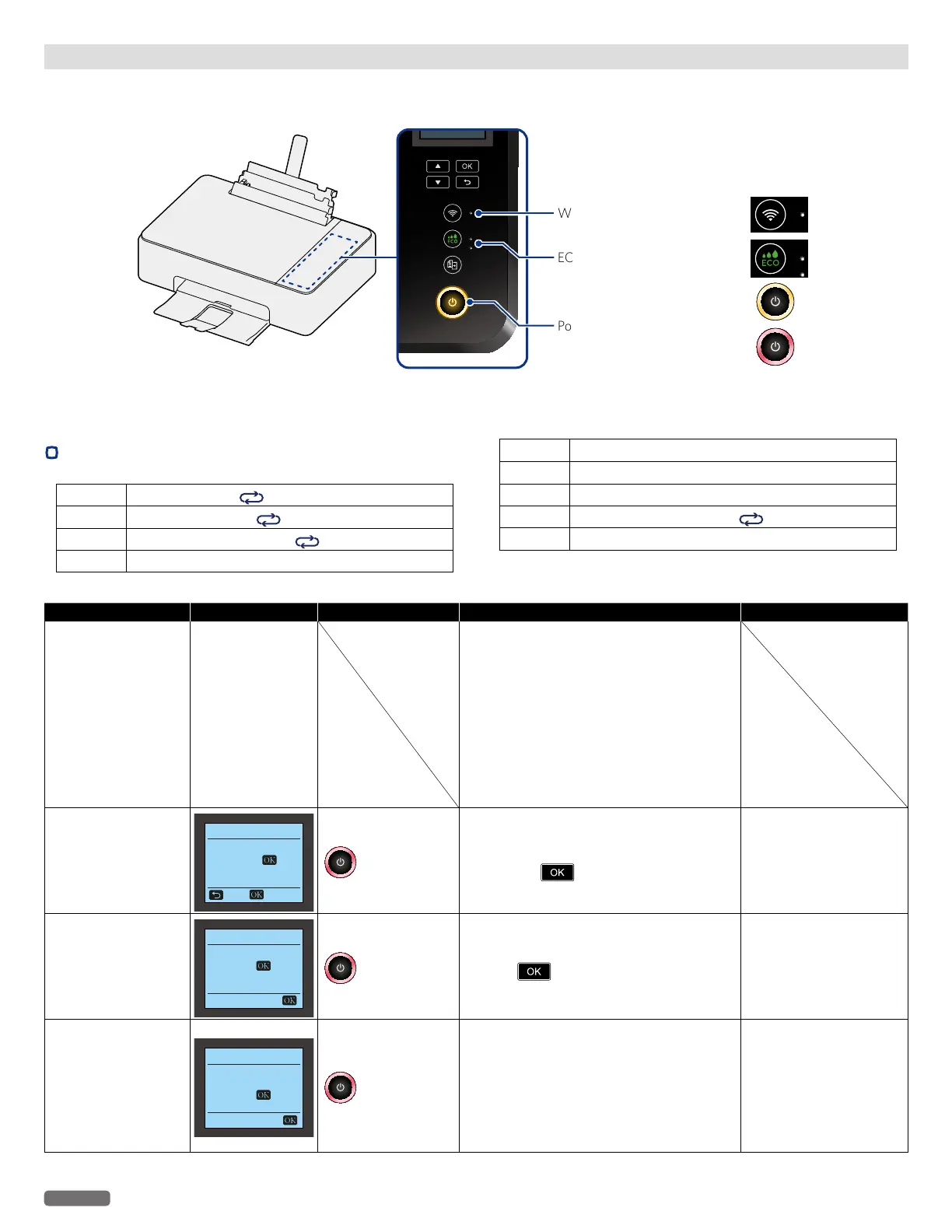
Status messages LCD messages LED behaviors Unit status or possible causes Refer to
Communication failure
Ready
(No Error message)
Communication failed on the unit.
– Check the AC plug is connected to the AC outlet
properly, the unit is turned On or the connection
environment (USB, Wireless) to the unit. Then
follow the procedures by showing the help text
on your connected unit.
•If this error occurs occasionally, refer to the
latest troubleshooting by visiting our website
at www.kodakverite.com/support
•If you cannot solve the problem, disconnect
the AC plug and contact an Authorized
Service Center.
Insert Paper
Insert Paper
Please insert paper
and press
.
Cancel Start
blinks as pattern 1
Insert Paper.
– Check the paper support.
•Set specified paper in the paper support, and
then press
.
“Insert paper into the paper
support”
on page 27.
Paper Jam
Paper Jam
Clear jam and
press
.
blinks as pattern 1
A paper jam has occurred inside of the unit.
– Firmly grasp both sides of the jammed paper,
then slowly pull it out.
Press
, to restart the rest of the print job.
“Clearing paper jam in
the unit”
on page 59.
Paper Jam.
Open rear cover.
Paper Jam
Open rear cover.
Clear jam and
press
.
blinks as pattern 1
A paper jam has occurred during duplex
printing, or the rear cover (Duplex Unit) is
detached.
– Open the rear cover (Duplex Unit), then firmly
grasp both sides of the jammed paper and slowly
pull it out.
– This error occurs when there is an automatic
duplex printing function.
“Clearing paper jam in
the unit”
on page 59.
Status messages, LCD messages and LED behaviors
The Status information will report problems with the unit. Take the proper action by referring to the following table.
»»
Refer to “Check print status from your PC” on page 25.
Wireless LED — indicated by
ECO LED — indicated by
Power LED — indicated by
Continued on next page.
•
LED lighting patterns
Blinking 1
Lights up for 1 sec.
No light for 1 sec.
Blinking 2
Lights up very rapidly
No light for more than 1 sec.
Blinking 3
Blinking very rapidly 2 times
No light for 1 sec.
Blinking 4 Blinking very slowly
Blinking 5 Blinking slowly
Blinking 6 Blinking rapidly
Blinking 7 Blinking very rapidly
Blinking 8
Blinking very rapidly 4 times
No light for 2 sec.
Blinking 9 Blinking slowly (in Power-on mode)


 To Next Page