CVS-841/851 Chapter 7
Functional Registration
Chapter 7 Functional Registration Registration
This chapter describes the procedures to register the user defined functional parameters to the Range
and MODE switches. The items that can be registered are as follows:
This chapter describes the procedures to register the user defined functional parameters to the Range
and MODE switches. The items that can be registered are as follows:
(1) Depth ranges (1) Depth ranges
(2) Display modes (USER 1, USER 2 and USER 3 and Zoom) (2) Display modes (USER 1, USER 2 and USER 3 and Zoom)
7.1 Depth range registration 7.1 Depth range registration
This procedure is used to register the sounding depth to each range number shown on the operating
panel around the range selection switch. To register:
This procedure is used to register the sounding depth to each range number shown on the operating
panel around the range selection switch. To register:
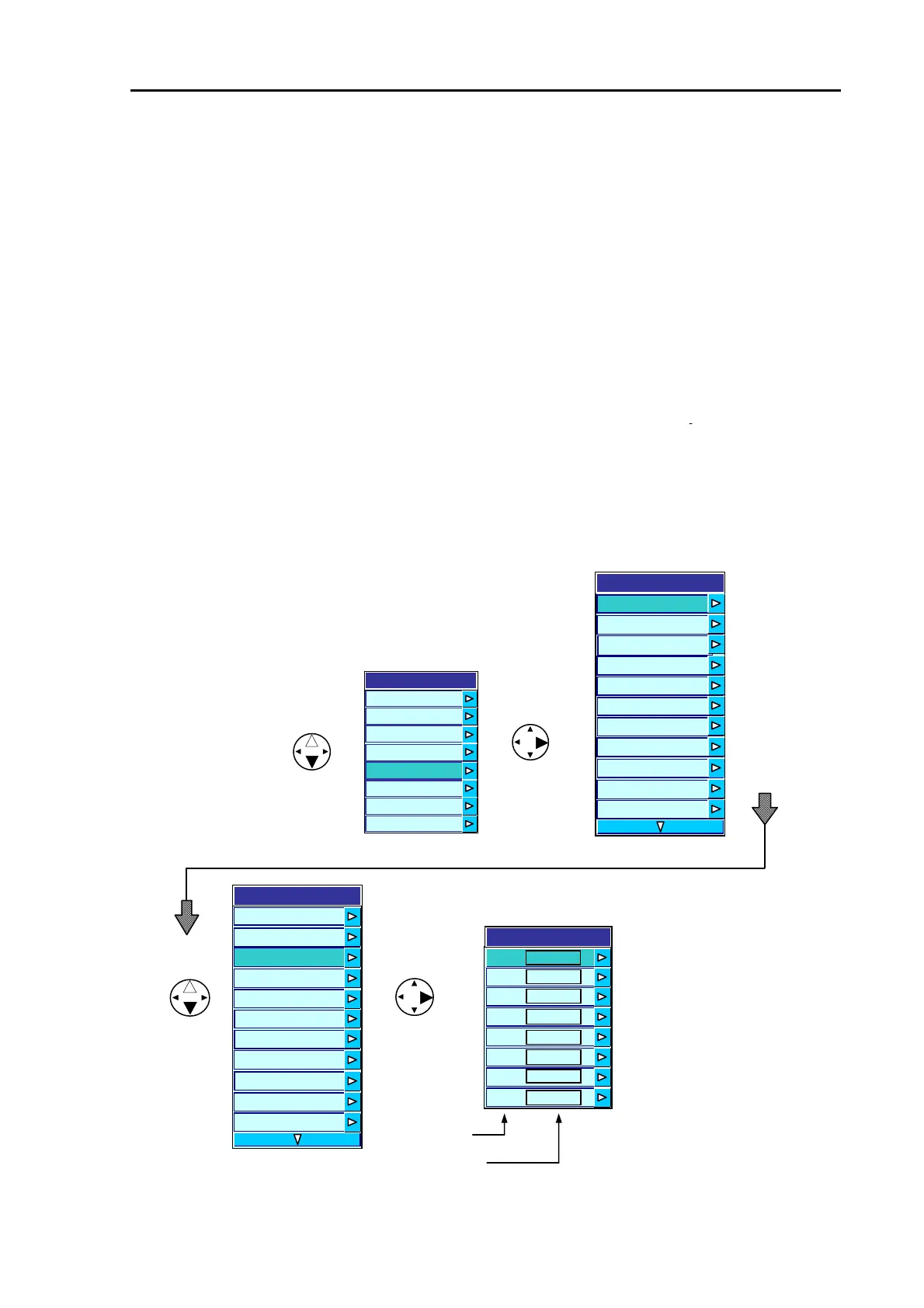
(1) Press the MENU key to display the main menu. (1) Press the MENU key to display the main menu.
(2) Press the up or down arrow key to highlight SYSTEM (2) Press the up or down arrow key to highlight SYSTEM
and press the right key to show the SYSTEM sub menu. and press the right key to show the SYSTEM sub menu.
(3) Press the up or down key to highlight DEPTH RANGE PRESET and press the right arrow key to
show the range registration list.
(3) Press the up or down key to highlight DEPTH RANGE PRESET and press the right arrow key to
show the range registration list.
(4) Press the up or down arrow key to select the range number. (4) Press the up or down arrow key to select the range number.
(5) Press the right arrow key to show the range number window. (5) Press the right arrow key to show the range number window.
Menu
Transmission
Image
Display
Auto
System
Customize
Initialize
Simulator
Range number
Sounding range
2
1
3
4
5
6
7
8
20
50
80
100
120
150
200
5
System
Time
Depth Unit m
Depth Range Preset
Draft Settin
0
Bottom Start 0
B
tt
m D
t
ti
n A
t
System
Time
Depth Unit m
Depth Range Preset
Draft Setting 0.0
Bottom Start 0.0
Depth Measurement
uto
Sonic Correction 0%
Boat Speed Correction
Water Temp Correction 0
o
om
e
ec
on
Bottom Detection
Sonic Correction 0%
Water Temp
ns
e
Range
0.0
0.0
Depth Measurement Auto
Correction
Boat Speed
Correction
Figure 7.1 Depth range registration (1)
93132682-00 7-1



 To Next Page