CVS-841/851 Chapter 5
Basic Operation
Chapter 5 Basic Operation 5 Basic Operation
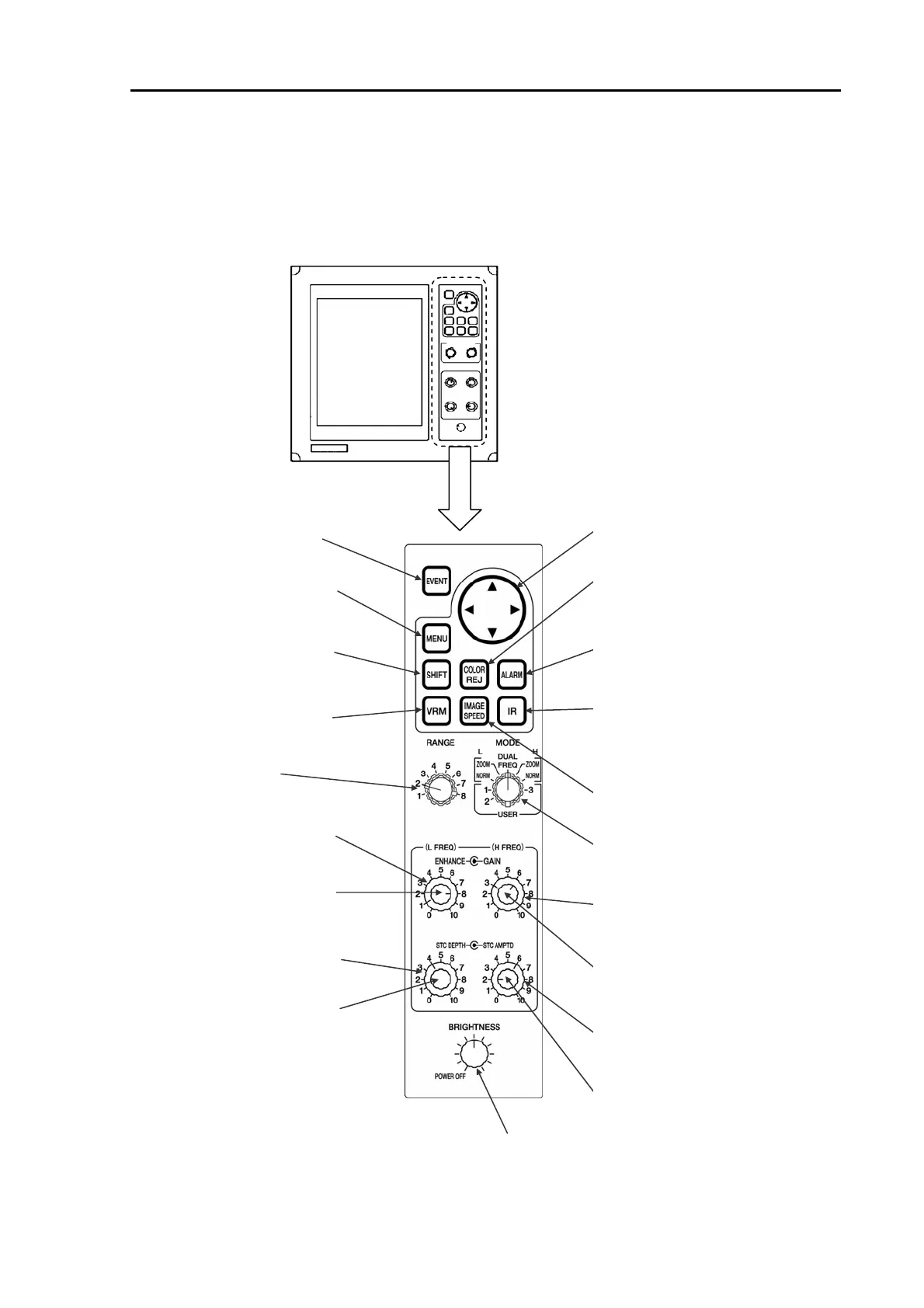
5.1 Operating controls and functions 5.1 Operating controls and functions
5.1.1 Operating controls and key switches 5.1.1 Operating controls and key switches
[CVS-841] [CVS-841]
Enlarged Enlarged
POWER/BRIGHTNESS control with a switch
Four way arrow key
Selects or sets up the menu items, etc.
COLOR REJ key
Selects the setting of Color Rejection
function.
ALARM key
Turns on or off the Alarm. This key is also
used to select the alarm setting.
IR key
Turns on or off the IR (Interference Reject)
effect. This key is also used to select the
IR setting.
IMAGE SPEED key
Selects the image speed
MODE switch
Selects the image mode.
H FREQ ENHANCE control
Varies the degree of enhance effect fo
High Frequency image.
H FREQ GAIN control
Varies the receiver gain of
High Frequency image.
H FREQ STC DEPTH control
Varies the effective range of High
Frequency STC in depth.
H FREQ STC AMPD control
Varies the intensity of High
Frequency STC.
Turns on or off the unit and adjusts the brightness of the
image.
EVENT key
Registers or updates the event.
MENU key
Turns on or off the menu
display.
SHIFT key
Turns on or off the image shift
mode
VRM key
Turns on or off VRM. It also
selects the VRM mode.
RANGE switch
Selects the depth range.
L FREQ ENHANCE control
Varies the degree of enhance
effect for Low Frequency image.
L FREQ GAIN control
Varies the receiver gain of Low
Frequency image.
L FREQ STC DEPTH control
Varies the effective range of Low
Frequency STC in depth
L FREQ STC AMPTD control
Varies the intensity of Low
Frequency STC.
Figure 5.1 CVS-841: Details of operating key switches
93132682-00 5-1



 To Next Page