KongsbergDPS232
11MakesurethattheProfessional+ismarkedasthedefaultdatabase.
5.10.3Updatelicense
Alicensele,normallynamedpassword.usr,issentfromC-Mapwhenalicensehasbeen
purchased.ThislicenseleisuniquelylinkedtotheIDoftheeTokendongle,anditis
requiredthatthiseTokenisinsertedtoaUSBportinordertocorrectlyupdatethelicense.
Howtoupdatealicense
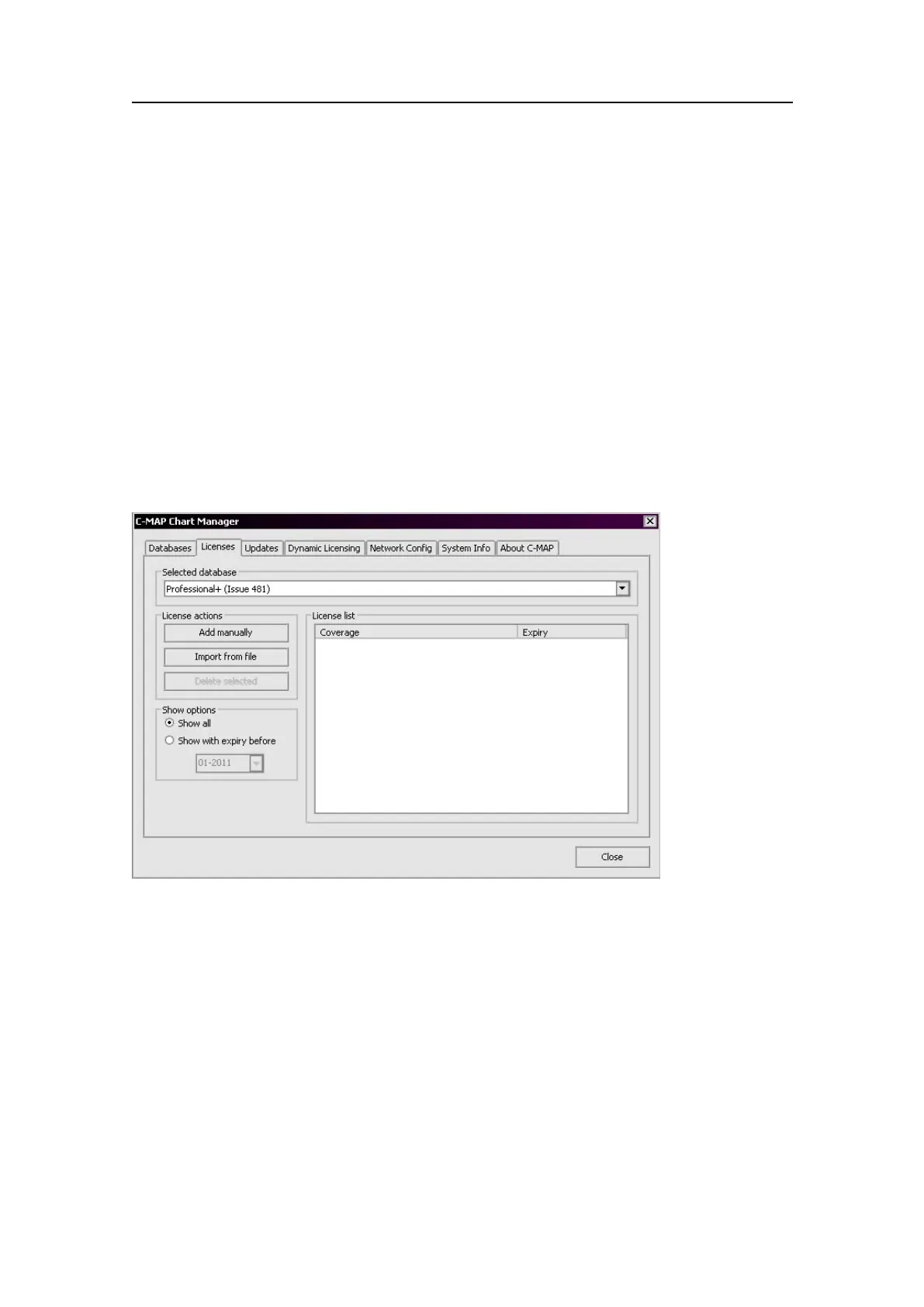
1SelecttheLicensestaboftheC-MapChartManager.
2SelecttheProfessional+databasefromthedrop-downlist.
3ClicktheImportfromlebutton.Browsetothelocationofthelicensele.
Figure51C-MapLicensetab
Thelicenseinformationwillbeupdatedimmediately.Iflicenseupdatefails,orthe
coverageorexpiryinformationisnotasexpected,pleasecontactC-Mapusersupport.
5.11CopyCongurationtool
Itispossibletocopythecompletesystemcongurationtoadiskbasedarchivele
ortoaUSBstick.
HowtocopyrelevantsystemcongurationtoaUSBstick
1InsertaUSBstickintotheUSBport.
2SelectTools→CopyConguration.
76
G210-14/3.0


 To Next Page