Conguration
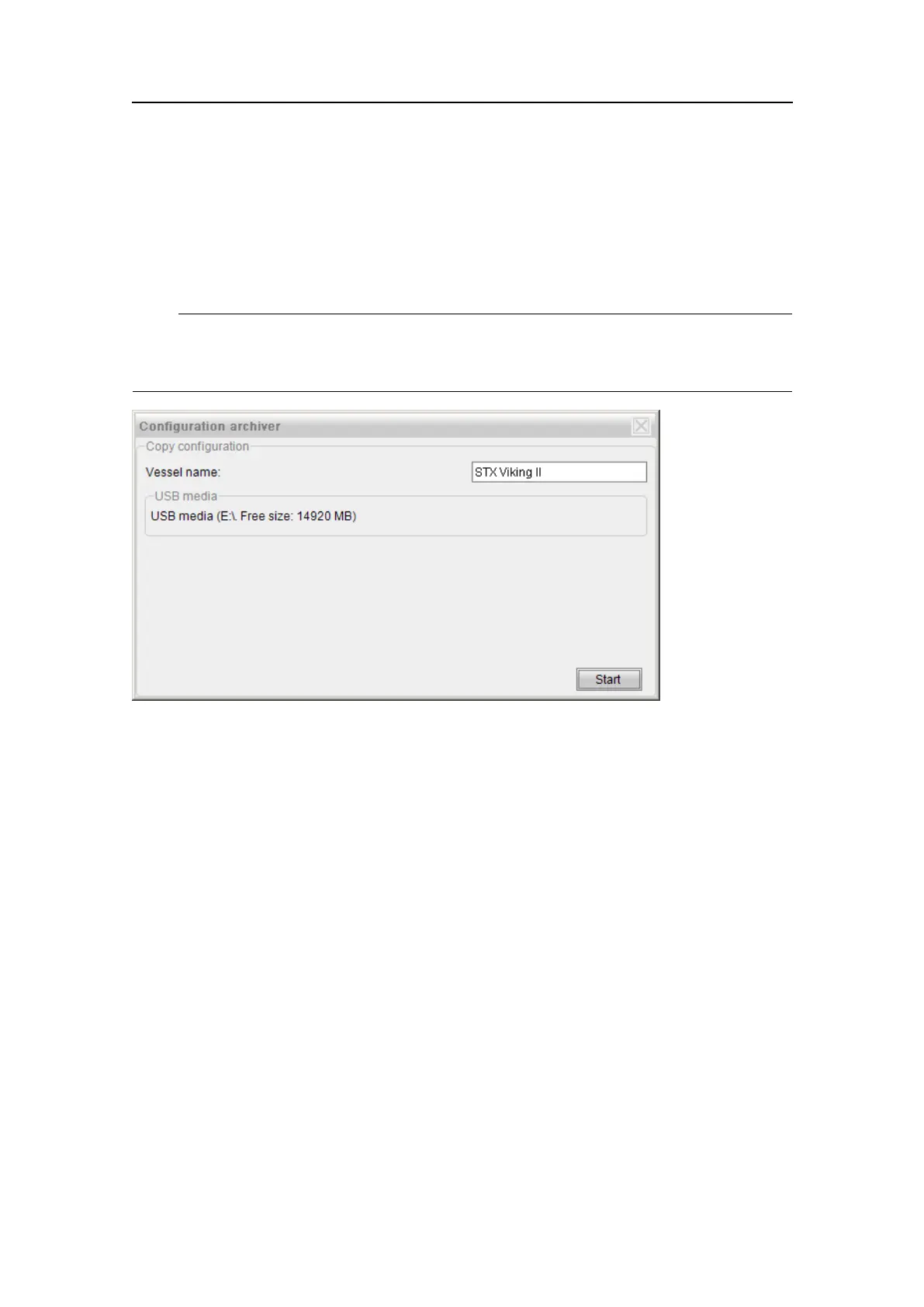
3Theconguredvesselnameisautomaticallyenteredintothevesselnametextbox
butcanbechangedifneeded.
4ClickStarttocopythecongurationles.Thecopiedcongurationwillbestored
asacompressedarchive(ZIPle)undertheConfigBackupfolderintherootof
theUSBstick.
Note
IfaUSBstickisnotinserted,thearchivewillbestoredinatemporarylocationonthe
localdisk.Inthiscase,thearchivewillonlybeavailableforrestoreuntilthenextreboot.
5.12RestoreCongurationtool
AcongurationsetcopiedusingtheCopyCongurationorSystemVericationtools
maybeappliedorrestoredtothesystem.
HowtorestoresystemcongurationfromaUSBstick
1InserttheUSBstickwiththewantedcongurationarchiveintotheUSBport.
2EnterEngineeringmodebyselectingSystem→Changesystemmode.Thepassword
isstx.
3SelectTools→RestoreConguration.
4AllavailablearchivelesontheinsertedUSBdiskwillbepresentedinalist.
G210-14/3.0
77


 To Next Page