32
Konica Fax 9825 User’s Manual
Getting to Know the Machine
Hardware Features
Back Panel and Right Panel
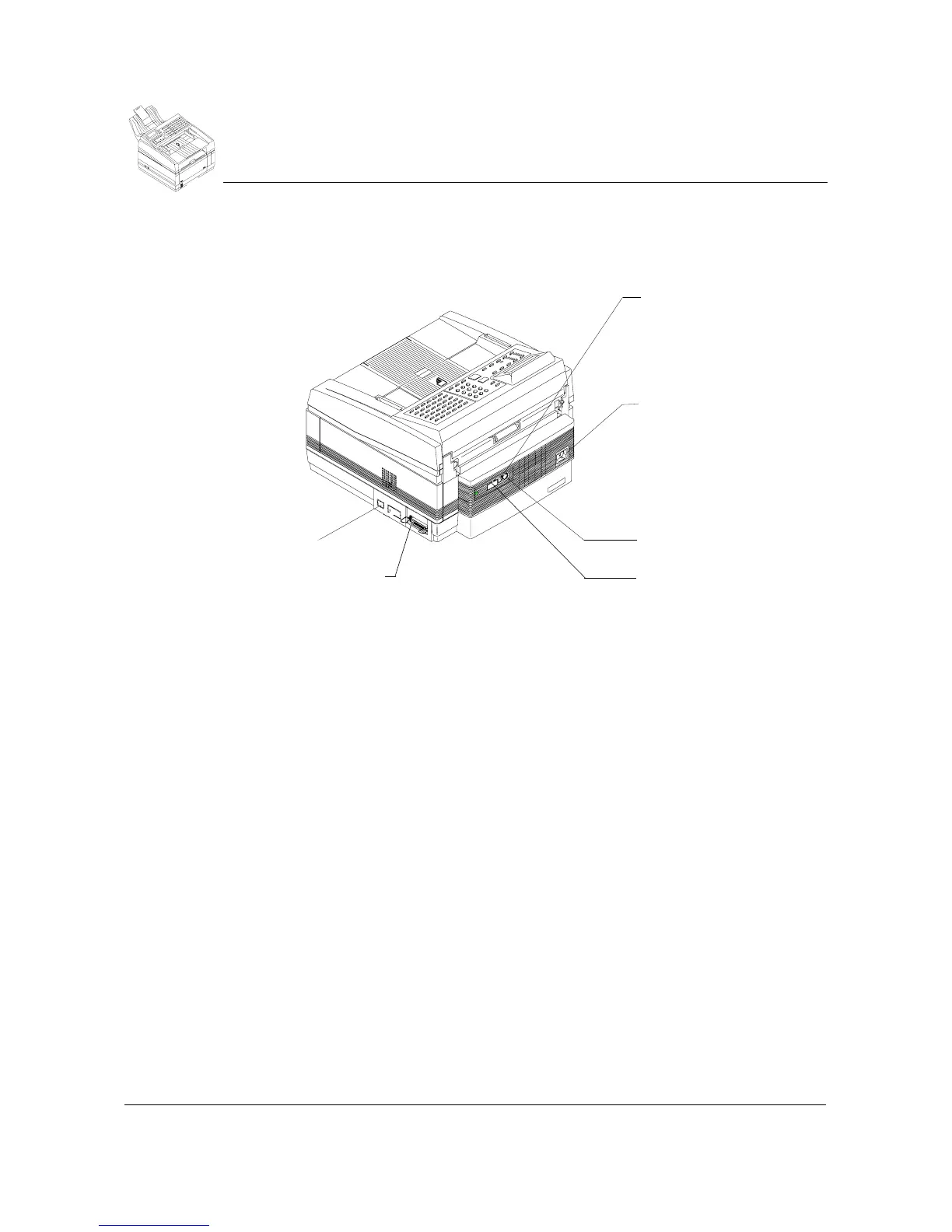
This diagram shows the items located on the rear of the machine and on the
right panel:
Back Panel
AC Power Receptacle:
Accepts a grounded AC cord.
Line Jack:
Receptor for the facsimile phone line.
Tel:
Receptor for an optional telephone.
Line 2:
Receptor for second facsimile phone line for optional 2 line instal-
lation. Covered.
Tel 2:
Receptor for an optional telephone for optional 2 line installation.
Covered.
Ri
ht Panel
Bi-Directional Parallel Connector (25 pin):
Connects bi-directional
parallel interface cable to the PC.
Optional connector:
Small connector may be used for optional second
paper tray. Large connector is unused. Covered.
Telephone jack
Power receptacle
Optional Paper Tray
Connection
Line jack
Optional Line 2 and sec-
ond phone line jacks
Parallel
connector



 To Next Page