78
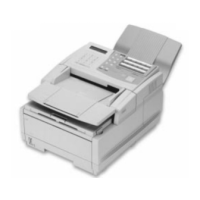
Konica Fax 9825 User’s Manual
Receiving a Fax
Answering Fax Calls
5
Press
2
to select the Answer phone menu option.
___Answer_phone__
Answer phone:
¾
Automatically
Press
Æ
, then ENTER
6
Press
Æ
until
Automatically
displays.
____Answer_Mode____
Answer on ring:
¾
1
Enter number 1-9
7
Use the keypad to enter the desired ring setting:
1-9
.
8
Press
Enter
.
Receiving Faxes Manually
FastAccess: M2322
The manual answer mode enables you to answer all incoming calls manually.
Use this mode if you use a shared line for fax and voice communications during
normal business hours.
This feature is usable only if you have a telephone connected the TEL jack on
your machine or have an extension phone on the same line as your machine.
➙
To answer calls and receive faxes manually:
1
Press
Menu
.
2
Press
2
to select the Fax menu.
3
Press
3
to select the Fax options menu.
4
Press
2
to select the Incoming faxes menu option.
5
Press
2
to select the Answer phone menu item.
___Answer_phone__
Answer phone
¾
Manually
Press
Æ
, then ENTER
6
Press Æ until
Manually
displays.
7
Press
Enter
.



 To Next Page