2. PERIODIC CHECK
4
Field Service Ver1.0 Jun.2005
DF-606
3.
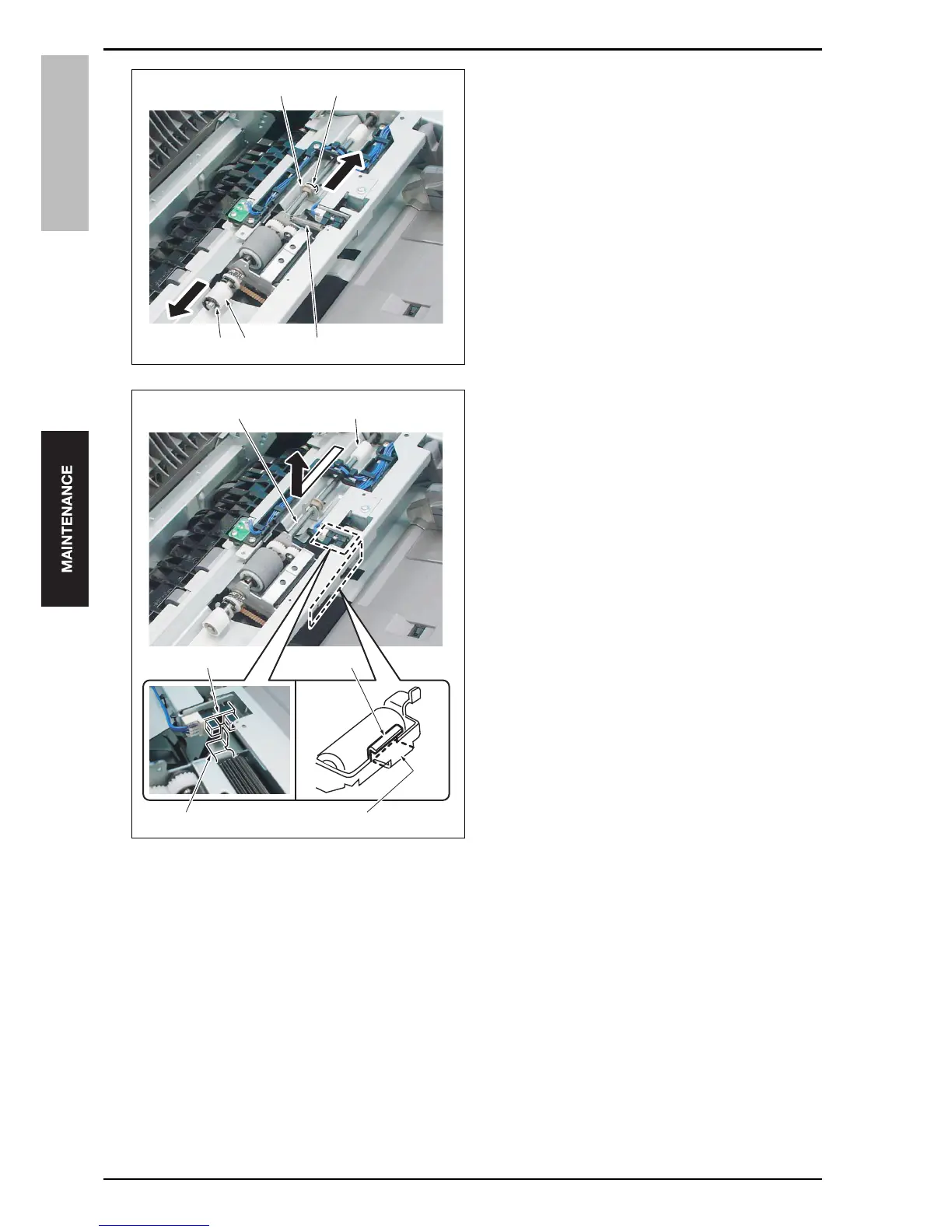
Remove the spring [1].
4.
Remove the C-clips [2] and [3], and slide the bear-
ing [4] and the one-way clutch [5] to the outside
respectively.
5.
Slide the pick-up roller unit [1] and release it from
the coupling [2] to remove it.
Note
• When installing the pick-up roller unit, be sure
to check to see if the projection [3] of the
pick-up roller unit is engaged with the original
registration sensor [4]. When it is not engaged
correctly, paper may not be fed correctly.
• When installing the pick-up roller unit, be sure
to check to see if the curved section [5] of the
pick-up roller unit comes above the curved
section [6] of the stay. If it is below the curved
section, paper may not be fed correctly.
[2] [5] [1]
[4] [3]
15saf2c002na
15saf2c003na
[1]
[2]
[5]
[6][3]
[4]










 To Next Page