DF-606
2. PERIODIC CHECK
5
Field Service Ver1.0 Jun.2005
6.
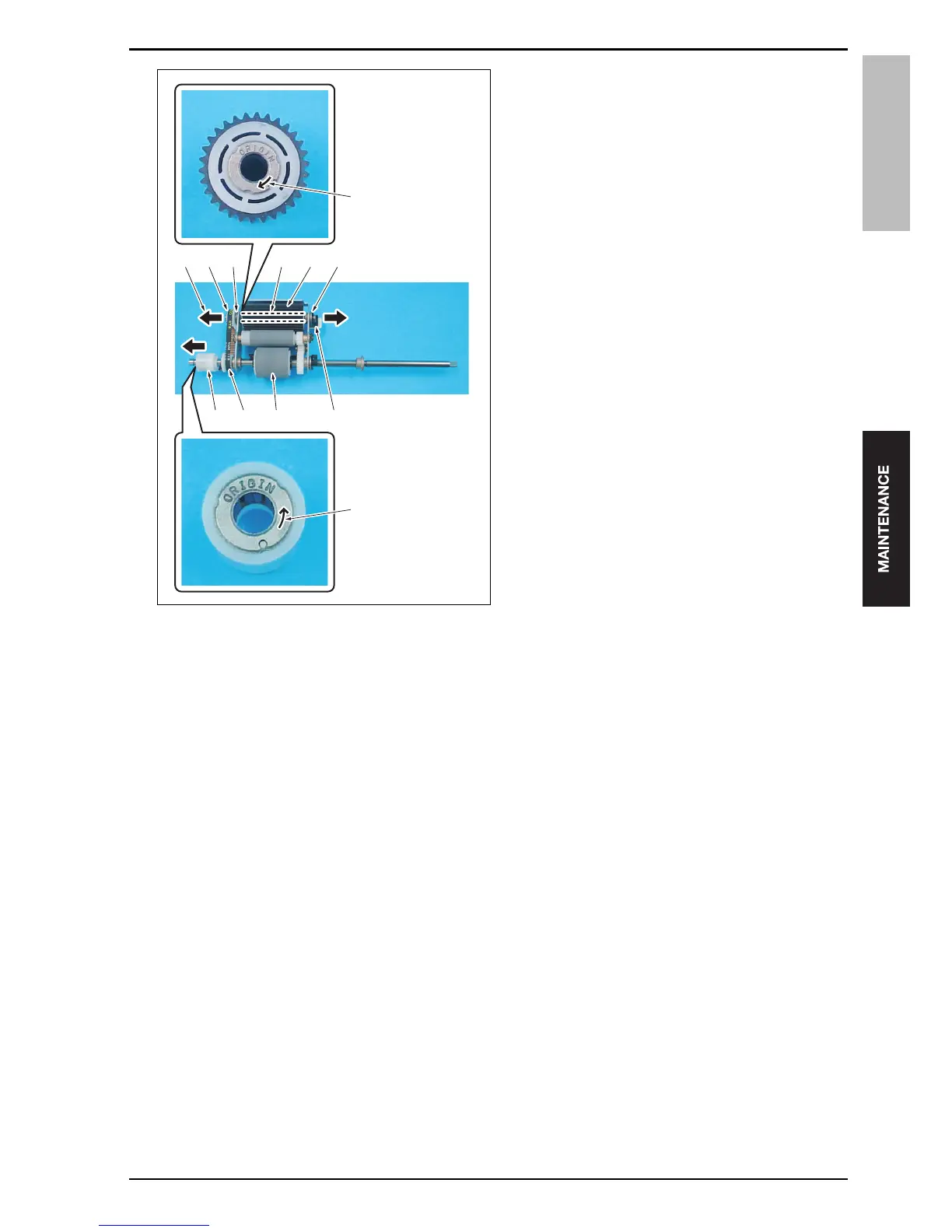
Position the pick-up roller unit so that the one-way
clutch [1] comes to the lower left side of it. And
then remove the one-way clutch.
Note
• When installing the one-way clutch [1], be
sure to check to see if the arrow mark of the
one-way clutch points in the direction oppo-
site to the paper feed roller [3]. When the one-
way clutch is installed in the reverse direc-
tion, paper may not be fed correctly.
7.
Remove the belt [4].
8.
Remove the C-clip [5] and then remove the bear-
ing [6].
9.
Pull out the shaft [8] of the pick-up roller [7] in the
arrow-marked direction [9] and then remove the
pick-up roller.
Note
• A washer is inserted between the pick-up
roller [7] and the bearing [10]. Be careful that
the washer does not get lost.
• When installing the pick-up roller [7], be sure
to check to see if the arrow mark [11] of the
pick-up roller points in the direction of the
gear [12]. When the pick-up roller is installed
in the reverse direction, paper may not be fed
correctly.
[12][9] [10] [8] [7] [6]
[1] [4] [3] [5]
[11]
[2]
15saf2c004na










 To Next Page