P.S.P.S.
The yellow color pre-shift light
will light on according to the
shift light setting number.
P.S.P.S.
5-2
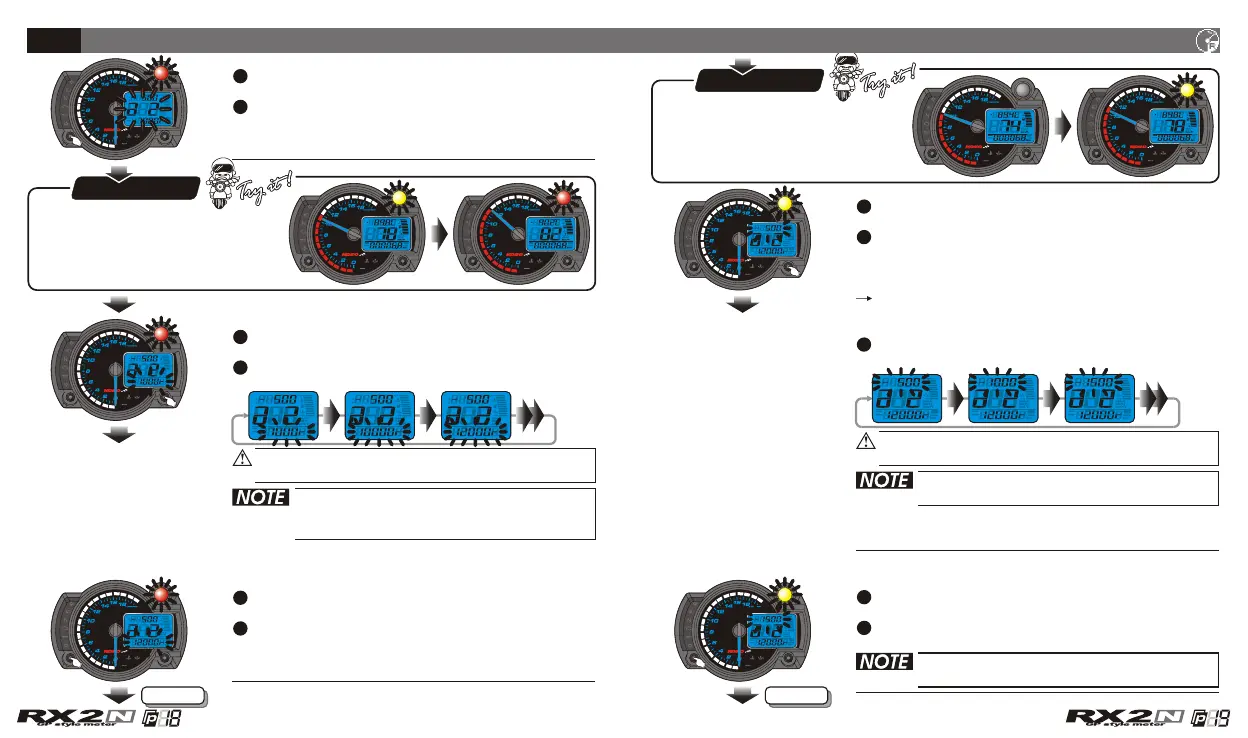
The RPM shift light setting
Now the pre-light and the setting number is
flashing!
Now the shift light and the setting value is
flashing!
The red color shift light will
light on according to the
shift light setting number.
In a 2 screen, press the Select button to enter
the RPM shift light setting screen.
EX. Now the RPM shift light setting is 7,000 RPM.
EX. The you want to set is
.
RPM shift light
12,000 RPM
Press the Adjust button to choose the setting
value.
Press the Select button to enter the pre-shift
light setting.
EX. Now the s setting is changed
from 7,000 RPM to 12,000 RPM.
hift light
EX.
The equation is as following,
The shift light setting value (12,000 RPM) - The
pre-shift light setting value, (X)= 10,500 (The
RPM you want the pre-shift light to light on.)
The setting value of pre-shift light= 1,500.
It means that you should set the pre-shift light
setting as 1,500.
You want the pre-shift light to light on at
10,500 RPM
Press the Adjust button to choose the setting
value.
The setting range: -500~-3,000 RPM.
Setting unit: 100 RPM.
The setting range: 1,000~10,000 /
20,000 RPM.
Setting unit: 100 RPM.
Next pageNext page
Press the Select button to return to a 2 setting
screen.
EX. Now The pre-shift light setting is changed
from 500 RPM to 1,500 RPM.
When you leave this screen, the setting
is finished.
CDI & FI CDI & FI


 To Next Page