4-2
4-1
Select button
Select & Adjust X 3 seconds
Select button X 3 seconds
Adjust button
Adjust button X 3 seconds
The button function instruction
1.In main screen, press the Select button to choose the display of clock,
water temperature or oil temperature.
2.In power test screen, press the Select button to choose the function you
want to use.
3.In setting screen, press the Select button to choose the function you want
to set.
1.When the temperature Is In the main screen, you could
press down the "Select" button for 3 seconds to switch
the temperature unit.
2.In power test screen, press down the Select
button for 3 seconds to back to the main screen.
3.In setting screen, press down the Select button
for 3 seconds to back to the main screen.
In main screen, press down the Adjust button for 3 seconds to reset the trip
A, trip B, or the Max. Record.
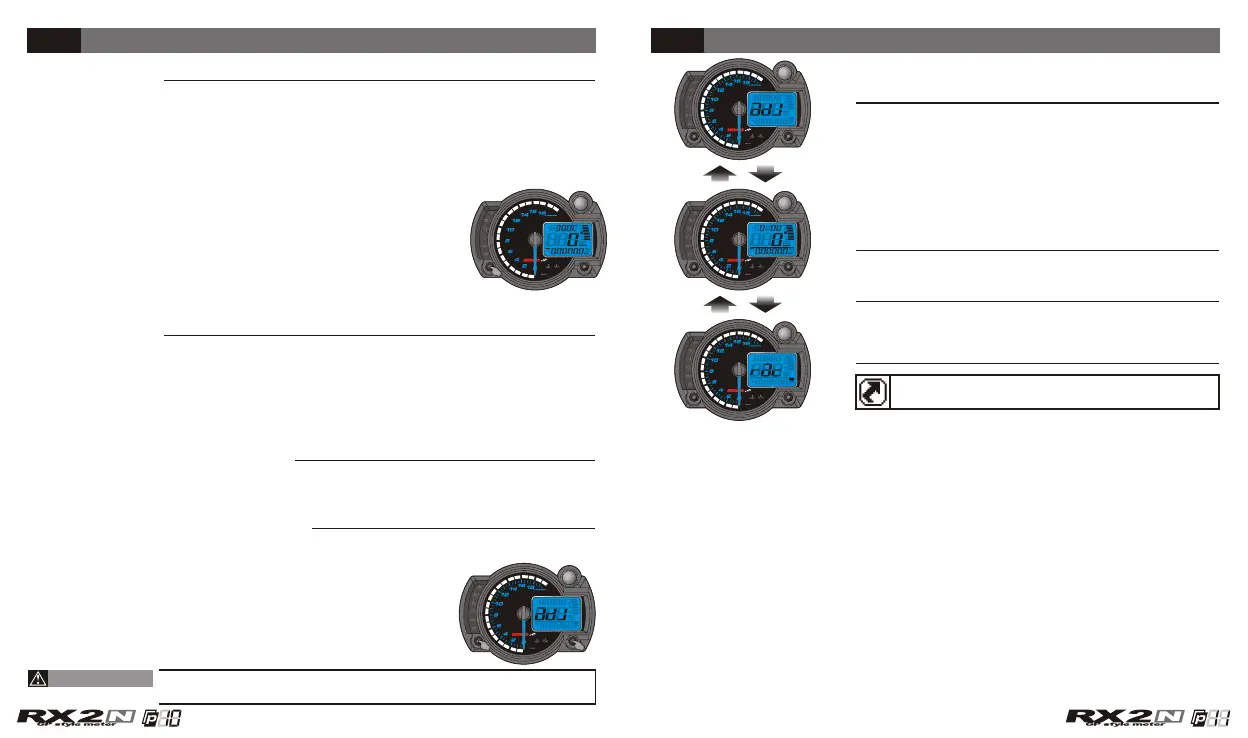
In main screen, press down the Select & Adjust
buttons at the same time for 3 seconds to enter
the setting screen.
CAUTION!
The screen switch instruction
In the setting screen, press down the Select
button for 3 seconds to back to the main screen.
In main screen, press down the Select & Adjust
button at the same time for 3 seconds to enter
the setting screen.
In main screen, press the Select & Adjust button
one time to enter the power test screen.
In power test screen, press down the Select
button for 3 seconds to back to the main screen.
In any screen, you could press down the Select
buttons for 3 seconds to back to the main screen.
Press down the Adjust button
In setting screen, to add the setting value fast.
For safety reason - you could adjust the setting or operate
the function only when the bike is stop.
1.In main screen, press the Adjust button to choose the display of odometer,
trip A, trip B or the Max. record.
2.In power test screen, press the Adjust button to reset the record, stop the
testing, or restart the test.
3.In setting screen, press the Adjust button to make the setting. If you keep
pressing down the Adjust button the setting number will increase fast.
Select &
Adjust
X3 S
Select
X3 S
Select &
Adjust
one time
Select
X3 S
CDI & FI CDI & FI


 To Next Page